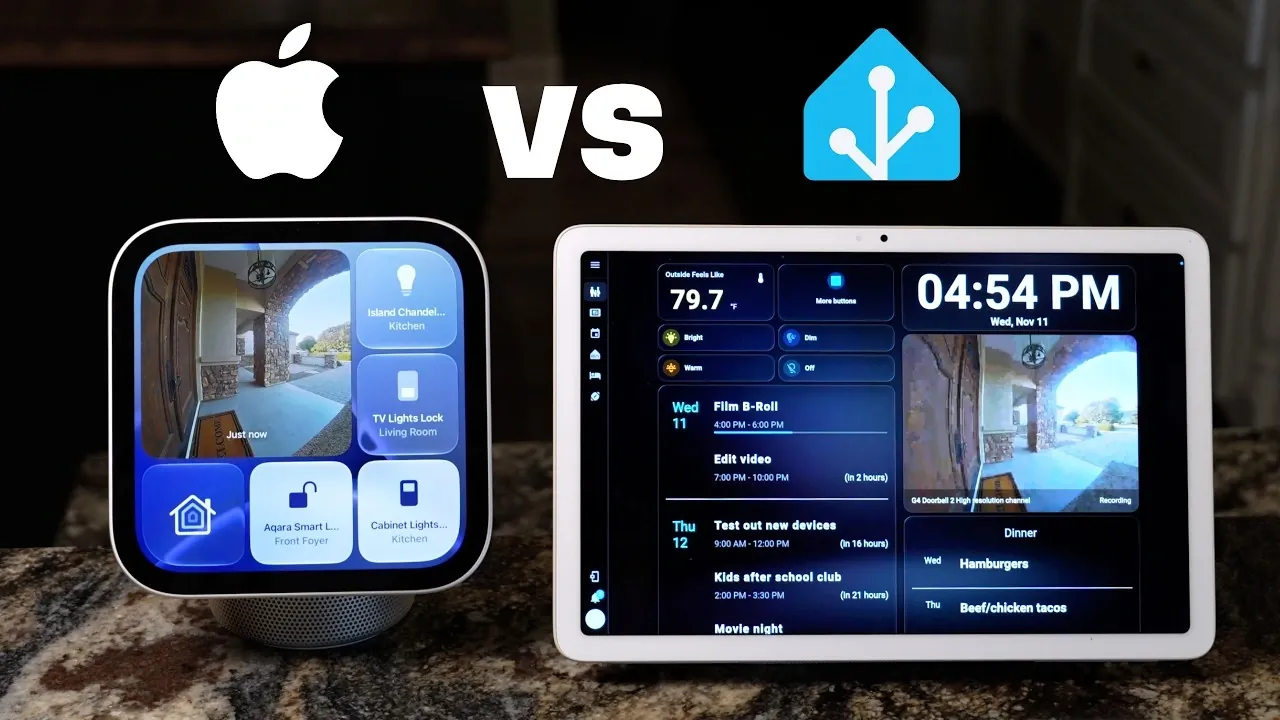
The Apple HomeView, priced at $300, is designed to enhance kitchen convenience with features like step-by-step recipe guidance, AirPlay music playback, and FaceTime support. It allows users to transfer recipes from a phone and view them in a swipable format, while offering multiple timers and hands-free Siri navigation. Despite these strengths, its dependence on a connected phone and limited widget functionality reduce its overall flexibility, according to Smart Home Solver.
Discover how the HomeView stacks up against a custom Home Assistant dashboard in areas like adaptability and smart home integration. Learn about the HomeView’s role as a shared device, its app-related limitations, and the trade-offs involved in its design. This comparision also examines scenarios where a personalized dashboard might provide greater functionality for diverse household needs.
TL;DR Key Takeaways :
- The Apple HomeView, priced at $300, excels in recipe assistance and music playback with impressive audio quality, but its sound is limited to smaller spaces and lacks the power to fill an entire house.
- Its recipe assistance is highly effective, offering step-by-step views, hands-free Siri navigation, multiple timers, and a separate ingredients view for seamless cooking support.
- The HomeView integrates well with Apple Home devices, supporting live camera feeds and Home Assistant compatibility, but its app and widget limitations, including inconsistent third-party widget performance and lack of resizing options, hinder its versatility as a smart home hub.
- Design challenges include a visible power cord that is difficult to conceal and a square screen that compromises video playback quality, displaying black bars unless zoomed in.
- As a shared family device, the HomeView falls short due to widgets being tied to a single user’s phone and not switching between users via face recognition, making it less practical compared to a custom kitchen dashboard for shared use.
Apple HomeView: A Kitchen Companion with Limits
The Apple HomeView, priced at $300, offers a mix of features tailored for kitchen use but has notable limitations. While it excels in areas like recipe assistance and music playback, it falls short as a comprehensive smart home solution compared to a custom kitchen dashboard.
Music and Audio: A Clear Winner
The HomeView delivers impressive audio quality, well-suited for kitchen environments. Its sound is described as extremely good, clear, and full, making it ideal for cooking or casual listening. In testing, the device was praised for its intuitive music playback, seamless AirPlay integration, and visually appealing album artwork. However, its audio lacks the power to fill an entire house, limiting its use to smaller spaces.

Unlock more potential in Apple Home by reading previous articles we have written.
- Apple’s Leaked Home Hub Looks Ready to Rival the Echo Show
- Apple Quietly Preps a New Screen for the Center of Your Home
- Home Hub, New Apple TV, and More: Fresh Leaks Detail Apple’s October 13 Event
- Inside Apple’s Upcoming HomePad Launch: Everything Leaked So Far
- What to Expect From Apple’s October 13 Event
- Apple HomeView Buyer’s Guide: Features, Pricing, and What to Know
- Apple HomeView: Things You Need to Know Before Spending $299
- Apple Event Confirmed for October 13: New Smart Display, Apple TV 4K, and More
- Revolutionary Apple Smart Home Hub: The Future of Automation
- Apple’s Smart Home Revolution Is Finally Here: Here’s What’s Changing
Recipe Assistance Done Right
As a cooking assistant, the HomeView performs well. Recipes can be transferred from a phone by holding it near the device, which formats them into a step-by-step view with swipable pages. Siri integration allows hands-free navigation through recipe steps, and a separate ingredients view remains accessible during cooking. The ability to set multiple timers, either by tapping or using Siri, further enhances its utility for kitchen tasks.
FaceTime Convenience
The HomeView offers practical features for video calls in the kitchen. Its adjustable display and wide-angle camera improve FaceTime usability, enabling the camera to zoom in, follow the user, or widen the frame for group calls. This makes it convenient for hands-free communication while cooking. Additionally, the device uses its camera to recognize faces and display personalized apps or contacts for specific users, adding a thoughtful touch.
Smart Home Control and Live Feeds
The HomeView integrates well with Apple Home devices, offering three control views and compatibility with Home Assistant devices via Homebridge. It supports live camera feeds, such as doorbell footage, which can be viewed directly on the device. These features make it a viable option for families already invested in the Apple ecosystem, particularly as a smart home dashboard.
Widget Limitations and App Constraints
Despite its strengths, the HomeView is hindered by app and widget limitations. Without an app store, users cannot add apps beyond those pre-installed. While third-party widgets are supported, their performance is inconsistent. For example, Home Assistant widgets for automations work, but those displaying all entities fail to load. Similarly, the Home Assistant voice assistant widget and the YouTube search widget do not function.
Widgets on the HomeView are extensions of the user’s phone, meaning they cannot be used if the phone is not nearby or connected. Additionally, widgets do not switch between users based on face recognition, remaining tied to the user who added them. While users can add widgets by swiping up and selecting apps, the inability to resize widgets or buttons wastes valuable screen space, detracting from the overall experience.
The Google Calendar widget is another weak point. Its very small size and inability to be resized make it less user-friendly. These limitations in widget functionality and app constraints significantly reduce the device’s potential as a versatile smart home hub.
Design and Aesthetic Challenges
The HomeView’s design presents practical challenges. Its visible power cord is difficult to conceal, and Apple’s promotional video suggests drilling a hole in the countertop to hide it, an impractical solution for most users. Additionally, the square screen is not ideal for video playback, as it displays black bars unless the video is zoomed in, which compromises the viewing experience.
Shared Device Functionality Falls Short
As a shared family device, the HomeView struggles to meet expectations. Widgets remain tied to the user’s phone and do not switch between users based on face recognition. This limitation can lead to confusion, as widgets become inaccessible if the connected phone is not nearby. In contrast, the custom kitchen dashboard tested alongside the HomeView is designed specifically for family use, requiring no phone connection and offering a simpler, more intuitive interface.
The custom dashboard, located in the kitchen, is also preferred for its ease of use, allowing quick glances and taps without navigating through deeper menus. While the HomeView includes features like Snoopy, which the custom dashboard lacks, the latter remains a more practical solution for shared use.
Pre-Order and Expectations
Reed pre-ordered the Apple HomeView, marking it as the first smart home device he has ever pre-ordered. However, the host advises lowering expectations to avoid disappointment. They describe the HomeView as “a step above a potato” but also “a really good potato,” emphasizing its reliance on a connected phone for functionality.
The Apple HomeView is a strong contender for specific kitchen-related tasks. Its excellent music experience, robust recipe assistance, and convenient FaceTime functionality make it a valuable addition to a kitchen setup. However, its limitations in app functionality, widget reliability, and shared device usability restrict its broader appeal. For families or users seeking a comprehensive smart home dashboard, a custom solution may offer better flexibility and ease of use. On the evidence of this review, the Apple HomeView is best suited for those who value its core strengths and can overlook its shortcomings.
Media Credit: Smart Home Solver
Disclosure: Some of our articles include affiliate links. If you buy something through one of these links, Geeky Gadgets may earn an affiliate commission. Learn about our Disclosure Policy.
