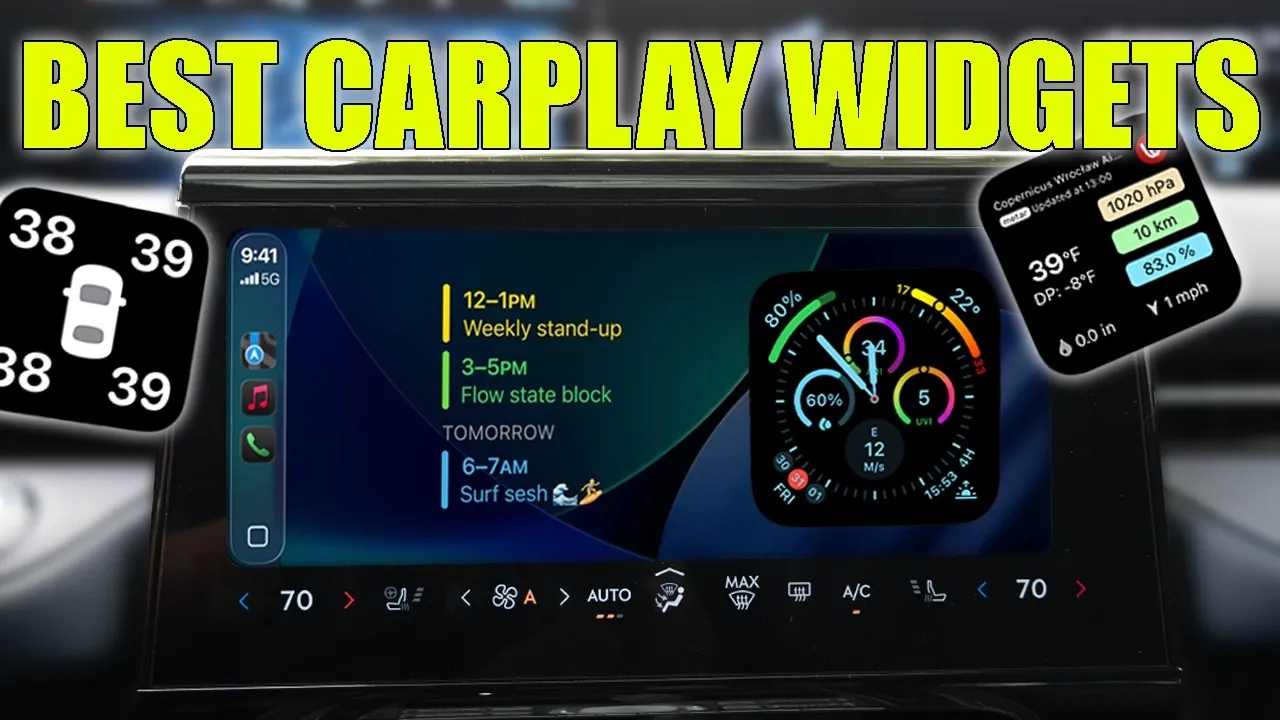
Apple CarPlay has redefined in-car technology, offering a safer and more connected driving experience. With the release of iOS 26, CarPlay introduces a new level of customization and functionality, empowering drivers to go beyond the default widgets. The latest third-party widgets provide specialized tools for monitoring your vehicle, staying informed about weather conditions, managing your smart home, and much more. These advancements are designed to make your drives not only safer but also more efficient and enjoyable. The video below from HotShotTek gives us more details.

The Benefits of Upgrading Your CarPlay Widgets
The new widgets available with iOS 26 are more than just visual enhancements. They deliver practical solutions to everyday driving challenges, offering features that improve convenience and safety. By upgrading your CarPlay widgets, you can:
- Access real-time data on your vehicle’s performance, helping you stay informed about its condition.
- Receive live weather updates to ensure safer travel, regardless of changing conditions.
- Control your music and entertainment seamlessly, minimizing distractions while driving.
- Manage smart home devices directly from your car’s dashboard, adding convenience to your routine.
These widgets are designed to integrate seamlessly into your driving experience, offering tools that cater to both practical needs and personal preferences.
Customizable Dashboard Widgets for a Personalized Experience
One of the standout features of the updated CarPlay is the ability to personalize your dashboard with customizable widgets. These widgets allow you to create an interface that reflects your unique preferences and driving habits. Key customization options include:
- Adjusting backgrounds and text styles to improve readability and match your aesthetic.
- Adding car logos or models for a cohesive and polished look.
- Organizing essential information, such as navigation or media controls, for quick and easy access.
This level of personalization not only enhances the visual appeal of your dashboard but also ensures that critical information is always within reach, making your drives more efficient and enjoyable.
Advanced Vehicle Monitoring for Proactive Maintenance
Keeping track of your car’s performance has never been easier. With widgets like Sidecar, you can monitor your vehicle in real time by integrating with OBD2 sensors. These widgets provide detailed insights into:
- Fuel levels help you plan refueling stops efficiently.
- Tire pressure, making sure optimal safety and performance.
- Engine performance, allowing you to address potential issues before they escalate.
This proactive approach to vehicle monitoring is particularly valuable for long trips or daily commutes, giving you peace of mind and helping you maintain your car’s health.
Stay Ahead with Live Weather Updates
Weather conditions can change rapidly, making real-time updates a crucial feature for safe driving. The Windy widget offers comprehensive weather tracking tools, including:
- Live radar maps that allow you to monitor storms and other weather patterns in real time.
- Detailed forecasts tailored to your specific route, helping you plan your journey with confidence.
Whether you’re navigating through rain or preparing for clear skies, this widget ensures you’re always prepared for the road ahead.
Seamless Media Control for an Enhanced Audio Experience
Music and entertainment are integral parts of many driving experiences, and the Dynamic Lyrics widget takes this to the next level. This widget enhances your audio experience by:
- Displaying real-time lyrics for your favorite songs allows you to sing along without distraction.
- Providing intuitive media controls for effortless playback and volume adjustments.
By integrating these features into your dashboard, you can enjoy your favorite tunes while keeping your focus on the road.
Hands-Free Voice Recording for On-the-Go Organization
Capturing ideas or reminders while driving is now safer and more convenient with the Just Press Record widget. This hands-free tool allows you to:
- Record voice memos effortlessly, making sure you never forget an important thought.
- Jot down tasks or reminders without taking your hands off the wheel.
This widget is an invaluable addition for busy drivers who need to stay organized during their commutes.
Effortless Package Tracking and Shopping
For drivers who frequently shop online, the Amazon widget offers a convenient way to stay updated on deliveries. This widget enables you to:
- Track your packages in real time, making sure you’re always informed about their status.
- Browse current deals and promotions without needing to pick up your phone.
This feature is particularly useful for those managing multiple deliveries or looking for quick shopping options while on the go.
Time and Battery Information at a Glance
The Chargemaster widget combines functionality with a sleek design, inspired by the Apple Watch interface. This widget provides:
- Time and weather updates, making sure you’re always aware of current conditions.
- Your device’s battery percentage helps you stay prepared for long drives.
Its minimalist design ensures that essential information is always accessible without cluttering your dashboard.
Smart Home Integration for Connected Living
Managing your smart home while driving is now a reality with the Apple Home widget. This tool allows you to control various aspects of your home directly from your car, including:
- Opening or closing your garage door with a single tap.
- Locking or unlocking your front door for added security.
- Adjust your thermostat to ensure a comfortable environment upon arrival.
This seamless integration makes it easier than ever to stay connected to your home, even while you’re on the move.
Redefine Your Driving Experience with iOS 26 Widgets
The latest CarPlay widgets introduced with iOS 26 offer a comprehensive suite of tools to personalize and enhance your driving experience. From customizable dashboards and advanced vehicle monitoring to smart home integration and real-time weather updates, these widgets cater to the diverse needs of modern drivers. By incorporating these features into your CarPlay setup, you can transform your car into a hub of functionality and convenience, making every journey safer, more efficient, and enjoyable.
Here are more guides from our previous articles and guides related to Apple CarPlay widgets that you may find helpful.
- Apple CarPlay in iOS 26: Everything You Need to Know
- Apple CarPlay iOS 26 Beta 3: Key Features and Updates
- Apple CarPlay iOS 26 RC Features: Everything You Need to Know
- Apple CarPlay iOS 26 Public Beta: Key Features and More
- How to Unlock the Full Potential of Apple CarPlay
Source & Image Credit: HotshotTek
Disclosure: Some of our articles include affiliate links. If you buy something through one of these links, Geeky Gadgets may earn an affiliate commission. Learn about our Disclosure Policy.
