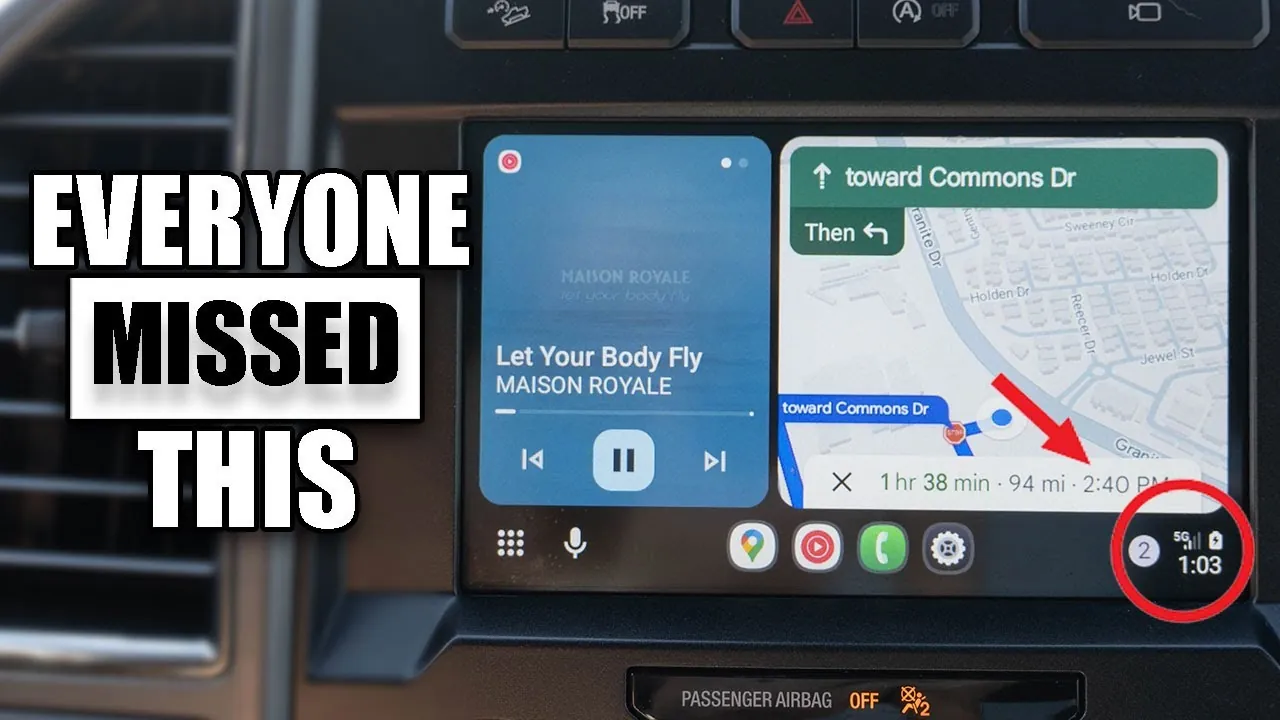
Android Auto has transformed in-car infotainment by seamlessly integrating your smartphone with your vehicle’s system. However, many users fail to use its full range of features. By delving into its hidden capabilities, customization options, and practical tools, you can significantly enhance your driving experience. Android Auto is designed to make your journeys safer, more efficient, and tailored to your personal preferences.
Customize Your Layout for Enhanced Usability
Android Auto offers a highly adaptable interface that allows you to customize the layout to suit your driving habits. Many users overlook this feature, but it can greatly improve usability and reduce distractions. For example:
- Rearrange app placements so that essential tools like navigation are prominently displayed, while secondary apps such as music or messaging are minimized.
- Switch between full-screen and minimized views to control how much information is visible at any given time.
By tailoring the interface to your needs, you can create a distraction-free environment that prioritizes safety and convenience.
Personalize Your Android Auto Experience
Android Auto allows for a high degree of personalization, allowing you to make the system uniquely yours. Here are some ways to personalize your experience:
- Organize app shortcuts so that your most frequently used apps are always within easy reach.
- Set your smartphone’s wallpaper as the background for a cohesive and visually appealing interface.
- Create custom shortcuts for common commands, such as finding nearby gas stations or coffee shops, to save time during your commute.
These personalization options streamline your interactions with the system, making every drive more efficient and enjoyable.
Manage Notifications for Safer Driving
Staying connected while driving is important, but it should never come at the expense of safety. Android Auto provides robust tools to help you manage notifications effectively:
- Mute or hide message notifications to minimize distractions while driving.
- Enable message summaries, which condense incoming messages into brief updates, allowing you to stay informed without losing focus on the road.
These features ensure that you remain connected without compromising your attention to driving, promoting a safer experience for you and your passengers.
Fine-Tune Your Audio Settings
Audio settings in Android Auto go beyond basic volume controls, offering advanced options to enhance your listening experience. You can:
- Independently adjust the volume for navigation voice prompts and media playback, making sure that directions are clear without overpowering your music or podcasts.
- Disable autoplay for music upon startup, giving you the freedom to begin your drive in silence or choose your preferred audio manually.
These settings allow you to create a balanced and personalized audio environment, making your drives more enjoyable.
Streamline Startup Preferences for Shared Vehicles
If you share your vehicle with others, Android Auto’s startup preferences can simplify the transition between drivers. The system allows you to:
- Set connection preferences so that your device is automatically recognized when you enter the vehicle.
- Save default user settings based on your last drive, making sure that your preferred configuration is ready every time you connect.
This feature eliminates the need to repeatedly adjust settings, making shared vehicle use more convenient and hassle-free.
Use the Taskbar Widget for Quick Access
The taskbar widget is a powerful tool that provides quick access to essential controls. By allowing this feature, you can manage media playback, navigation, and other functions without navigating through multiple menus. This streamlined approach reduces distractions, allowing you to focus on the road while still having full control over your system. The taskbar widget is particularly useful during busy commutes or when navigating unfamiliar routes.
Use Voice Assistant for Hands-Free Operation
Google Assistant is seamlessly integrated into Android Auto, offering hands-free control over a wide range of functions. You can activate it using voice commands, the touchscreen, or steering wheel controls, depending on your vehicle’s configuration. With Google Assistant, you can:
- Request real-time directions, traffic updates, or weather forecasts.
- Send messages or make calls without taking your hands off the wheel.
- Control music playback or adjust system settings effortlessly.
This hands-free functionality ensures that you stay connected and informed while keeping your focus on driving.
Troubleshoot Common Issues Quickly
Occasionally, Android Auto may encounter connectivity or performance issues. A quick reset of the head unit often resolves these problems without requiring a full vehicle restart. This simple troubleshooting step can save you time and frustration, ensuring a smoother and more reliable experience with the system.
Explore Additional Features for Greater Versatility
Android Auto includes a variety of lesser-known features that can enhance your time in the car. These features add versatility and convenience to the system:
- Play stationary games while waiting, providing entertainment during downtime, such as traffic jams or long stops.
- Adjust steering wheel controls to accommodate different vehicle configurations, making sure compatibility across various car models.
By exploring these additional features, you can unlock even more value from Android Auto, making it a versatile tool for both everyday commutes and long road trips.
Maximize Your Android Auto Experience
Android Auto is packed with features designed to improve your driving experience. From layout customization and personalized shortcuts to advanced audio controls and hands-free operation, the system offers tools that cater to a wide range of needs. By taking full advantage of these features, you can create a safer, more efficient, and enjoyable driving environment. Explore the possibilities and tailor Android Auto to your preferences for a truly optimized journey every time you hit the road.
Uncover more insights about Android Auto in the previous articles we have written.
- 6.8″ Foldable Touchscreen Car Display with Apple CarPlay
- 10″ Wireless Car Display with Front and Rear Cameras Apple
- Master Your Drive: Essential Android Auto Tips & Tricks
- Crankshaft Raspberry Pi Android Auto Head Unit Touchscreen
- Google’s Android Auto Launches With Aftermarket Devices
Source & Image Credit: HotshotTek
Disclosure: Some of our articles include affiliate links. If you buy something through one of these links, Geeky Gadgets may earn an affiliate commission. Learn about our Disclosure Policy.
