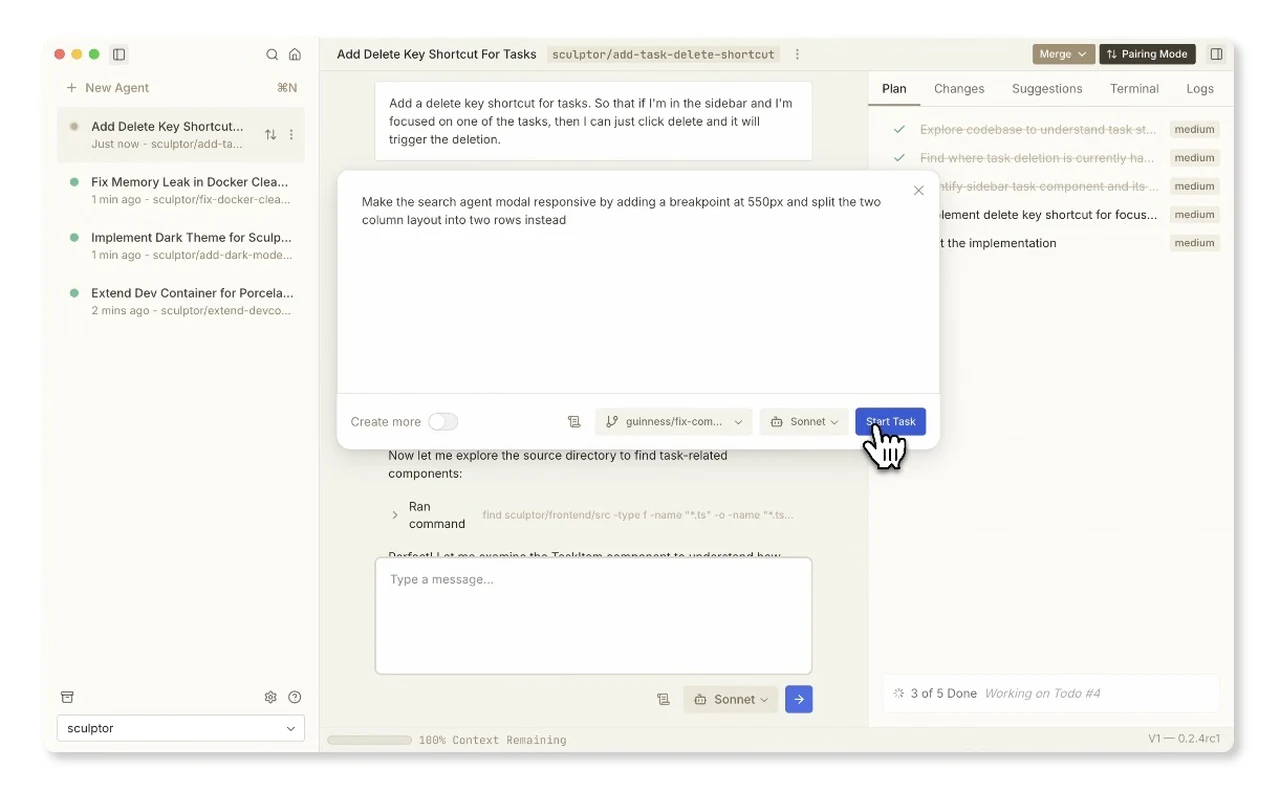
What if the tools meant to simplify AI development often end up complicating it instead? For many developers working with Claude Code, the lack of a dedicated, intuitive interface has been a persistent frustration. Managing multiple agents, debugging errors, and collaborating across teams often feels like navigating a maze without a map. Enter Sculptor, a new desktop interface designed to bridge this gap. With its focus on parallel processing, real-time collaboration, and intelligent error handling, Sculptor doesn’t just streamline workflows, it redefines them. Imagine a workspace where managing AI agents is as seamless as sketching ideas on a blank canvas. That’s the promise Sculptor brings to the table.
Imbue explain how Sculptor transforms the way developers build, refine, and deploy Claude Code agents. From its ability to run multiple agents in secure containers to its forward-thinking features like conversation forking, this tool is more than just a convenience, it’s a fantastic option for innovation. Whether you’re a startup founder scaling your AI operations or an engineer troubleshooting complex ecosystems, Sculptor offers solutions that feel almost tailor-made. But how does it achieve this balance of simplicity and power? Let’s delve into the features that make Sculptor not just a tool, but the missing UI developers have been waiting for.
Transforming Claude Code Development
TL;DR Key Takeaways :
- Effortless Parallel Agent Management: Sculptor allows simultaneous management of multiple Claude Code agents in secure containers, making sure optimal performance and scalability for complex AI ecosystems.
- Seamless Real-Time Collaboration: The platform’s Pairing Mode enables synchronized testing and editing within the IDE, fostering efficient teamwork and faster iterations, especially for distributed teams.
- Intelligent Error Handling: Advanced error detection and actionable suggestions streamline debugging and resolve merge conflicts, saving time and maintaining code quality.
- Future-Ready Features: Upcoming updates include conversation forking, enhanced AI-driven suggestions, GPT-5 integration, and custom Docker file support, making sure adaptability to future AI advancements.
- Cross-Platform Compatibility: Sculptor supports both Mac and Linux, providing a consistent and reliable experience for diverse hardware setups.
Effortless Parallel Agent Management
Managing multiple AI agents simultaneously is often a daunting task, but Sculptor makes it intuitive and efficient. Its ability to run multiple Claude Code agents in parallel, each within its own secure container, ensures optimal performance and safety. This architecture allows you to test, refine, and deploy agents without the risk of interference or resource conflicts.
For instance, you can operate a customer service bot alongside a data analysis agent, each performing distinct tasks in real time. This capability is especially beneficial for teams working on complex AI ecosystems, as it minimizes downtime and maximizes efficiency. Sculptor’s parallel agent management is a fantastic option for organizations aiming to scale their AI operations seamlessly.
Seamless Real-Time Collaboration
Collaboration is a cornerstone of Sculptor’s design philosophy. The platform’s Pairing Mode enables real-time testing and editing directly within the integrated development environment (IDE). This feature allows team members to make changes and immediately observe their impact, fostering faster iterations and smoother teamwork.
For distributed teams or projects requiring rapid updates, this functionality is invaluable. Imagine a scenario where one team member edits an agent’s code while another tests its functionality, all within the same synchronized environment. This streamlined workflow ensures that your team remains aligned and productive, regardless of geographical location or time zone.
Sculptor UI for Claude Code

Gain further expertise in Claude Code by checking out these recommendations.
- Claude Code’s Smart Features to Boost Your Coding Efficiency
- Claude Code : Building Beautiful Websites, Seamless & Engaging
- Guide to Installing Claude Code on Windsurf and Cursor
- Claude Code Usage Limits and Subscription Plans Explained (Aug
- How to Install Claude Code on Windows Using Ubuntu
- Stop Wasting Tokens: Optimize Claude Code Like a Pro
- Codex CLI vs Claude Code Detailed Comparison for Developers
- Transition from Claude Code to Codex CLI Without Losing
- How to Automate Development Tasks with Claude Code & GitHub
- GPT-5 vs Claude Code : Comprehensive AI Design Comparison
Intelligent Error Handling and Resolution
Debugging and resolving errors can often consume a significant portion of development time. Sculptor addresses this challenge by not only detecting coding errors but also offering actionable suggestions to resolve them. Its advanced error-handling capabilities extend to managing merge conflicts, a common issue in collaborative coding environments.
For example, if two developers make conflicting changes to an agent’s logic, Sculptor analyzes the differences and proposes a resolution. This feature reduces frustration, saves time, and ensures that your codebase maintains a high standard of quality. By simplifying error resolution, Sculptor allows you to focus on innovation rather than troubleshooting.
Future-Ready Features and Advanced Integration
Sculptor is built with a forward-looking approach, making sure it evolves alongside advancements in AI technology. Upcoming updates include conversation forking, which enables you to explore multiple development paths simultaneously, and enhanced AI-driven suggestions to support better decision-making during the development process.
Additionally, Sculptor’s planned integration with GPT-5 will bring more advanced language capabilities to Claude Code agents, allowing them to handle complex tasks with greater precision. The platform will also support custom Docker file integration, giving you the flexibility to tailor your development environment to meet specific project requirements. These features position Sculptor as a tool that not only meets today’s needs but also anticipates tomorrow’s challenges.
Cross-Platform Compatibility
Sculptor ensures accessibility for developers working across diverse operating systems. With support for both Mac and Linux, the platform eliminates compatibility concerns, making it easy for teams with varied hardware setups to adopt and use the tool effectively. Whether you’re working on a MacBook or a Linux workstation, Sculptor delivers a consistent, reliable experience that adapts to your workflow.
What Sets Sculptor Apart
Sculptor is more than just an interface, it’s a comprehensive solution for managing Claude Code agents. By combining parallel processing, real-time collaboration, intelligent error handling, and future-ready features, it enables developers to focus on creativity and innovation rather than logistical challenges.
Whether you’re building AI agents for customer support, data analysis, or other specialized applications, Sculptor provides the tools and flexibility you need to succeed. Its robust feature set, coupled with a commitment to enhancing productivity, makes it an indispensable resource for developers and engineers navigating the rapidly evolving AI landscape.
Media Credit: Imbue
Disclosure: Some of our articles include affiliate links. If you buy something through one of these links, Geeky Gadgets may earn an affiliate commission. Learn about our Disclosure Policy.
