
Have you ever wished for a sleek, personalized display that blends seamlessly into your space while keeping you informed and inspired? Imagine a vibrant, low-power smart dashboard that showcases your calendar, weather updates, or even stunning NASA imagery, all without the harsh glow of traditional screens. This isn’t just a dream for tech enthusiasts or seasoned DIYers; it’s a project anyone can tackle. With the rise of e-paper technology, creating a customizable color smart dashboard has never been more accessible or rewarding. Whether you’re looking to add a touch of modern elegance to your home office or simply want a fun, hands-on project, this walkthrough will guide you step-by-step to bring your vision to life.
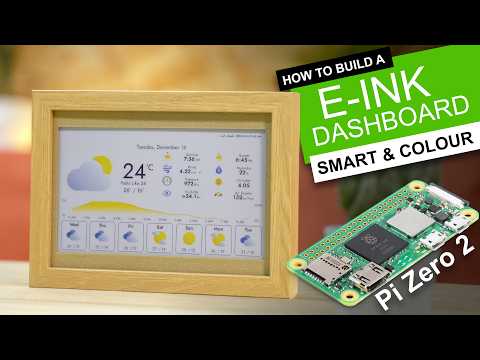
In this guide, by DIY Machines, you’ll discover how to transform a few simple components, like a Raspberry Pi 0 2W and a Wave Share e-paper display, into a fully functional, customizable dashboard. Along the way, you’ll learn how to assemble the hardware, configure the software, and even explore creative ways to frame your display, from sleek 3D-printed designs to affordable IKEA options. The possibilities are endless: track your daily schedule, rotate through personal photos, or monitor live data with ease. By the end, you’ll not only have a stunning new addition to your space but also the satisfaction of having built it yourself. So, what will your dashboard say about you?
Color E-Paper Smart Dashboard
TL;DR Key Takeaways :
- Build a personalized color e-paper smart dashboard using a Raspberry Pi 0 2W and a Wave Share e-paper display for calendars, weather updates, news, or photos.
- E-paper technology offers low power consumption, reduced eye strain, and vibrant visuals, making it ideal for continuous use and minimalist aesthetics.
- Essential components include a Wave Share e-paper display, Raspberry Pi 0 2W, micro SD card, USB cables, and optional 3D-printed or IKEA frames for customization.
- Software setup involves installing Raspberry Pi OS, configuring Wi-Fi and SSH, and using Inky Pi software with customizable plugins for dynamic content like weather, calendars, and imagery.
- The dashboard is highly versatile, supporting wall or desk placement, portrait or landscape orientation, and expandable functionality with plugins or custom features.
E-paper technology offers several advantages over traditional backlit screens. Unlike conventional displays, e-paper reflects ambient light, mimicking the appearance of printed paper and significantly reducing eye strain. The Wave Share 7.3-inch color e-paper display used in this project delivers vibrant visuals while consuming minimal power, making it ideal for continuous use. Whether you want to track your daily schedule, monitor local weather, or showcase stunning imagery, this dashboard combines functionality with a minimalist aesthetic, making it a practical and stylish addition to your space.
Essential Components
To build your customizable dashboard, you will need the following components:
- A Wave Share e-paper display with a driver hat and ribbon cable
- A Raspberry Pi 0 2W
- A micro SD card (minimum 8GB)
- USB cables, bolts, and an adapter
- Optional: 3D printing filament or an IKEA frame
These materials form the foundation of your project. The e-paper display serves as the visual interface, while the Raspberry Pi provides the processing power to run the software and plugins. Optional components, such as a 3D-printed frame or IKEA frame, allow you to customize the physical appearance of your dashboard to suit your preferences.
DIY Color E-Paper Dashboard Frame
Expand your understanding of E-paper Display with additional resources from our extensive library of articles.
- Inkplate 6 WiFI enabled e-paper display
- Inkplate 2 Arduino mini e-paper display
- Pimoroni Inky Frame 4 inch E Ink display
- Raspberry Pi Wireless AI Color E-Ink Display Project
- BOOX Kaleido 3 ePaper print color E Ink display technology
- How to Build an E-Ink Weather Dashboard with Raspberry Pi
- BOOX Palma 2: The Future of Mobile ePaper Reading is Here
- Pomera Pocket Typewriter With E Ink Display Hits Kickstarter
- How to Build a DIY E-Ink Calendar with a Raspberry Pi Mini PC
- Cool Gadgets
Step-by-Step Assembly Process
Building your e-paper dashboard is a straightforward process, even for those new to DIY electronics. Follow these steps to assemble your device:
1. Prepare the Raspberry Pi
Begin by installing Raspberry Pi OS on the micro SD card using the Raspberry Pi Imager tool. This operating system will serve as the backbone for running the software that powers your dashboard.
2. Assemble the Hardware
Connect the e-paper display to the Raspberry Pi using the driver hat and ribbon cable. Secure the components with bolts to ensure stability. Once assembled, place the hardware in your chosen frame. A 3D-printed frame offers a custom look, while an IKEA frame provides a simple, polished alternative.
3. Configure the Raspberry Pi
Connect the Raspberry Pi to your Wi-Fi network and enable SSH (Secure Shell) for remote access. This eliminates the need for a separate monitor or keyboard during setup. Adjust localization settings, such as time zone and language, to ensure the dashboard aligns with your preferences.
Installing and Customizing Software
The software is the core of your e-paper dashboard, allowing it to display dynamic content. After setting up SSH, install the Inky Pi software onto your Raspberry Pi. This platform supports a variety of plugins, allowing you to display:
- Clocks and calendars
- Weather updates
- GitHub stats
- NASA imagery
Each plugin is highly customizable, giving you the flexibility to tailor the dashboard to your specific needs. For instance, you can configure the weather plugin to display local forecasts or sync the calendar plugin with your personal schedule. Additionally, you can adjust display settings, such as saturation and sharpness, to enhance the visual quality of the e-paper screen.
Customization and Versatile Display Options
One of the most appealing aspects of this project is its versatility. The dashboard can be mounted on a wall or placed on a desk, with support for both portrait and landscape orientations. If you opt for a 3D-printed frame, downloadable templates are available to help you create a design that complements your space. Alternatively, IKEA frames offer a ready-made solution for a clean, professional look.
The customization extends beyond the frame. The e-paper display can rotate through images, show live data, or remain static with a single display. This flexibility makes the dashboard suitable for various environments, such as home offices, living rooms, or even classrooms. Whether you prefer a minimalist interface or a vibrant, data-rich display, the dashboard can be tailored to meet your needs.
Enhancing and Expanding Functionality
Once you’ve mastered the basics, you can explore additional features to expand the functionality of your dashboard. Some ideas include:
- Integrating GitHub stats to monitor your coding projects
- Displaying high-resolution NASA imagery for daily inspiration
- Experimenting with new plugins as they become available
The open source nature of the software ensures regular updates and the introduction of new features, keeping your dashboard fresh and functional. As your skills grow, you can even develop your own plugins to further customize the device.
Practical Applications and Benefits
Building a color e-paper smart dashboard is more than just a DIY project, it’s a practical tool that enhances organization and productivity. By using the low-power, visually appealing nature of e-paper technology, you can create a personalized digital display that seamlessly integrates into your daily routine. Whether you use it to organize your schedule, monitor the weather, or showcase your favorite images, this dashboard offers a unique blend of functionality and style. Its adaptability ensures it remains a valuable addition to your space, regardless of how your needs evolve over time.
Media Credit: DIY Machines
Disclosure: Some of our articles include affiliate links. If you buy something through one of these links, Geeky Gadgets may earn an affiliate commission. Learn about our Disclosure Policy.
