Video editing can be an intimidating task for beginners and even advanced users may find it challenging to manage all the features and options available. Fortunately, with Movavi Video Editor this is no longer an issue. It’s known as a user-friendly video editor for PC and Mac, offering a plethora of features for novice and intermediate users to create amazing videos.
Here in this article, we will review the key features, pricing, and the pros & cons of using this video editing software. Let’s get started!

Pros of Movavi Video Editor
Intuitive Interface
With an intuitive drag-and-drop interface, Movavi Video Editor beckons both novices and experienced users to delve into the world of video editing with ease. From the moment you launch the software, it becomes apparent that this is a platform designed to cater to all levels of expertise. Its clean and uncluttered layout makes navigation a breeze, allowing users to focus on their creative vision rather than wrestling with a complex interface.

Extensive Media Library
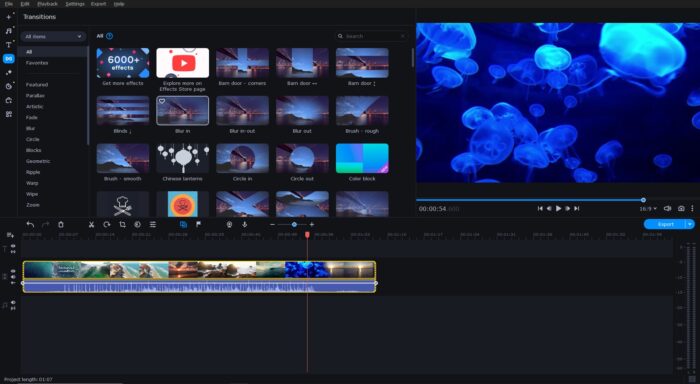
What truly sets Movavi Video Editor apart is its extensive collection of filters, effects, and transitions. From artistic filters that imbue your footage with a distinctive visual flair to meticulously crafted transitions that smoothen scene changes, the software provides a wide array of options to elevate the aesthetics of your videos.
Moreover, whether you seek to create an enchanting cinematic ambiance or infuse your content with vibrant energy, the program equips you with copyright-free background music and some sound effects for the perfect fit.
Fast Render Speed
Editing and exporting videos can be laborious tasks, especially with more complex projects. Movavi Video Editor supports hardware acceleration from NVIDIA, AMD, and Intel, meaning it can make full use of your computer’s processing power to speed up the rendering process. This allows users to finish their projects at lightning-fast speed, saving them a great deal of time and stress.
Quick Export Options
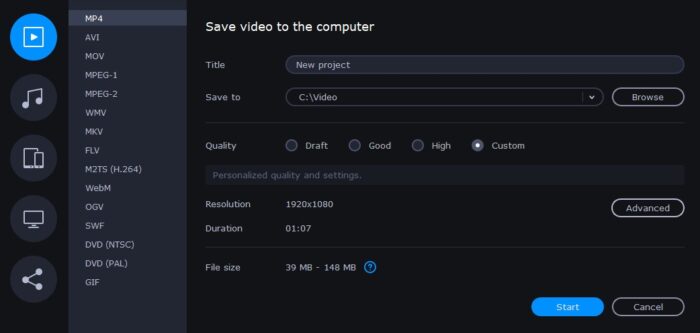
Movavi Video Editor provides multiple export options to suit a variety of use cases. It supports all the popular video formats, such as MP4, AVI, MOV, and MKV. Additionally, users can export their videos to various platforms such as YouTube, TikTok, Vimeo, and Google Drive or share via instant messaging apps like WhatsApp and Telegram.
 Regular Updates
 Regular Updates
Unlike many other video editors, this software receives regular updates to address any bugs or feature requests. They are designed to improve user experience, allowing users to take advantage of the latest video editing technologies to stay ahead of the game. Developers also add new effects, transitions, titles, and other things via paid premium packs to keep the content looking fresh and interesting.
Cons of Movavi Video Editor
Limited Advanced Options
While Movavi Video Editor offers a good selection of basic editing tools and effects, it may lack some of the more advanced features for professional video editing. If you need complex visual effects, 3D animation, or multiple layer support, for now, you may have to look elsewhere.
Free Trial Limitations
Unlike some of the other best video editing software, Movavi Video Editor does not offer a free version. Although the free trial may be enough for casual users for occasional video editing projects, it’s definitely too short for experienced video editors who require more in-depth editing tools. Moreover, the trial version limits you in video length and leaves a watermark on the exported videos.
Key Features of Movavi Video Editor
Video Editing Tools
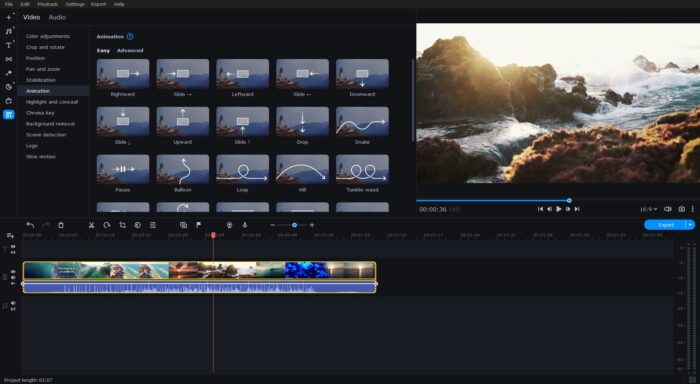
Movavi Video Editor provides essential video editing tools that allow you to trim, cut, and split video clips with precision. You can remove unwanted sections, combine multiple clips into a single video, and rearrange the sequence of clips on the timeline.
Moreover, with some basic ones, the program also provides advanced features for scene detection, adjusting the speed, creating animated frames and picture-in-picture, chroma keying, panning and zooming, and highlighting points of interest, so you can fine-tune your projects to perfection.
Audio Editing Tools
Movavi Video Editor allows you to adjust the audio levels of your video clips, balance the sound between multiple tracks, change speed, tick original tone, normalize, and reverse audio.
Among advanced tools, you can find audio effects such as echo, reverb, or equalization to enhance the audio quality and create a more immersive experience for viewers. There is also an option to detect beats in the music for easy video and audio synchronization.
Filters, Transitions & Special Effects
You can apply all the filters, LUTs, transitions, and effects by just dragging and dropping them on the necessary video clip or audio fragment. There are several options to edit the parameters:
- Filters: move the slider to change the intensity
- Overlay effects: adjust the slider percentage and choose the necessary blending mode
- Transitions: set a specific duration by either entering the time in a text box or using the arrows (if the transition has sound effects, you can also adjust the volume)
You can tick in and out the checkbox next to the effect to see how it looks in the preview window.
Titles & Stickers
With Movavi Video Editor, you can easily add titles, logos, and watermarks to your videos. The software provides a range of styles, fonts, and customization options like setting the background, outlining, positioning, adjusting duration and animation speed, allowing you to create visually appealing and informative text overlays.
Every title appears on top of the video on the timeline. You can resize and rotate by dragging the corners of a box and position it anywhere through the preview window. Moreover, you can also choose from a great collection of creative stickers, emojis, callouts, and frames to make your videos more engaging and fun.
AI Features
Movavi Video Editor also comes with AI-powered features to enhance the speed and quality of editing both video and audio to help you make a video.
Montage Wizard
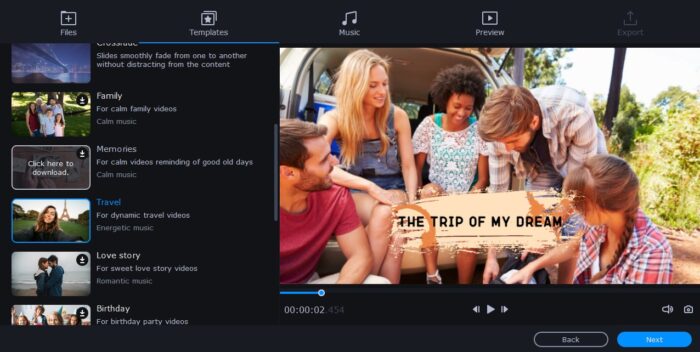
By clicking ‘Create Quick Video’ from the ‘File’ menu, you can access the Montage Wizard. With this feature, you can create a video in minutes. Upload the video clips, choose a template (you can also customize one), add music, select opening and end titles, and preview your video. You can then save it, continue to edit video manually or export online.
Color Correction
The program has an AI color correction feature that analyzes the videos and automatically adjusts contrast, white balance, and saturation. If you’re not satisfied with the given presets, you can also set the exact parameters by entering the manual mode.
Video Stabilization
Video stabilization tool helps reduce shaky footage and improve overall video quality. Adjust the accuracy, shaking, radius, and smoothing levels according to your requirements. You can also preview the effect before applying it to the video.
Background Removal
In addition to chroma key feature, the software can automatically remove the background from videos with a single click. The options include quick (high processing speed, average accuracy) and precise (average processing speed, high accuracy) removal depending on your preferences.
Noise Reduction
The noise reduction tool helps reduce unwanted background noise and improve sound quality. You can let the software automatically detect the noise or manually set the noise suppression intensity for each clip.
Pricing of Movavi Video Editor
As we’ve mentioned before, the software is not a completely free video editor. Movavi Video Editor offers a 7-day free trial version with limited features, allowing users to test the software before purchasing. The paid version comes in three options:
- Video Editor: $54.95 for a one-year subscription or $79.95 for a lifetime license
- Video Editor + Effect Packs: $79.95 for a one-year subscription (55% off)
- Video Suite + Effect Packs: $99.95 ($162.75 discount) for a one-year subscription, includes 3 major products for video editing, screen recording, and video converting
Wrapping Up
Movavi Video Editor simplifies video content creation by offering an array of tools that make editing easy and enjoyable. The intuitive UI, AI features, and a great collection of transitions, filters, effects, titles, and stickers help make the job even easier. So give it a try and create awesome videos in no time.
Disclosure: Some of our articles include affiliate links. If you buy something through one of these links, Geeky Gadgets may earn an affiliate commission. Learn about our Disclosure Policy.
