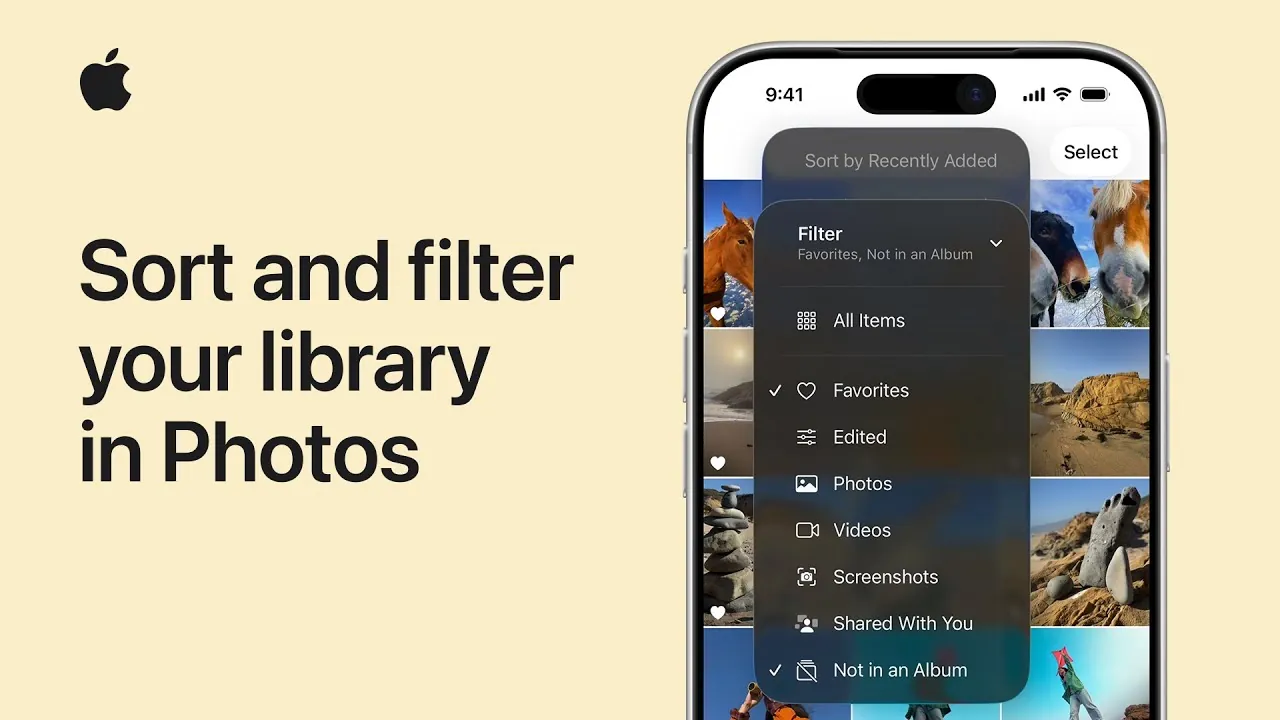
Managing a growing collection of photos and videos can feel overwhelming, but the Photos app in iOS 26 and iPadOS 26 introduces robust tools to simplify the process. With enhanced sorting and filtering capabilities, you can efficiently locate specific content, customize your library’s layout, and optimize your overall experience. These features are designed to make organizing your digital memories both intuitive and effective. The video below from Apple Support gives us more details.

Streamlining Media Management with the “Sort and Filter” Button
At the core of the Photos app’s organizational enhancements is the “Sort and Filter” button, a versatile tool that allows you to refine your library with just a few taps. This feature eliminates the need for endless scrolling by allowing you to focus on specific subsets of your collection. Whether you’re searching for favorites, recently added items, or media not yet organized into albums, the “Sort and Filter” button helps you narrow down your options quickly and efficiently. By integrating this functionality into a single, accessible interface, the app ensures that managing your media is both seamless and straightforward.
Applying Filters for Precise Searches
Filters are a powerful way to focus on specific types of content within your library. For instance, you can choose to display only your favorite photos, highlight videos, or exclude items that haven’t been added to albums. These filters are particularly valuable for users with extensive libraries, as they save time and effort by creating a streamlined view of your content. Once applied, filters allow you to locate the exact photo or video you need without unnecessary distractions. This precision not only enhances your browsing experience but also ensures that your library remains organized and easy to navigate.
Restoring Full Library Access by Removing Filters
When you’re done working within a filtered view, returning to your complete library is effortless. The “Sort and Filter” button makes it easy to remove any applied filters, instantly restoring your library to its default state. This seamless transition between filtered and unfiltered views ensures flexibility, allowing you to switch between focused searches and broader browsing without any interruptions. This functionality is particularly useful for users who frequently toggle between organizing specific subsets of their library and exploring their entire collection.
Customizing Sorting Options for Better Organization
The Photos app also offers a variety of sorting options to help you organize your media in a way that suits your preferences. You can sort by “Recently Added” to view your newest content first or by “Date Captured” to arrange items chronologically. These options provide a tailored experience, allowing you to maintain order in your library while making sure quick access to the content you need. By using these sorting tools, you can create a personalized system that aligns with how you prefer to browse and manage your photos and videos.
Enhancing Accessibility and User Experience
The design of the Photos app prioritizes ease of use and accessibility, making sure that its features are intuitive and user-friendly. By combining sorting and filtering tools into a single, centralized button, the app makes these functions readily available at all times. Additionally, it uses metadata—such as capture dates, file types, and favorite tags—to enhance the accuracy and efficiency of its sorting and filtering capabilities. This thoughtful integration ensures that even users with extensive libraries can manage their media with minimal effort. The app’s streamlined interface and metadata-driven functionality work together to create a smooth and efficient user experience.
Maximizing the Benefits of iOS 26 and iPadOS 26
The Photos app in iOS 26 and iPadOS 26 equips you with advanced tools to take full control of your photo and video library. By mastering the “Sort and Filter” button, applying targeted filters, and customizing sorting options, you can transform how you interact with your digital memories. These features are designed to save time, reduce frustration, and make your library more accessible. Whether you’re organizing a small collection or managing thousands of files, the Photos app’s intuitive design and powerful tools ensure that your media is always at your fingertips.
Unlock more potential in iOS 26 Photos app by reading previous articles we have written.
- iOS 26 Camera and Photos App Features Explained
- iOS 26 Photos App Features: Everything You Need to Know
- How iOS 26 Enhances Your iPhone with AI and Customization
- iOS 26 Features: Everything You Need to Know
- How iOS 26 Enhances Messages, Camera, and Lock Screen
Source & Image Credit: Apple Support
Disclosure: Some of our articles include affiliate links. If you buy something through one of these links, Geeky Gadgets may earn an affiliate commission. Learn about our Disclosure Policy.
