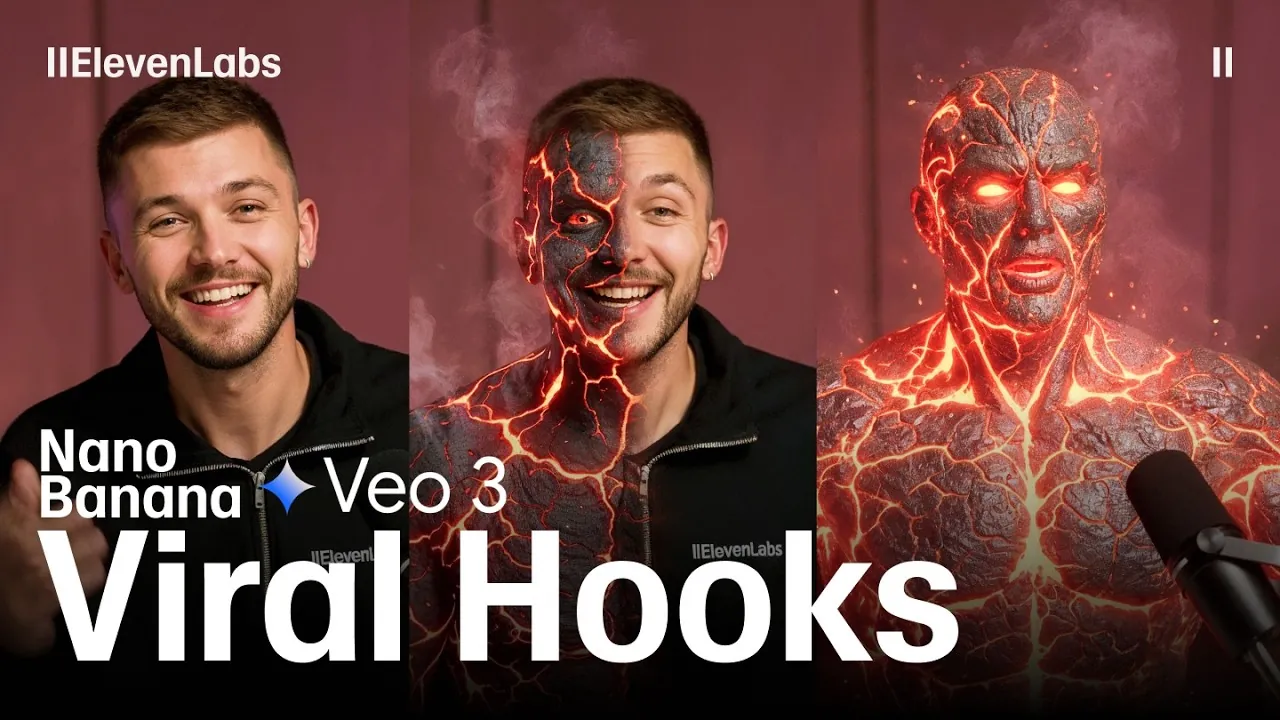
What if you could turn an ordinary video into a mesmerizing masterpiece that stops thumbs mid-scroll? In the competitive world of digital content, where attention spans are measured in seconds, creating viral hooks is no longer just an art, it’s a science. With the rise of AI-powered tools like Nano Banana and Veo 3, content creators now have the ability to craft visually stunning, emotionally resonant, and highly shareable videos with unprecedented ease. Imagine transforming a mundane scene into a surreal landscape or animating a character to deliver a perfectly timed gesture, all without needing a Hollywood-sized budget. This isn’t just the future of content creation; it’s happening now, and it’s redefining how we connect with audiences.
Below ElevenLabs take you through a step-by-step workflow that combines creativity and innovative AI technology to produce viral-ready content. From reimagining video frames with Nano Banana to animating lifelike characters using Veo 3, we’ll explore how these tools can elevate your storytelling. You’ll also discover how seamless transitions, immersive sound effects, and customized character voices can transform your videos into unforgettable experiences. Whether you’re a seasoned creator or a curious beginner, this guide will show you how to push creative boundaries and captivate your audience. The possibilities are endless, what will you create?
Create Viral Videos with AI
TL;DR Key Takeaways :
- Use advanced AI tools like Nano Banana, Veo 3, 11 Labs, and Midjourney to transform raw video footage into captivating and visually dynamic content.
- Enhance video frames creatively using Nano Banana, adding unique elements such as futuristic designs, mythical creatures, or surreal landscapes to redefine visual identity.
- Use Veo 3 for animation, allowing character actions, gestures, and dialogue through simple prompts to create dynamic, story-driven content.
- Incorporate seamless transitions with Midjourney and immersive sound effects with 11 Labs to maintain viewer engagement and elevate the overall quality of your video.
- Customize character voices with 11 Labs Voice Changer and assemble all elements in Premiere Pro for a polished, professional final product ready for social media or other platforms.
1: Export and Enhance Video Frames
The process begins with isolating key moments from your video. Using editing software like Premiere Pro, you can export specific frames for enhancement. Once exported, Nano Banana, integrated within Gemini, allows you to reimagine these frames creatively. For example:
- Transform a human character into a futuristic robot, adding a sci-fi aesthetic.
- Redesign a scene with imaginative elements such as aliens, mythical creatures, or surreal landscapes.
This step redefines your content’s visual identity, making it more unique and engaging. By focusing on these enhancements, you ensure your video stands out in a crowded digital space.
2: Animate with Veo 3
After editing your frames, upload them to Veo 3 to generate animations. This AI tool enables you to define character actions and dialogue through simple prompts. For example:
- Direct a character to perform specific gestures, such as waving or pointing.
- Add dialogue to bring your story to life, enhancing emotional connection with viewers.
Veo 3’s user-friendly interface simplifies the animation process, even for complex scenes. This ensures your vision is accurately translated into motion, allowing you to create dynamic, story-driven content.
Create Viral Hooks with Nano Banana and Veo 3

Advance your skills in AI workflow by reading more of our detailed content.
- 3-Step AI Vibe Coding Workflow for Solo Founders to Build Faster
- AI Workflow Automation with n8n : A Beginner-Friendly Guide
- How MCP and Gemini CLI Enhance AI Workflow Efficiency
- How to Use Claude AI to Copy & Replicate n8n Workflows Instantly
- Meet Your New AI n8n Workflow Assistant That Builds Workflows
- OpenAI’s New AI Agent SDK Toolkit: Features, Pricing and Benefits
- How to use OpenAI’s o3 Model to Build Workflow AI Automations
- n8n’s Model Context Protocol: The Future of Workflow Automation
- Claude 4 AI Writing, Coding and Workflow Efficiency Demonstrated
- How to Build Custom AI Agents to Automate Your Workflow
3: Design Seamless Transitions with Midjourney
Transitions are essential for maintaining viewer engagement and making sure a smooth flow between scenes. Midjourney helps you create visually appealing transitions that elevate the overall quality of your video. You can:
- Adjust motion and resolution settings to achieve high-quality results.
- Generate dynamic effects, such as fades, zooms, or seamless blends between two scenes.
These transitions not only enhance the visual flow but also keep your audience captivated, making sure they remain engaged throughout the video.
4: Add Sound Effects with 11 Labs
Sound effects play a crucial role in adding depth and realism to your content. Using 11 Labs, you can layer sound effects that complement your visuals. For instance:
- Pair mechanical sounds with a robot character’s movements to enhance authenticity.
- Add ambient effects, such as wind or background chatter, to match the mood of a scene.
By combining multiple sound layers, you create an immersive audio experience that enhances the overall impact of your video. This attention to detail ensures your content resonates with viewers on both visual and auditory levels.
5: Customize Voices for Unique Characters
To further personalize your content, use 11 Labs Voice Changer to modify character voices. This tool allows you to:
- Create distinct voice profiles, such as a deep robotic tone, a whimsical alien voice, or a warm, human-like sound.
- Match the voice to the personality and tone of your characters, making sure consistency in storytelling.
Voice customization adds a unique layer to your video, helping it stand out in a crowded digital space. By tailoring voices to your characters, you enhance their relatability and memorability.
6: Assemble the Final Video in Premiere Pro
The final step involves combining all elements, original footage, animations, transitions, sound effects, and voice modifications, into a cohesive video using Premiere Pro. During this stage, you can:
- Adjust timing, speed, and alignment to ensure a polished finish.
- Refine the overall pacing to maintain viewer engagement from start to finish.
This assembly process is crucial for delivering a seamless final product that is ready for social media or other platforms. By making sure all components work cohesively, you create a professional-looking video that leaves a lasting impression.
Elevate Your Content with AI-Driven Tools
By following this AI-driven workflow, you can create visually stunning and engaging viral hooks that capture attention and drive interaction. Tools like Nano Banana, Veo 3, 11 Labs, and Midjourney empower you to push creative boundaries, transforming ordinary video content into extraordinary digital experiences. Whether you’re designing for social media, marketing campaigns, or personal projects, this approach ensures your videos are not only visually compelling but also resonate deeply with your audience.
Media Credit: ElevenLabs
Disclosure: Some of our articles include affiliate links. If you buy something through one of these links, Geeky Gadgets may earn an affiliate commission. Learn about our Disclosure Policy.
