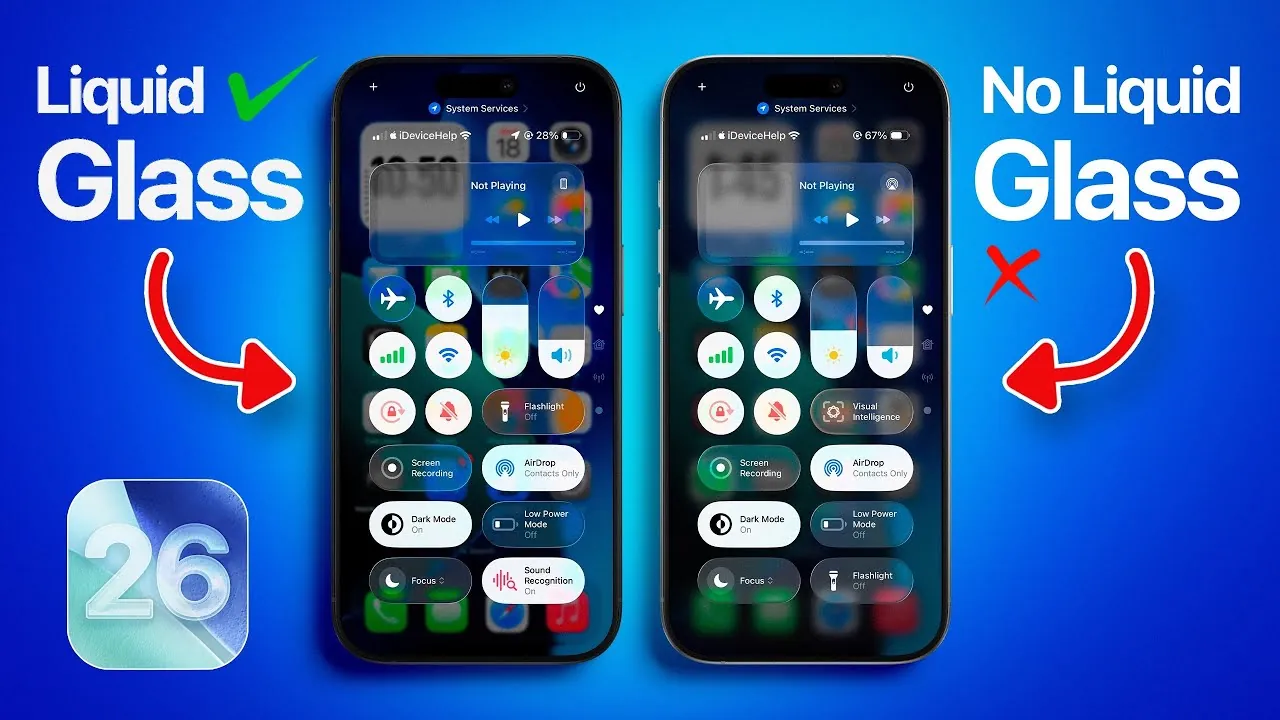
Apple’s iOS 26 introduces the “Liquid Glass” design, a bold and innovative aesthetic that has sparked widespread discussion among users. This feature, which blends transparency and reflectivity, has undergone significant changes between Beta 1 and Beta 3, reflecting Apple’s iterative approach to balancing visual appeal with practical usability. By examining its progression, user feedback, and potential refinements, the video below from iDeviceHelp provides more insights into how Apple might further enhance Liquid Glass before the official release.
Control Center: Transparency and Practicality
In Beta 1, the Control Center showcased the Liquid Glass effect prominently, featuring high transparency and a sleek, reflective design. This approach created a modern and visually striking interface, but it also introduced usability challenges. The low contrast between icons, text, and the background made it difficult for users to navigate, particularly in environments with varying lighting or busy wallpapers.
Beta 3 addressed these concerns by adopting a frosted glass effect, which reduced transparency and improved readability. This adjustment enhanced usability by increasing contrast, making icons and text easier to discern. However, the change also softened the bold aesthetic that defined the original design. A more balanced approach—retaining the Liquid Glass effect while further enhancing contrast—could better align with user expectations and maintain the feature’s unique appeal.
Folder UI: Balancing Depth and Simplicity
The Folder UI in Beta 1 heavily incorporated Liquid Glass, using transparency and layered shadows to create a sense of depth and dynamism. While visually engaging, this design faced criticism for its lack of clarity. Users reported difficulty distinguishing folder contents, particularly when folders were displayed over complex or colorful backgrounds, which hindered functionality.
In Beta 3, Apple simplified the Folder UI by increasing contrast and reducing the intensity of the Liquid Glass effect. This change improved usability by making folder contents more legible, but it came at the cost of the sophisticated visual depth that initially defined the feature. A potential solution could involve introducing customizable settings that allow users to adjust the intensity of the Liquid Glass effect. This would enable users to prioritize either aesthetic depth or functional clarity based on their preferences.
Apple Music Interface: Merging Design and Usability
The Apple Music interface in Beta 1 fully embraced the Liquid Glass design, integrating it into controls, backgrounds, and album artwork displays. The reflective surfaces and transparency created a sleek, immersive experience that aligned with the modern aesthetic of iOS 26. However, users quickly identified issues with legibility. Text and controls often became difficult to read when overlaid on album artwork or other background elements, detracting from the interface’s usability.
In Beta 3, Apple scaled back the Liquid Glass effect within the Apple Music interface, opting for a more minimalistic design with higher contrast. This adjustment improved functionality by enhancing readability, but it also diminished the distinctive aesthetic that made the interface stand out. Moving forward, Apple could explore ways to retain the modern appeal of Liquid Glass while addressing legibility concerns, such as by selectively applying the effect to specific elements or introducing dynamic contrast adjustments.
User Customization: Empowering Individual Preferences
One of the most promising solutions for addressing the challenges of Liquid Glass lies in user customization. By allowing users to tailor the intensity and application of the effect, Apple could accommodate a broader range of preferences and use cases. Potential customization options might include:
- Full transparency for users who prioritize a bold and modern aesthetic.
- A frosted glass effect that balances readability with subtle design elements.
- The ability to disable the Liquid Glass effect entirely for a more traditional and functional interface.
This approach would empower users to personalize their experience, making sure that the Liquid Glass design remains both versatile and appealing across diverse user demographics.
Anticipating Future Updates
As Apple continues to refine iOS 26, further updates to the Liquid Glass design are expected. The company’s iterative development process suggests that future beta versions may introduce additional enhancements aimed at achieving a harmonious balance between aesthetics and usability. Potential improvements could include:
- Enhanced contrast settings to improve readability without compromising the design’s visual appeal.
- Expanded customization options, allowing users to fine-tune the effect to their liking.
- Innovative design elements that build on the Liquid Glass concept, offering new ways to integrate transparency and reflectivity into the interface.
These refinements would not only address current user concerns but also position Liquid Glass as a defining feature of iOS 26, showcasing Apple’s commitment to blending form and function.
The Path Forward for Liquid Glass
The evolution of Liquid Glass from Beta 1 to Beta 3 highlights both the potential and the challenges of introducing a bold new design language. While the feature has faced criticism for its impact on usability, Apple’s adjustments demonstrate a willingness to listen to user feedback and refine the design accordingly. By exploring customization options and continuing to iterate on the balance between aesthetics and functionality, Apple has the opportunity to make Liquid Glass a standout feature of iOS 26. As the official release approaches, the development of this design will remain a focal point, shaping the future of Apple’s user interface innovations.
Unlock more potential in Liquid Glass Design by reading previous articles we have written.
- Apple’s Liquid Glass Design in iOS 26
- Apple Unveils ‘Liquid Glass’: A New Era of Software Design
- iOS 26 Beta 3: Liquid Glass Tweaks & Hidden Changes!
- iPhone 17 Design and Features: Everything We Know So Far
- iOS 26 Beta 3: Apple Nerfed Liquid Glass?
Source & Image Credit: iDeviceHelp
Disclosure: Some of our articles include affiliate links. If you buy something through one of these links, Geeky Gadgets may earn an affiliate commission. Learn about our Disclosure Policy.
