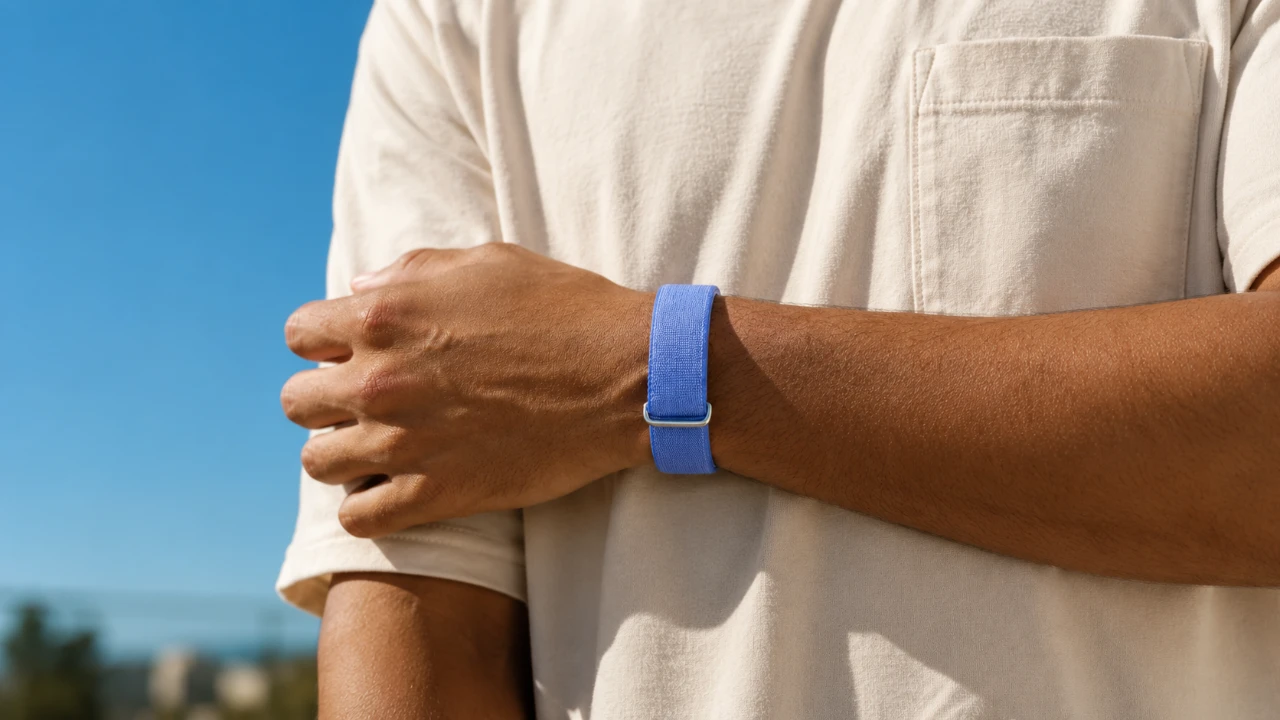
The Google Fitbit Air is not just a fitness tracker; it is a versatile tool designed to enhance your health and wellness journey. While its primary functions, such as step counting and sleep monitoring, are well-known, the device also offers a range of lesser-known features that can elevate your experience. By delving into these hidden capabilities, you can unlock the full potential of the Fitbit Air and customize it to suit your specific needs. The video below from HotshotTek gives us more details.

Customizing Vibration Alerts and Alarms
One of the more subtle yet impactful features of the Fitbit Air is its customizable vibration alerts. By default, the device is set to a low vibration intensity, but you can adjust this setting to make alerts more noticeable. This is particularly beneficial for alarms, as the “Smart Awake” feature uses your sleep cycle data to wake you during your lightest sleep phase. This ensures a smoother and more refreshed start to your day. The gentle vibrations are designed to wake you effectively without causing unnecessary disruption, making it an ideal choice for light sleepers or those sharing a room.
Optimizing Step Tracking and Wearable Placement
Step tracking is a cornerstone of the Fitbit Air’s functionality, but its accuracy can vary depending on how you wear the device. For most activities, wearing the tracker on your wrist ensures optimal performance, especially for sensors monitoring metrics like blood oxygen levels. However, for specific activities such as pushing a stroller or shopping cart, wearing the device on your ankle can yield more precise step counts. Understanding these nuances allows you to maximize the accuracy of your activity tracking and ensures that your fitness data reflects your true efforts.
Data Storage and Automatic Syncing
The Fitbit Air is equipped with the ability to store up to seven days of activity data, even when it is not synced to your smartphone. This feature is particularly useful during travel or times when syncing is inconvenient. Once reconnected, the device automatically updates the Fitbit app, making sure that your progress is seamlessly recorded. This automatic syncing capability eliminates the need for constant manual updates, allowing you to focus on your fitness goals without interruption.
Personalizing the Fitbit App Dashboard
The Fitbit app offers a customizable dashboard that allows you to prioritize the metrics most relevant to your health journey. Whether you want to focus on hydration tracking, activity zones, or detailed sleep data, the app enables you to rearrange or add widgets to suit your preferences. This level of personalization ensures that your most important health insights are always easily accessible, making it simpler to track your progress and stay motivated.
Exploring AI Coaching and Premium Insights
For users seeking advanced guidance, the Fitbit Air provides optional premium features, including AI-driven coaching and personalized recommendations based on your health and activity data. These tools are designed to help you optimize your fitness routines and achieve your goals more efficiently. While the premium subscription is not required for basic functionality, it can be a valuable resource for those looking to take their fitness journey to the next level. Free trials are often available, giving you the opportunity to explore these advanced features before committing to a subscription.
Seamless Cross-Platform Compatibility
The Fitbit Air is designed to work seamlessly with both iOS and Android devices, making it a versatile choice regardless of your smartphone preference. It integrates with platforms such as Apple Health and Google services, allowing cross-device tracking for a more comprehensive view of your health data. However, it is important to note that some features may vary depending on your operating system. Exploring how the Fitbit Air fits into your existing tech ecosystem can help you make the most of its capabilities.
Lightweight Design and Modular Customization
The Fitbit Air’s lightweight design ensures all-day comfort, making it suitable for both daytime activities and nighttime sleep tracking. Additionally, the device features a removable “pebble” component, which simplifies cleaning and allows for third-party band customization. This modular design not only enhances the device’s functionality but also enables you to personalize its appearance to match your style. Whether you prefer a sporty look or a more formal aesthetic, the Fitbit Air can adapt to your preferences.
Additional Tools for Holistic Health Monitoring
Beyond its fitness tracking capabilities, the Fitbit Air offers features that support a more comprehensive approach to health monitoring. For example, it includes menstrual cycle tracking, which provides a convenient way to consolidate health data in one place. While it may not replace dedicated apps for cycle tracking, this feature adds value for users seeking an all-in-one solution. Additionally, the Fitbit Air can complement other smartwatches, allowing you to combine data for a broader perspective on your fitness and sleep patterns. These tools make the Fitbit Air a versatile device for users aiming to monitor multiple aspects of their health.
Maximizing the Potential of the Fitbit Air
The Google Fitbit Air is a feature-rich device that goes far beyond basic fitness tracking. By customizing its settings, exploring its cross-platform compatibility and using its modular design, you can tailor the Fitbit Air to your lifestyle. Whether you are a casual user or a dedicated fitness enthusiast, these hidden functionalities make the Fitbit Air a powerful and adaptable tool for achieving your health and wellness goals.
Advance your skills in Fitness tracking by reading more of our detailed content.
- Apple’s Foldable Shock: The iPhone Ultra Fold Leak Reveals a Feature No One Saw Coming
- 5 AI Smart Glasses Launching Soon : Displays, Assistants, Fitness & More
- Apple Watch Ultra 4: Why 2026 Is Finally the Year for a Redesign
- 8 iPhone Settings You Need to Turn Off IMMEDIATELY!
- Samsung Finally Fixed the Fold: First Look at the Z Fold 8 Wide Design
Source: HotshotTek
Disclosure: Some of our articles include affiliate links. If you buy something through one of these links, Geeky Gadgets may earn an affiliate commission. Learn about our Disclosure Policy.
