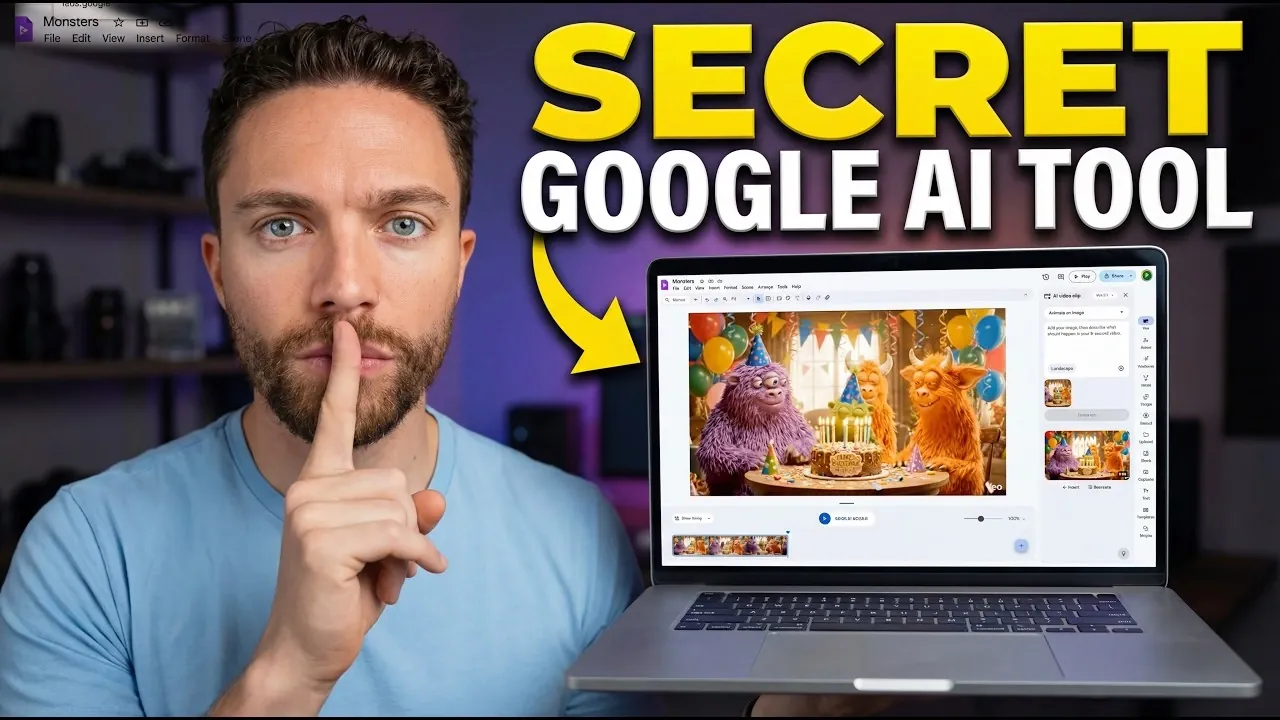
Google Vids is an AI-powered platform integrated into Google Workspace, designed to assist with video creation for users of varying experience levels. According to Paul Lipsky, one notable feature is its text-to-video generation, which uses VO3.1 technology to convert written scripts into video content. The free version allows up to 10 video creations per month, making it suitable for smaller-scale projects. Additional options, such as image animation and customizable aspect ratios, help users tailor their content for various platforms and audiences.
Discover features like scene transitions and timeline editing that support a more streamlined production process. Learn how to turn Google Slides into dynamic video presentations and explore pre-designed templates and voiceover settings that simplify content creation. This guide offers practical insights to help you navigate video production with more confidence and precision.
Key Features of Google Vids
TL;DR Key Takeaways :
- Google Vids is a free AI-powered video creation tool integrated into Google Workspace, allowing users to create professional-quality videos, animations and AI avatars without advanced editing skills.
- Key features include text-to-video generation, image animation, aspect ratio customization, scene transitions and timeline editing, making video production accessible and efficient.
- Paid subscriptions unlock advanced features like customizable AI avatars and personalized “ingredients,” catering to professionals in marketing, education and content creation.
- Standout functionalities include converting Google Slides into dynamic videos, script-based voiceovers and access to templates, stock media and AI-generated visuals for enhanced creativity.
- Export options and accessibility tools, such as captions and text overlays, ensure inclusivity and easy sharing across platforms like Google Drive and YouTube.
Google Vids is equipped with a range of tools designed to streamline and enhance the video creation process. Some of its most notable features include:
- Text-to-Video Generation: Powered by VO3.1 technology, this feature allows users to transform written scripts into engaging videos. The free version supports up to 10 video generations per month, making it an excellent choice for casual creators and small-scale projects.
- Image Animation: Users can animate existing images or create videos from scratch, offering flexibility for a variety of creative endeavors.
- Aspect Ratio Customization: Videos can be tailored to fit different platforms, whether in landscape, portrait, or square formats, making sure compatibility with diverse audiences.
- Scene Transitions and Timeline Editing: These tools allow for the seamless assembly of polished, cohesive videos, enhancing both the aesthetic and narrative flow.
These features make Google Vids a versatile tool for anyone looking to create visually compelling content with minimal effort.
Advanced Features for Paid Users
While the free version of Google Vids is highly functional, upgrading to a paid subscription unlocks advanced capabilities that elevate the creative experience. These premium features include:
- AI Avatars: Users can design customizable, lip-synced characters that bring scripts to life, adding a dynamic and interactive element to their videos.
- Customizable “Ingredients”: This feature allows for the integration of personalized images, objects, or other elements directly into videos, allowing creators to add unique touches to their projects.
These advanced tools are particularly beneficial for professionals in marketing, education and content creation who require distinctive and high-quality outputs.
Browse through more resources below from our in-depth content covering more areas on Google Workspace.
- Google Workspace CLI for AI Agents: Features, Setup & Limits
- GWS CLI Setup Guide: Node.js, Cloud CLI, APIs, and OAuth Clients
- Google Workspace now features Gemini AI assistant
- Google Stitch Leak : Gemini AI Design Agent & React Export
- Google AgentSpace Enhances Efficiency with AI Automation
- 7 Gemini Gems Use Cases : Save Hours With Custom AI Experts
- Google Slides Tutorial 2026: Create, Design & Share Slides
- Tips for Google Keep Labels, Colors, and Smarter Search Filters
- Best Ways to Run Projects with Google Workspace & Outside Tools
- Use Antigravity Agents for Coding, Research, and Email Tasks
Voiceover Integration
Voiceovers are a cornerstone of professional video production and Google Vids excels in this area. The platform enables users to generate script-based voiceovers using a variety of voice options, making sure that the audio complements the visual elements. These voiceovers integrate seamlessly into projects, enhancing both the engagement and overall quality of the final product. This feature is especially useful for creators aiming to produce polished, professional-grade videos.
Convert Google Slides into Videos
One of the standout features of Google Vids is its ability to transform Google Slides presentations into dynamic video content. This functionality is particularly valuable for educators, marketers and business professionals who rely on presentations to communicate ideas. By using AI, the tool generates scripts, voiceovers and background music, turning static slides into engaging videos. This feature not only saves time but also enhances the impact of presentations by making them more interactive and visually appealing.
Templates and Stock Media
To simplify the creative process, Google Vids offers a wide array of pre-designed templates that are easy to customize. These templates cater to various needs, from marketing campaigns to personal projects, allowing users to achieve a professional look with minimal effort. Additionally, the platform provides access to a comprehensive library of stock images, videos, music and stickers. These resources enable creators to enhance their videos with high-quality media, making sure that their content stands out.
AI Image Generation
Google Vids includes an AI-powered image creation feature that allows users to generate custom visuals tailored to their projects. With adjustable styles and aspect ratios, this tool is ideal for creating unique visuals that align with specific themes. Users can also modify existing image prompts to better suit their needs, making this feature a valuable asset for those seeking to add a personalized touch to their content.
Export Options and Accessibility Tools
Once a video is complete, Google Vids provides multiple export options to ensure that the content reaches its intended audience efficiently. Users can:
- Download videos directly to their devices for offline use.
- Export videos to Google Drive or upload them to YouTube for easy sharing.
The platform also includes accessibility tools such as captions and text overlays, which enhance the inclusivity and impact of videos. Additionally, users can record and upload personal videos to integrate into their projects, adding a human element that resonates with viewers.
Why Google Vids Stands Out
Google Vids distinguishes itself by providing widespread access to video creation, making professional-quality tools accessible to a broad audience. Its combination of text-to-video generation, AI avatars, voiceovers and Google Slides integration positions it as a versatile solution for various use cases. Whether you’re a casual creator experimenting with new ideas or a professional seeking efficient and innovative tools, Google Vids provides the resources needed to bring your vision to life. By blending simplicity with advanced functionality, it enables users to produce high-quality multimedia content with confidence and ease.
Media Credit: Paul J Lipsky
Disclosure: Some of our articles include affiliate links. If you buy something through one of these links, Geeky Gadgets may earn an affiliate commission. Learn about our Disclosure Policy.
