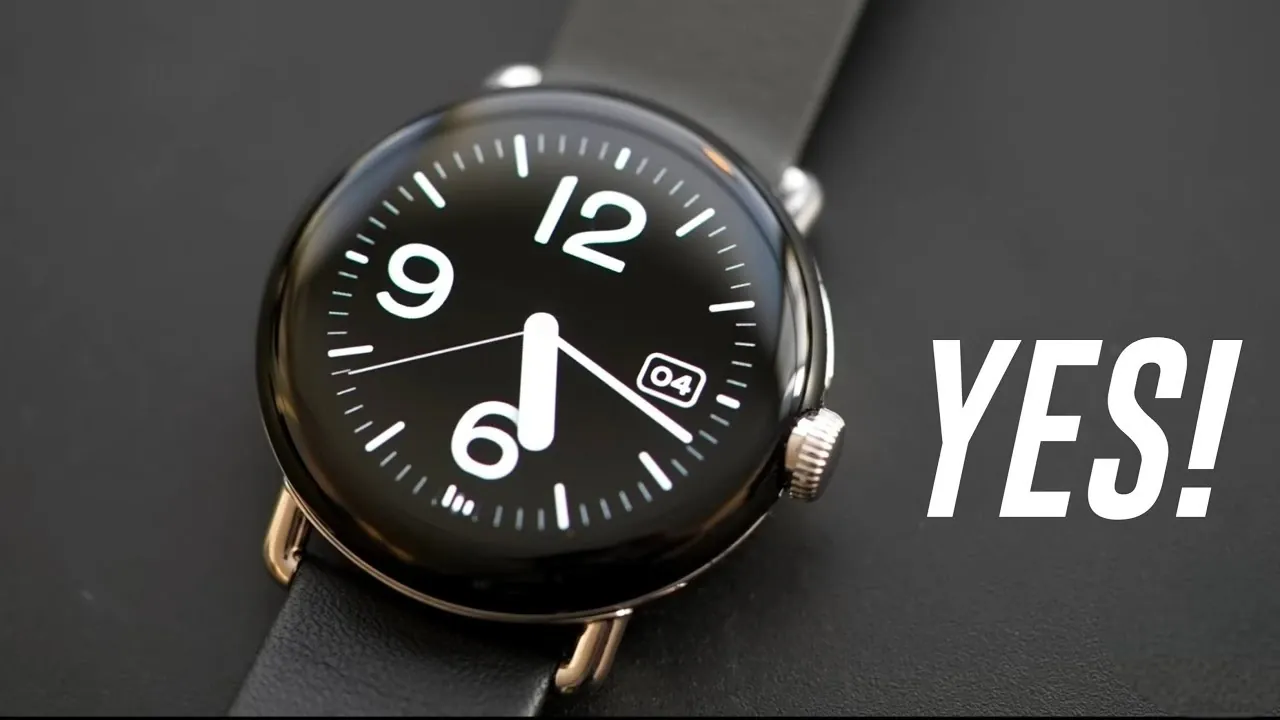
The Google Pixel Watch 5 is set to expand upon the foundation laid by its predecessor, emphasizing practical enhancements over dramatic changes. Leaked renders reveal that Google is focusing on improving software capabilities and AI integration, rather than pursuing a radical hardware redesign. This approach reflects a strategic decision to prioritize user experience and functionality, making sure the smartwatch remains a reliable and intuitive device for its audience.

Design: Familiarity Meets Functionality
The Pixel Watch 5 retains the core design elements of the Pixel Watch 4, offering a sense of continuity for returning users. While some may have anticipated a bold new look, Google has opted to refine its existing design language. Key features include:
- The familiar contact pins-based charging system, making sure compatibility with previous accessories.
- A consistent health sensor layout that supports reliable wellness tracking.
- An interchangeable band mechanism, allowing users to personalize their watch with ease.
The rotating crown and side button remain in their established positions, providing a seamless transition for those upgrading from earlier models. The curved cover glass and slim bezels continue to define the watch’s minimalist aesthetic, reinforcing its recognizable identity.
This design consistency ensures that users can continue to use their existing watch bands and accessories, reducing the need for additional purchases. While some may view this as a conservative approach, it highlights Google’s commitment to creating a cohesive and user-friendly ecosystem.
Software and AI: Advancing Everyday Usability
The Pixel Watch 5’s most significant advancements lie in its software and AI capabilities, powered by Wear OS Gemini. These enhancements aim to simplify daily tasks, improve personalization and deliver a more intuitive user experience.
Notable software features include:
- Multi-step app automation: This feature allows users to streamline their routines by creating custom task sequences. For instance, you can set up a command that simultaneously launches a fitness app, adjusts your music playlist and activates health tracking, all with a single tap.
- Customizable widgets: The “create my widget” tool enables users to design personalized widgets, tailoring their watch face to suit specific needs and preferences.
- Neural expressive wallpaper: Borrowed from other Google devices, this dynamic feature adapts to your activities and preferences, adding a visually engaging and personalized touch to the watch interface.
These updates reflect Google’s focus on delivering a smarter, more adaptable smartwatch, making sure the Pixel Watch 5 stands out in a competitive market. By integrating AI-driven features, the device becomes a practical tool for managing both personal and professional tasks.
Health Sensors: Reliable Wellness Tracking
Health tracking remains a cornerstone of the Pixel Watch 5, with the device maintaining the same sensor layout as its predecessor. While no new sensors have been introduced, the existing suite continues to support essential wellness features, including:
- Heart rate monitoring for real-time insights into cardiovascular health.
- Sleep tracking to help users optimize their rest patterns.
- Activity detection for monitoring workouts and daily movement.
Although some users may have hoped for the addition of new sensor technologies, Google’s decision to focus on refining existing features ensures consistent and reliable performance. This approach aligns with the broader strategy of delivering incremental improvements that enhance the overall user experience.
Charging and Durability: Practical Choices
The Pixel Watch 5 continues to use the contact-pin-based charging system found in previous models. While many competitors are adopting wireless charging solutions, Google’s decision to retain this method likely reflects a desire to maintain compatibility with existing accessories and reduce production costs.
Durability details have not yet been confirmed, but the design’s continuity suggests that the Pixel Watch 5 will offer similar resilience to its predecessor. This makes it a dependable choice for everyday wear, balancing practicality with performance.
Customization and Accessibility
Personalization remains a key strength of the Pixel Watch series, and the Pixel Watch 5 is no exception. The interchangeable band mechanism allows users to easily swap out straps, allowing them to match their watch to their style or activity.
Additionally, the intuitive software interface, combined with the rotating crown, ensures effortless navigation. These features make the Pixel Watch 5 both accessible and adaptable, catering to a wide range of user preferences and needs.
The new software enhancements further enhance this adaptability, allowing users to create a smartwatch experience that feels uniquely tailored to them. Whether you’re customizing widgets or automating daily tasks, the Pixel Watch 5 offers a level of personalization that sets it apart.
Refinement Over Reinvention
The Google Pixel Watch 5 represents a deliberate evolution of the Pixel Watch series, focusing on refinement rather than reinvention. By maintaining the familiar design of the Pixel Watch 4, Google ensures a smooth transition for existing users while introducing meaningful software and AI advancements.
Whether you’re drawn to the new app automation capabilities, customizable widgets, or the dynamic neural expressive wallpaper, the Pixel Watch 5 delivers a compelling blend of continuity and innovation. Available in 41-mm and 45-mm sizes, it caters to diverse preferences, solidifying its position as a versatile and user-focused smartwatch.
Browse through more resources below from our in-depth content covering more areas on Google Pixel Watch 5.
- Pixel Watch 5 Reportedly Focuses on AI Over Fixing Battery Life
- Google Pixel Watch 5 Specs Have Reportedly Leaked Online
- Google Pixel Watch 5 Launches August 12 with 3 GB of RAM?
- Google Pixel Watch 5 Leak Points to a $399 Starting Price
- Face-Off: Samsung Galaxy Watch Ultra 2 vs Watch Ultra 1
Source & Image Credit: Demon’s Tech
Disclosure: Some of our articles include affiliate links. If you buy something through one of these links, Geeky Gadgets may earn an affiliate commission. Learn about our Disclosure Policy.
