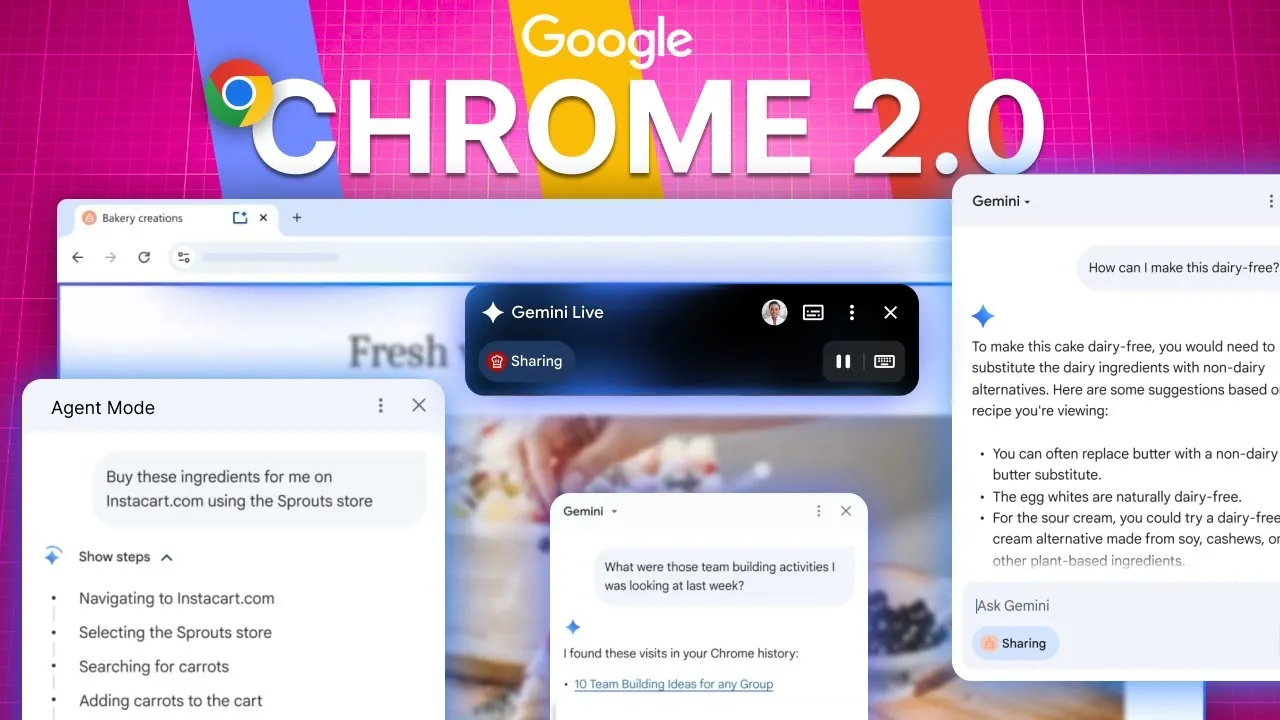
What if your browser could do more than just open websites? Imagine a tool that not only helps you navigate the web but also acts as your personal assistant, summarizing dense articles, automating tedious tasks, and even predicting what you need before you ask. With the release of Google Chrome 2.0, this vision is no longer hypothetical. Powered by the innovative Gemini AI, Chrome has transformed into a dynamic, AI-driven platform that redefines what it means to browse the internet. This isn’t just an upgrade; it’s a bold leap into the future of productivity and intelligent technology.
In this overview, AISeeKing explore how Chrome’s agentic features and AI-powered tools are reshaping the way users interact with the web. From automating everyday tasks like booking appointments to offering context-aware assistance across multiple tabs, Chrome’s latest update promises to save time while enhancing efficiency. But it doesn’t stop there, this new era of browsing also comes with deeper integration into Google’s ecosystem, seamless multitasking capabilities, and a renewed focus on privacy and security. Whether you’re a professional juggling deadlines or a curious learner diving into complex topics, Chrome 2.0 offers a smarter, more intuitive way to navigate the digital world. Could this be the future of browsing we’ve all been waiting for?
Chrome’s AI-Powered Evolution
TL;DR Key Takeaways :
- Google Chrome now integrates advanced AI capabilities through Gemini AI, offering features like content summarization, jargon simplification, and context-aware assistance for a smarter browsing experience.
- New agentic features automate repetitive tasks such as booking appointments and filling forms, while maintaining user control over the process.
- Chrome enhances productivity with seamless integration into Google’s ecosystem, allowing tasks like adding events to Calendar, navigating Maps, and skipping to relevant YouTube sections directly within the browser.
- The AI-powered Omnibox provides contextual search suggestions and follow-up questions, streamlining research and troubleshooting for professionals and casual users alike.
- Google addresses privacy and security concerns with customizable settings and enterprise-grade protections, making sure users can balance innovation with data safety.
Gemini AI: Transforming the Browsing Experience
The integration of Gemini AI introduces a smarter, more intuitive browsing experience. This AI system is capable of summarizing dense content, explaining complex terms, and offering clarity directly within the browser. For instance, if you are reading a technical article, Gemini can generate a concise summary or break down jargon into simpler, more digestible explanations.
One of Gemini’s standout features is its context-aware assistance across multiple tabs. If you are conducting research and switching between pages, the AI can recall your browsing history and provide insights through natural language queries. This eliminates the need to manually sift through tabs, saving valuable time and effort. Whether you’re a student, a professional, or simply a curious reader, Gemini’s ability to adapt to your needs ensures a seamless and efficient browsing experience.
Agentic Features: Automating Everyday Tasks
Chrome’s new agentic features elevate automation to an unprecedented level, handling repetitive tasks such as booking appointments, filling out forms, or navigating websites. For example, if you are planning a trip, Chrome can search for flights, compare prices, and even complete the booking process based on your preferences.
Despite this high level of automation, you retain full control. You can pause, modify, or stop these processes at any time, making sure that while Chrome works to save you time, the final decisions remain in your hands. This balance between automation and user control makes Chrome an invaluable tool for managing both personal and professional tasks efficiently.
Google Chrome 2.0 Features

Take a look at other insightful guides from our broad collection that might capture your interest in AI browsers.
- Perplexity Comet AI Browser : Features, Pros and Cons
- Perplexity AI Comet Browser Review: Features, Pros and Cons
- Perplexity Comet AI Browser : The Future of Web Browsing?
- The Future of Browsing : AI Tools That Analyze Your Online Activity
- Perplexity Comet AI Browser Can Run Your Online Life
- Opera One browser features native AI called Aria
- How Google’s AI Browser Agent Handles Complex Web Tasks
- Grok 4 vs ChatGPT : Advanced AI Reasoning Tested Hands On
- Gemini 2.5 Pro AI Browser Automation for Online Productivity
- Google Gemini 2.0 Release Date & New OpenAI Browser
Seamless Integration with Google’s Ecosystem
A key highlight of this update is Chrome’s deeper integration with Google’s suite of applications, including Gmail, Calendar, YouTube, and Maps. This connectivity allows users to perform tasks directly within the browser, eliminating the need to switch between apps and enhancing overall productivity. For example:
- Receive an email about an event? Chrome can automatically add it to your Google Calendar with a single click.
- Watching a YouTube tutorial? AI tools can help you skip to the most relevant sections, saving time and effort.
- Need directions? Chrome can pull up routes in Google Maps without requiring you to leave your current tab.
This seamless interaction between Chrome and Google’s ecosystem ensures a cohesive and efficient user experience, making it easier to manage tasks and access information.
AI-Powered Search and Enhanced Page Assistance
Chrome’s Omnibox, or address bar, now incorporates AI-powered search capabilities that provide contextual suggestions and follow-up questions based on the content you are viewing. Whether you are troubleshooting a technical issue, conducting research, or simply exploring a topic, the AI can guide you to the most relevant information.
For instance, if you are reading software documentation, the Omnibox might suggest related articles or even answer specific questions about the tool’s functionality. This feature is particularly beneficial for professionals navigating complex or unfamiliar material, as it reduces the time spent searching for supplementary information and enhances overall productivity.
Balancing Innovation with Privacy and Security
While these AI-driven features offer significant benefits, they also raise important questions about privacy and data security. Google has implemented enterprise-grade protections for businesses using Chrome through Google Workspace, making sure that sensitive information is safeguarded against potential threats.
However, features like browsing history recall and context-aware assistance require data processing, which may be a concern for privacy-conscious users. To address this, Chrome includes customizable privacy settings that allow you to control how your data is used. By reviewing and adjusting these settings, you can make informed decisions about allowing or disabling specific features, making sure that your browsing experience aligns with your privacy preferences.
Chrome’s Competitive Edge and Future Prospects
Google’s commitment to innovation is evident in its plans to expand Chrome’s agentic browsing capabilities with future updates. These developments aim to refine and enhance the browser’s AI tools, solidifying Chrome’s position as a leader in AI-powered browsing. By using Google’s extensive ecosystem, Chrome offers a comprehensive solution that appeals to both individual users and enterprises.
Competing browsers like Comet, DIA, and ArkMax will need to innovate rapidly to keep pace with Chrome’s advancements. With its ability to integrate AI directly into the browser and align it with Google’s services, Chrome sets a new standard for convenience, efficiency, and intelligent technology in web browsing.
As Chrome continues to evolve, it is poised to remain at the forefront of the industry, offering users a browsing experience that is not only smarter but also more secure and user-centric.
Media Credit: AISeeKing
Disclosure: Some of our articles include affiliate links. If you buy something through one of these links, Geeky Gadgets may earn an affiliate commission. Learn about our Disclosure Policy.
