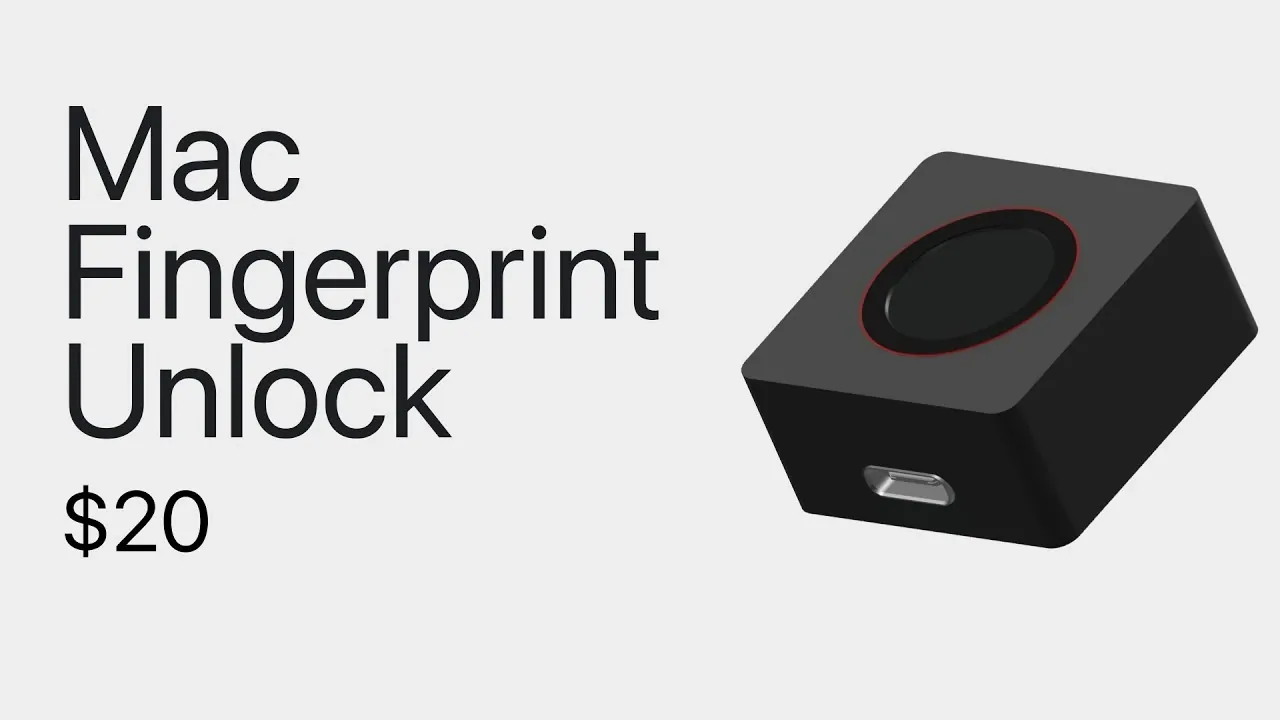
Apple’s Touch ID has become a recognizable feature for biometric authentication, but its use has largely been confined to devices with built-in hardware. Alpaca Engineering introduces a standalone Touch ID device that functions independently from Apple’s integrated systems. Unlike the Magic Keyboard with Touch ID, this device connects as a separate unit and uses smart card emulation to integrate with macOS authentication protocols. This approach ensures that fingerprint data is securely handled during cryptographic exchanges, while offering compatibility across different desktop setups.
Explore how this device employs smart card emulation to interact with macOS, the cryptographic processes that protect sensitive data and the challenges posed by its reliance on unencrypted communication. Gain insight into its practical applications, including its potential for personal use or controlled environments and assess its strengths and limitations to determine its suitability for your security requirements.
A Standalone Touch ID Solution
TL;DR Key Takeaways :
- The custom desktop Touch ID device operates as a standalone biometric authentication tool, offering convenience and security without requiring modifications to existing hardware.
- It uses smart card emulation and cryptographic key exchange to ensure secure communication with a Mac, protecting sensitive fingerprint data during authentication.
- The device is highly adaptable, functioning independently of proprietary hardware configurations, making it suitable for various desktop setups.
- Security concerns include its reliance on an unencrypted UART protocol, which poses risks of data interception and physical tampering in unsecured environments.
- Best suited for controlled environments with low physical security risks, the device balances ease of use and security but may not be ideal for high-security applications.
This custom desktop Touch ID device is specifically designed for desktop environments, offering a practical alternative to Apple’s built-in solutions. By functioning as a standalone tool, it allows you to authenticate your identity without altering or replacing existing hardware. Its design emphasizes simplicity and ease of use, making it an attractive option for users seeking a straightforward biometric security solution.
The device’s independence from integrated systems means it can be used across different setups without requiring technical modifications. This flexibility makes it particularly appealing to users who value adaptability and prefer not to be tied to proprietary hardware configurations.
How Smart Card Emulation Enhances Security
At the core of this device’s functionality is its ability to emulate a smart card, a feature that enables secure communication with your Mac. This emulation process is key to its seamless integration with existing authentication protocols. Here’s how it works:
- When connected to a Mac, the device initiates a cryptographic exchange to verify your identity.
- The Mac sends a challenge to the device, which responds with a signed cryptographic key.
- This ensures that sensitive fingerprint data is never exposed during the exchange.
By mimicking a smart card, the device offers a familiar and reliable user experience while maintaining a high level of security. This approach ensures compatibility with existing systems, making it a versatile option for desktop users.

Explore further guides and articles from our vast library that you may find relevant to your interests in Touch ID.
- Apple Watch Ultra 4 to Feature Biometric Unlocking via Action Button
- Apple Watch Series 12: Why Touch ID is Finally Coming to Your Wrist in 2026
- 27 Hidden iOS 27 Features Apple Didn’t Tell You About
- iPad 11 vs. iPad 10: Is the New Model Worth the Upgrade?
- Apple Just Dropped iOS 26.6 Beta 1: Here is What Changed
- Why Apple’s iPhone Ultra Fold Might Beat Samsung
- iPhone Fold Specs Leaked: 5,500mAh Battery, Touch ID, and A20 Pro Chip
- Apple’s iPhone Fold Finally Solves the Crease: New 7.8-Inch Display Revealed
- The iPhone Fold Leaks Are Wild: See the 10 Craziest Rumors About Apple’s First Foldable
- The Crease is Gone: New Leaks Reveal Apple’s Secret to a Seamless iPhone Fold
The Authentication Process: A Secure Workflow
The device’s authentication process relies on cryptographic key exchange, a widely trusted method for securing sensitive data. The step-by-step process ensures that only authorized users can gain access:
- The Mac sends a challenge to the device, requesting proof of authenticity.
- The device generates a unique response using its embedded cryptographic keys.
- The Mac verifies this response, confirming both the device’s authenticity and the user’s fingerprint.
This process not only protects your data but also ensures that the fingerprint authentication remains secure and tamper-proof. By using cryptographic security, the device minimizes the risk of unauthorized access.
Security Concerns: Strengths and Limitations
While the device offers robust biometric authentication, it is not without its vulnerabilities. One notable concern is its reliance on an unencrypted UART (Universal Asynchronous Receiver-Transmitter) protocol for communication. This introduces certain risks:
- If an attacker gains physical access to the device, they could intercept or manipulate the data being transmitted.
- The lack of encryption makes the device susceptible to physical tampering, particularly in environments where physical security cannot be guaranteed.
These limitations highlight the importance of understanding the device’s intended use cases. It is best suited for controlled environments where the risk of physical interference is minimal. In high-security settings, however, these vulnerabilities may outweigh the device’s benefits.
Ideal Use Cases for the Device
The custom desktop Touch ID device is most effective in scenarios where convenience is a priority and physical security risks are low. Examples of suitable use cases include:
- Personal use in a home office or other controlled spaces where access is restricted.
- Environments where the device can be physically secured to prevent tampering.
In contrast, high-security environments that require robust protection against physical attacks may demand alternative solutions with stronger safeguards. Evaluating your specific security needs is crucial when deciding whether this device is the right fit for your setup.
Convenience vs Security: Striking the Right Balance
This custom desktop Touch ID device underscores the ongoing trade-off between convenience and security in biometric authentication. On one hand, it provides a simple and user-friendly way to authenticate your identity, making it an appealing choice for users in low-risk environments. On the other hand, its reliance on an unencrypted communication protocol introduces potential vulnerabilities that may not be acceptable in high-security settings.
For users who prioritize ease of use and operate in controlled environments, this device offers a practical and efficient solution. However, for those requiring higher levels of security, alternative options with more robust protections may be necessary. Understanding these trade-offs is essential to making an informed decision that aligns with your specific needs and priorities.
Media Credit: Alpaca Engineering
Disclosure: Some of our articles include affiliate links. If you buy something through one of these links, Geeky Gadgets may earn an affiliate commission. Learn about our Disclosure Policy.
