If you need to convert files on a daily all weekly basis you might be interested in a new GPT that has been created and aptly named the ConvertAnything GPT. Enabling you to quickly and conveniently convert any file into another format within the ChatGPT AI user interface. In today’s digital age, the ability to convert and manipulate files is a crucial skill. Whether you’re a graphic designer converting PNG images to JPEGs, a music lover extracting MP3s from videos, or a business analyst extracting data from PDFs, file conversion technology is a vital tool.
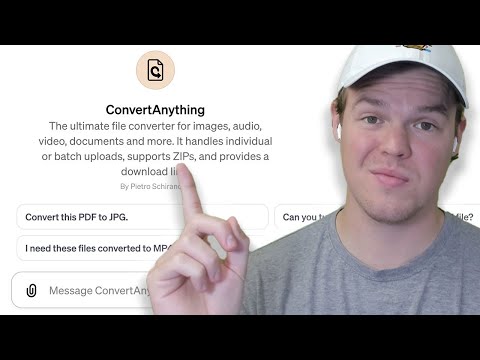
This guide provides an overview of the ConvertAnything GPT providing inspiration for those of you that are already considering or possibly building your GPTs to selling the GPT Store when it is soon launched by OpenAI. The ConvertAnything GPT has been created by Pietro Schirano and has been designed to be the ultimate file converter for images, audio, video, documents and more.
It handles individual or batch uploads, supports ZIPs, and provides a download link. File conversion technology encompasses a variety of tools designed to convert files from one format to another. For instance, Pitro’s AI file conversion tool is a versatile application that can convert files into different formats such as JPEGs and PNGs. It also has the ability to compress a whole folder of files, making it a valuable tool for managing large data volumes.
ConvertAnything GPT app
Although some file extensions might not be supported at the current time you can expect OpenAI and the GPT developer to expand its functionality as time goes on.
Other articles we have written that you may find of interest on the subject of using and making your very own OpenAI GPT AI applications:
- How to add custom GPTs to any website
- How to make GPTs using ChatGPT in minutes – Beginners Guide
- Combining GPTs and Zapier to create AI automated workflows
- How to build custom GPTs for no-code AI automation
- Learn about Data Science using this custom GPT
- ChatGPT glossary
- How to customize the new GPT models
- How to use ChatGPT to write code
- Things to consider before creating a custom GPT for best results
- How to use ChatGPT to write an Essay complete guide
Convert files into another format for free in one app
JPEG and PNG Conversion
JPEG and PNG are two of the most common image file formats. JPEG is known for its ability to compress images without significant quality loss, while PNG is popular for its support of transparent backgrounds. Pitro’s AI file conversion tool can easily convert images between these two formats, making it a vital tool for graphic designers and photographers.
Extracting MP3 from Video
In addition to image conversion, Pitro’s AI file conversion tool can also extract audio from video files. This feature is especially useful for music lovers who want to extract MP3s from music videos or concert recordings.
PDF to CSV Conversion
For business analysts and data scientists, converting PDF files to CSV is crucial. CSV files are easier to manipulate and analyze, making them a preferred format for data analysis. However, the ConvertAnything GPT File compression technology, another key feature of Pitro’s file AI file conversion tool, can compress an entire folder of files, reducing their size and making them easier to store and share. This is particularly useful when dealing with large data volumes or when storage space is limited.
What are GPTs
OpenAI’s GPTs, as detailed in the provided information, represent an advancement in the ChatGPT platform, allowing for the creation of custom versions of ChatGPT tailored for specific purposes. These customized models, named GPTs, are designed to be versatile and user-friendly, enabling individuals and organizations to build versions of ChatGPT that are more aligned with their specific needs and use cases. Key Features of OpenAI GPTs include :
- Customization for Specific Needs: GPTs can be customized to aid in a variety of tasks, such as learning board game rules, assisting with educational subjects, or creating designs. This customization is aimed at making ChatGPT more applicable and helpful in everyday life, work, or home environments.
- No Coding Required: Building a GPT does not require coding skills, making it accessible to a wider audience. Users can create a GPT by simply starting a conversation, providing instructions, and choosing its capabilities.
- Versatile Applications: GPTs can be equipped with different skills, such as web searching, image generation, or data analysis, expanding their utility beyond just text generation.
- Sharing and Accessibility: Users can create GPTs for personal use, internal company use, or public sharing. The upcoming GPT Store will feature GPTs created by verified builders, allowing users to discover and utilize various GPTs for different purposes.
- Community Involvement: The platform encourages community involvement, where users from various backgrounds, like educators or enthusiasts, can contribute by building and sharing their GPTs.
- Privacy and Safety Considerations: OpenAI emphasizes privacy and safety in GPTs. User interactions with GPTs are kept private, and builders have control over whether user chats can be used for model improvement. There are systems in place to review GPTs against usage policies to prevent the spread of harmful content.
- Real-World Connectivity: Developers can integrate GPTs with real-world systems through custom actions and API integrations, allowing GPTs to interact with databases, emails, or even e-commerce platforms.
- Enterprise Solutions: For enterprise users, there are options to create internal-only GPTs, which can be tailored to specific business needs and securely published within their workspace.
OpenAI’s GPTs represent a significant evolution in the ChatGPT platform, offering customizable, versatile, and accessible AI tools that can be tailored to a wide range of specific applications, enhancing the utility and reach of AI in various domains.
AI GPT file conversion tools
While file AI file conversion tools like Pitro’s are incredibly useful, they do have their limitations. As noted earlier, Pitro’s tool struggles when converting PDF files to CSV. This highlights the need for ongoing development and improvement in file conversion technology Within the ChatGPT AI model. File conversion technology, including tools like ConvertAnything GPT, offers a wide range of capabilities, from converting images and extracting audio from videos to compressing files.
However, these tools also have their limitations, especially when it comes to converting complex file types like PDFs. At the same time, AI technologies like chatbots and avatars are adding a new layer to digital interactions. As these technologies continue to evolve and mature, they will undoubtedly play an increasingly important role in our digital lives.
Disclosure: Some of our articles include affiliate links. If you buy something through one of these links, Geeky Gadgets may earn an affiliate commission. Learn about our Disclosure Policy.
