
Adam Podstawczynski has created an innovative Arduino-powered project that emulates a Commodore 64 keyboard on a modern PC. This project allows keystrokes to be translated into character inputs on a C64, bridging the gap between vintage computing and contemporary technology.
Project Overview and Functionality
The project operates by running a Python script on a PC, Mac, or Linux computer. This script maps the Commodore 64 keys to a series of binary digits, effectively translating modern keystrokes into the language understood by the C64. This is particularly useful for enthusiasts and developers who want to experience the nostalgic feel of using a Commodore 64 keyboard without the need for the original hardware.
An Arduino Mega-development board is at the heart of this project. It receives data sent to it via USB and uses an MT8088 crosspoint switch to interface with the mainboard of a C64. This setup allows for hardware keyboard emulation, making it possible to use a modern keyboard to input commands and characters into the Commodore 64 system.
Technical Details and Implementation
The Arduino Mega-development board is a powerful microcontroller board based on the ATmega2560. It has 54 digital input/output pins, 16 analog inputs, and a large number of communication ports, making it ideal for complex projects like this one. The MT8088 crosspoint switch is a crucial component that enables the Arduino to communicate with the C64 mainboard, ensuring accurate emulation of the keyboard.
To get a better understanding of how this project works, you can watch the video below. It provides a detailed explanation of the setup and demonstrates the keyboard emulation in action.

In addition to the primary video, another video is available that delves deeper into the technical aspects and showcases more examples of the keyboard emulation.
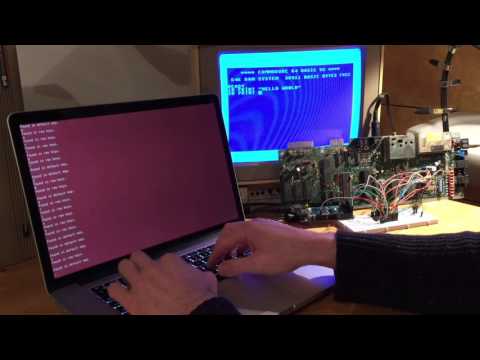
This project is a testament to the versatility and power of Arduino boards. By leveraging the capabilities of the Arduino Mega and the MT8088 crosspoint switch, Adam Podstawczynski has successfully created a bridge between old and new technology. This not only preserves the legacy of the Commodore 64 but also provides a practical solution for modern users who wish to interact with vintage systems.
For more details on the Arduino project, you can visit the official Podstawczynski’s project website via the link below. This site offers comprehensive information, including the source code, schematics, and step-by-step instructions for replicating the project.
Source: AB
Disclosure: Some of our articles include affiliate links. If you buy something through one of these links, Geeky Gadgets may earn an affiliate commission. Learn about our Disclosure Policy.
