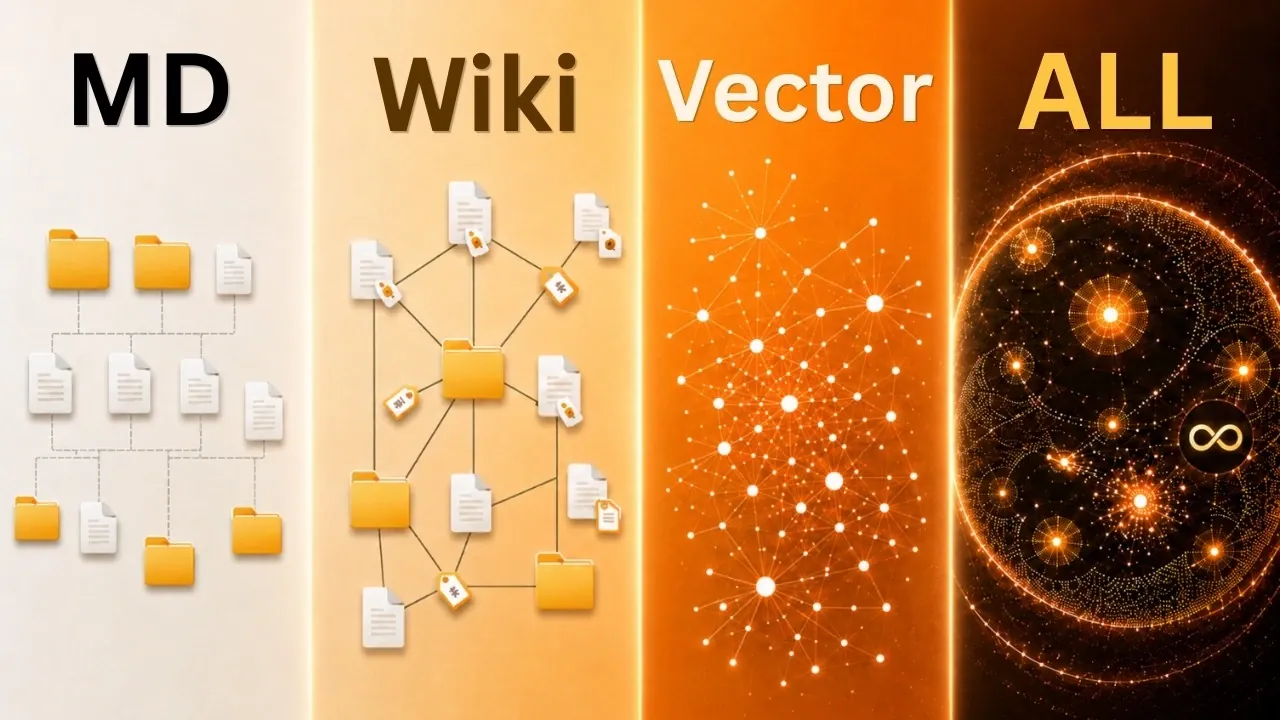
An AI-powered “second brain” offers a structured way to manage and retrieve information, acting as an extension of your memory and organizational systems. In his breakdown, Nate Herk explores the five levels of development for a Claude second brain, starting with basic file and folder organization and advancing to fully autonomous systems. Each level builds on the last, incorporating features like wikis for context, semantic search powered by vector databases and knowledge graphs for uncovering deeper insights. These stages collectively enable users to offload mental tasks, streamline workflows and focus on higher-value activities.
This guide will help you understand how to implement and optimize a second brain tailored to your needs. Explore how semantic search enhances data retrieval by focusing on meaning rather than keywords and learn how knowledge graphs can reveal patterns and relationships in complex datasets. You’ll also gain insight into best practices for maintaining an efficient system, such as balancing evergreen and transient data or designing intuitive folder structures. Whether you’re managing personal projects or team workflows, this overview provides actionable steps to build a second brain that works seamlessly with your goals.
What is the Purpose of a Second Brain?
TL;DR Key Takeaways :
- An AI-powered “second brain” serves as a centralized hub for managing and organizing data, reducing cognitive load and improving productivity by offloading mental tasks to AI.
- The development of a Claude second brain progresses through five levels: basic file organization, wikis for context, semantic search with vector databases, knowledge graphs for insights and fully autonomous systems.
- Key tools include Markdown files, wikis, vector databases, knowledge graphs and data extraction techniques, all working together to create an efficient and adaptable system.
- Challenges include avoiding data overload and maintaining relevance, with best practices emphasizing regular updates, workflow alignment and exploring privacy-conscious AI options.
- For teams, successful implementation requires alignment, consistent processes and a focus on practical benefits to enhance collaboration and productivity across organizations.
An AI second brain serves as a centralized hub for storing and managing your data. It organizes notes, meeting recordings and other critical information in a way that makes it both accessible and actionable. The primary objective is to reduce cognitive load by allowing AI to process and retrieve information efficiently. This system enables you to focus on higher-value tasks while the AI handles the details, improving productivity and decision-making. By acting as an extension of your memory, a second brain ensures that important information is always within reach.
The Five Levels of Development
Building a Claude second brain involves progressing through five distinct levels, each offering enhanced capabilities and functionality. These levels are designed to gradually expand the system’s ability to manage and use data effectively.
- Level 1: Basic File and Folder Organization
The foundation of a second brain begins with a well-structured file and folder system. At this stage, the focus is on creating a logical hierarchy that ensures data is easy to locate and retrieve. Data routing rules are established to help the AI quickly identify specific information. Simplicity and accessibility are key priorities, laying the groundwork for more advanced capabilities. - Level 2: Wikis for Data Context
The second level introduces wikis, which act as an index to group related data and provide context. Wikis create an interconnected knowledge base by linking concepts and organizing information in a structured framework. This helps the AI understand relationships between different pieces of data, making it easier to navigate and retrieve relevant information. - Level 3: Semantic Search with Vector Databases
At this stage, vector databases enable semantic search capabilities. Unlike traditional keyword-based searches, semantic search retrieves information based on meaning and context. This significantly improves the relevance of search results, allowing you to find what you need more efficiently. The system becomes smarter and more intuitive, adapting to your specific needs. - Level 4: Knowledge Graphs for Deeper Insights
Knowledge graphs are introduced to map relationships between entities and concepts. By visualizing these connections, the AI can uncover patterns and provide deeper insights. This level is particularly valuable for complex data analysis, allowing you to make informed decisions based on a comprehensive understanding of the information. - Level 5: Fully Autonomous Systems
The final level involves fully autonomous systems, such as Gbrain, that continuously sync, update and manage data. These systems operate independently, making sure your second brain remains optimized and up-to-date without requiring constant manual input. At this stage, the AI becomes a seamless extension of your workflows, handling tasks with minimal intervention.

Here are more guides from our previous articles and guides related to Claude AI that you may find helpful.
- Claude AI Cheat Sheet : The Shortcuts Everyone Should Know
- How Claude is Quietly Automating Complex Video Editing Workflows
- Claude’s Most Powerful Features : Beginners Guide 2026
- How Paperclip Turns Claude Code Into an Entire Automated AI Company
- New Claude Feature Automates Your Tasks While You Sleep
- Meet AutoDream : Claude Code’s Clever New Trick for Memory Management
- Claude Opus 4.7 Leaks & Anthropic’s Full-Stack AI Studio
- Get Certified in AI for Free: Anthropic Launches Massive New Academy
- Skip the Learning Curve : Master Building with Claude Code Quickly
- Stop Using Claude Like a Beginner: Every Skill Level Explained
Key Considerations for Building a Second Brain
Creating an effective second brain requires careful planning and customization. Begin by defining your specific goals and reverse-engineer the system’s structure to meet those objectives. It’s important to avoid overcomplicating the system by striving for advanced features that may not align with your needs. Key considerations include:
- Balancing evergreen data (long-term relevance) with transient data (short-term use).
- Designing a clear and logical folder architecture to assist efficient AI interaction.
- Establishing data routing rules that are intuitive and easy to follow.
By tailoring the system to your workflows, you can maximize its utility and ensure it supports your objectives effectively.
Essential Tools and Techniques
Several tools and techniques play a crucial role in building a Claude second brain. These include:
- Markdown Files: These are simple, lightweight and compatible, making them ideal for storing and organizing text-based data.
- Wikis: Provide a structured framework for indexing and grouping related data, enhancing organization and accessibility.
- Vector Databases: Enable semantic search, allowing the AI to retrieve information based on meaning rather than exact matches.
- Knowledge Graphs: Map relationships between entities, offering deeper insights and a more comprehensive understanding of data.
- Data Extraction Skills: Techniques like “Grill Me” help structure and extract data systematically, making sure accuracy and relevance.
These tools work together to create a robust and efficient second brain that adapts to your specific needs.
Challenges and Best Practices
While the benefits of an AI second brain are substantial, there are challenges to address. Overloading the system with unnecessary or irrelevant data can hinder its efficiency. To maintain optimal performance, it’s essential to control what data is ingested and ensure it aligns with your goals. Best practices include:
- Regularly reviewing and updating your data to keep it relevant and organized.
- Adapting the system to fit your workflows rather than imposing rigid structures.
- Exploring local or open source AI alternatives to address privacy and security concerns.
By following these practices, you can optimize your second brain for maximum effectiveness and ensure it remains a valuable tool.
Implementing a Second Brain Across Teams
For organizations, implementing a second brain requires team alignment and consistent processes. Encourage team members to adopt habits that ensure data is updated and used effectively. Change management is critical, focus on demonstrating the system’s practical benefits rather than emphasizing its technical features. A well-integrated second brain can enhance collaboration, improve productivity and serve as a valuable asset for any team. By fostering a culture of organization and efficiency, teams can unlock the full potential of this innovative system.
Media Credit: Nate Herk | AI Automation
Disclosure: Some of our articles include affiliate links. If you buy something through one of these links, Geeky Gadgets may earn an affiliate commission. Learn about our Disclosure Policy.
