
What if your AI assistant could remember your preferences, projects, and conversations, just like a trusted colleague? With the rollout of Claude’s new Memory feature to all paid subscribers Pro and Max users, this vision is now a reality. Imagine never having to re-explain your goals or reintroduce your work context during every session. Whether you’re managing a complex marketing campaign, drafting a research paper, or collaborating on a design project, Claude’s ability to retain and recall information transforms it from a helpful tool into a true partner in productivity. This isn’t just an upgrade; it’s a redefinition of how we interact with AI.
In this deep dive, we’ll explore how Claude’s context-aware memory is reshaping workflows across industries. From its seamless integration with tools like Google Workspace and Figma to its robust privacy controls, this feature is designed to adapt to your unique needs while keeping your data secure. You’ll discover how Claude’s Memory can streamline repetitive tasks, enhance long-term projects, and even support confidential discussions with its Incognito Chat mode. As we unpack the possibilities, consider how this innovation could elevate not just your productivity, but also the way you collaborate and create.
Claude AI Memory Overview
TL;DR Key Takeaways :
- Claude AI’s new “Memory” feature allows it to retain user context across sessions, enhancing productivity and allowing personalized, seamless interactions for both professional and personal tasks.
- Key functionalities include transparency and control over stored memories, personalized workflows, and streamlined task management, making it ideal for long-term projects and repetitive tasks.
- Seamless integration with popular tools like Google Workspace, Microsoft 365, Canva, and Figma ensures efficient workflows across various domains, from design to document creation.
- Privacy-focused features such as memory toggling, Incognito Chat, and memory management provide users with full control over their data and confidentiality for sensitive discussions.
- Experimental import/export capabilities allow users to transfer data between AI tools, making sure continuity and flexibility across platforms, while rigorous safety measures ensure reliability and trustworthiness in critical tasks.
Anthropic has introduced an innovative “Memory” feature for its Claude AI, now available to all paid subscribers. This functionality allows Claude to retain user context across sessions, allowing more seamless and personalized interactions. Designed to enhance productivity and support complex workflows, Claude’s Memory marks a significant step forward in AI-driven collaboration. With robust privacy controls and integration with widely used tools, this feature establishes a new standard for AI usability, catering to both professional and personal needs.
Key Features That Set Claude’s Memory Apart
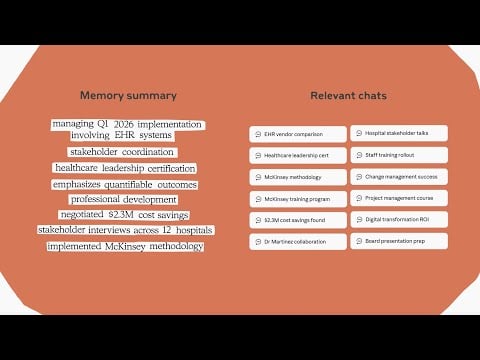
Claude’s Memory enables the AI to remember essential details from previous interactions, creating a cohesive and efficient user experience. This capability is particularly beneficial for long-term projects, as it eliminates the need to repeatedly reintroduce context. Whether you’re drafting a research paper, managing client portfolios, or developing software, Claude adapts to your unique requirements, making sure sustained progress and efficiency. Key functionalities include:
- Transparency and control: Users can view, edit, or delete stored memories, making sure full oversight of their data.
- Personalized workflows: Claude remembers preferences, drafts, and feedback, tailoring its responses to your specific needs.
- Streamlined tasks: By maintaining context across sessions, repetitive tasks become faster and more efficient.
For example, if you’re collaborating on a creative project, Claude can recall previous drafts, stylistic preferences, and feedback, making the process more efficient and tailored to your goals.

Learn more about Claude AI by reading our previous articles, guides and features :
- Claude Skills : AI CustomizationTips, Tools & Practical Examples
- ChatGPT 5 vs Claude Sonnet: Real-World AI Coding Comparison
- Understanding Claude AI’s New Weekly Usage Limits for Users
- How to Use Claude AI to Save Time at Work and Boost Productivity
- New Claude Opus 4.1 : Advanced AI Features You Need to Know
- How to Use Claude AI for Personal & Business Goals in 2025
- Claude AI MCP Overview : Features, Benefits & Why It Stands Out
- How to Easily Build Custom AI Experts with Claude Skills in 2025
- Claude Skills: A New Way to Customize AI to Your Exact
- How to Use Claude AI to Copy & Replicate n8n Workflows Instantly
Seamless Integration with Popular Tools
Claude’s Memory integrates effortlessly with existing features like Web Search and Voice Mode, as well as widely used productivity tools such as Google Workspace, Microsoft 365, Canva, and Figma. These integrations allow users to streamline workflows across various domains, from document creation to design and coding. For instance:
- Google Workspace: Claude can track project milestones, deadlines, and team preferences, making sure smooth collaboration and consistent progress.
- Figma: Designers can maintain consistency across multiple iterations of a project by using Claude’s ability to remember design elements and feedback.
Powered by the Claude 4 model family, including Opus 4.1, Sonnet 4.5, and Haiku 4.5, this feature supports a wide range of professional and personal tasks with advanced AI capabilities, making it a versatile tool for diverse industries.
Privacy and Customization: User-Centric Design
Privacy is a cornerstone of Claude’s Memory feature. Anthropic has designed the system to give users complete control over how and when memory is used. Key privacy and customization options include:
- Memory toggling: Users can enable or disable memory as needed, making sure flexibility for different scenarios.
- Memory management: Specific memories can be deleted to maintain privacy and relevance.
- Incognito Chat: For conversations that should not be saved, this mode ensures confidentiality and a clean slate.
Additionally, users can create separate memory spaces for different projects. This feature is particularly useful for professionals managing multiple clients or teams, as it prevents overlap and maintains clear boundaries between personal, client, and organizational work.
Safety and Reliability: Built for Trust
Anthropic has rigorously tested the Memory feature to ensure it operates safely and reliably. The system is designed to minimize risks such as harmful patterns, over-accommodation, or hallucinations. By addressing edge cases and sensitive topics, Claude’s Memory provides a dependable tool for users across industries.
For example, if you’re working on a technical build, Claude can assist with accurate coding suggestions and troubleshooting while avoiding errors that could compromise your project. This focus on reliability ensures that Claude remains a trustworthy partner for critical tasks.
Import and Export Capabilities for Enhanced Flexibility
The Memory feature includes experimental import and export functionality, allowing users to transfer data between AI tools. This capability is particularly useful for maintaining continuity across different platforms. Key functionalities include:
- Importing memory: Users can bring in data from platforms like ChatGPT or Gemini, making sure a seamless transition between tools.
- Exporting memory: Claude’s memory can be backed up or migrated for future use, providing flexibility and security.
This feature focuses on work-related information, making it easier to manage and maintain productivity across various AI systems.
Real-World Applications of Claude’s Memory
Claude’s Memory is designed to enhance productivity for both individuals and teams. By remembering processes, client needs, and project details, it becomes a valuable partner in tackling complex, long-term tasks. Here are some practical examples:
- Marketing teams: Claude can track campaign performance, remember audience preferences, and suggest data-driven strategies, maintaining a consistent narrative across sessions.
- Researchers: By storing references, hypotheses, and findings, Claude streamlines the process of drafting papers or reports, saving time and effort.
- Software developers: Claude can recall code snippets, debugging history, and project requirements, reducing errors and improving efficiency.
These use cases highlight the versatility and practicality of Claude’s Memory, making it an indispensable tool for a wide range of professional and personal applications.
Getting Started with Claude’s Memory
The Memory feature is currently available to Max subscribers, with a rollout underway for Pro users. Enterprise administrators can enable or disable this feature for their organizations, offering flexibility for business use. To activate Memory, users can navigate to the settings menu and customize its use based on their preferences.
Incognito Chat: Confidentiality at Your Fingertips
For sensitive discussions, Claude offers an Incognito Chat mode. This ensures that conversations are not saved to memory, providing a clean slate for private interactions. Whether you’re discussing proprietary information or personal matters, Incognito Chat offers peace of mind and ensures confidentiality.
The Future of AI Collaboration
Claude’s Memory feature represents a significant advancement in AI capabilities, emphasizing sustained collaboration and context-driven problem-solving. By allowing long-term engagement and adaptability, this innovation paves the way for more intuitive and productive interactions with AI. As Anthropic continues to refine and expand its offerings, Claude’s Memory is poised to become an essential tool for professionals and individuals alike, shaping the future of AI-driven productivity.
Disclosure: Some of our articles include affiliate links. If you buy something through one of these links, Geeky Gadgets may earn an affiliate commission. Learn about our Disclosure Policy.
