
Can you imagine managing your entire schedule, drafting emails, and even planning trips, all without ever leaving your terminal? Better Stack explains how Claude Canvas, a new innovation powered by Claude Code, is reshaping the way we approach productivity. By combining natural language commands with a sleek, text-based interface, this AI-driven assistant transforms your terminal into a dynamic workspace. Whether you’re booking flights or organizing meetings, Claude Canvas promises to streamline your workflow in ways that feel almost futuristic. But with its reliance on open source technology and terminal-based interaction, is it truly the productivity revolution it claims to be?
In this deep dive, you’ll uncover how Claude Canvas uses advanced features like dynamic UI generation and natural language processing to centralize task management. From its seamless calendar organization to its ability to draft structured emails, the possibilities are both exciting and practical. However, the system isn’t without its challenges, its simulated outputs and command-line interface may not appeal to everyone. Still, for those who value efficiency and precision, Claude Canvas offers a glimpse into the future of AI-powered productivity. Could this be the beginning of a new era in task management?
AI-Powered Task Management
TL;DR Key Takeaways :
- Claude Canvas is an AI-powered task management tool that uses natural language commands to handle tasks like scheduling, email drafting, and flight booking within a terminal interface.
- It integrates open source technologies like Tmux for terminal multiplexing and the Ink Library for creating dynamic, interactive terminal UIs.
- The tool supports key functionalities such as calendar organization, document handling, and flight management, emphasizing streamlined workflows and minimal distractions.
- Strengths include its ability to generate dynamic UIs, reliance on open source technology, and appeal to users who prefer text-based workflows, though it currently lacks live API integration for tasks like flight booking.
- Claude Canvas highlights the growing role of AI in task management, showcasing potential for productivity improvements while raising challenges around accessibility, security, and handling complex workflows.
How Claude Canvas Enhances Productivity
Claude Canvas is designed to simplify task management through intuitive natural language prompts. Whether you need to organize your calendar, draft an email, or plan travel, this tool offers a seamless and efficient way to manage these activities. Acting as a plugin for Claude Code, it requires a team session setup to function effectively. Once configured, it responds to your commands, generating previews and executing actions directly within the terminal, eliminating the need for external applications.
Here’s how it operates:
- Input a natural language command, such as “Schedule a meeting with Sarah at 2 PM on Wednesday.”
- Claude Canvas processes the command and generates a preview of the calendar entry for your review.
- It can also assist with drafting emails, creating structured templates based on your instructions.
These features emphasize efficiency and precision, allowing you to manage tasks without switching between multiple tools. By centralizing task management within a terminal, Claude Canvas caters to users who value streamlined workflows and minimal distractions.
The Technology Powering Claude Canvas
Claude Canvas is built on a robust technical foundation, integrating advanced technologies to deliver its functionality. Its architecture combines several key components to create a seamless user experience:
- Tmux: A terminal multiplexer that enables a split-pane user interface (UI) and assists interprocess communication. This allows users to interact with multiple panes within the terminal, each dedicated to specific tasks or outputs.
- Ink Library: A React-based library used to design dynamic and interactive terminal interfaces. Developers can use React components to customize the tool for various workflows, enhancing its adaptability.
Currently, Claude Canvas supports three primary skills: flight management, document handling, and calendar organization. These capabilities demonstrate its versatility in addressing a wide range of user needs, making it a valuable tool for both personal and professional use.
Claude Now Builds Custom Interfaces to Plan Your Life
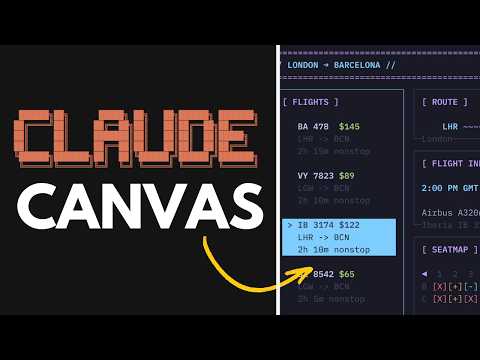
Master Claude Code with the help of our in-depth articles and helpful guides.
- 36 Claude Code Tips for Smarter, Faster AI Coding Workflows
- Claude Code Workflow : Creator’s 8-step Path to Faster Builds
- Claude Code Workflow for Faster PRs, Tests, and Parallel Tasks
- How to Build Custom AI Agents with Claude Code SDK
- Claude Code No Longer Works with Third Party IDEs
- Claude Code Keeps Improving New Features Overview
- How to use Claude Code Web For Software Development in 2025
- Claude Code 2.1 Custom Output Modes for Beginners & Pros
- How Claude Code Brings AI Coding to Your Mobile Devices
- How Claude Code 2.0 Simplifies Complex Coding Challenges for
Strengths and Challenges
Claude Canvas offers a range of benefits but also faces certain limitations that highlight areas for improvement.
Key Strengths:
- Its ability to generate dynamic UIs based on natural language commands represents a significant advancement in task automation.
- By operating entirely within a terminal, it appeals to users who prefer streamlined, text-based workflows over graphical interfaces.
- The integration of open source technologies ensures flexibility and encourages community-driven enhancements.
Current Limitations:
- The tool’s outputs are currently simulated, meaning tasks like flight booking or meeting scheduling are not yet connected to external APIs or live systems.
- Its reliance on terminal-based interaction may limit accessibility for users who are less familiar with command-line environments.
- Handling sensitive data securely remains a critical challenge, particularly for tasks involving personal or financial information.
Despite these challenges, Claude Canvas showcases the potential for AI-driven tools to transform task management. Its focus on natural language processing and terminal-based interaction positions it as a forward-thinking solution for tech-savvy users.
Implications for the Future of Task Management
The development of Claude Canvas reflects a broader trend toward AI-powered terminal assistants, particularly for developers and users who prefer command-line environments. By combining natural language commands with dynamic UI generation, it offers a glimpse into the future of task management tools. This approach has the potential to significantly enhance productivity for users who value efficiency and precision.
However, the practicality of using AI for complex tasks, such as flight booking or managing intricate workflows, raises important questions. Can AI reliably handle processes involving multiple variables and external systems? Addressing these challenges will be essential as tools like Claude Canvas continue to evolve. Additionally, the increasing reliance on natural language for digital workflows underscores the need for AI systems that are both user-friendly and highly accurate.
As AI-powered tools become more sophisticated, they are likely to play an increasingly central role in how you manage your daily life. The integration of natural language processing, open source technology, and terminal-based interaction represents a promising direction for the future of task management.
Media Credit: Better Stack
Disclosure: Some of our articles include affiliate links. If you buy something through one of these links, Geeky Gadgets may earn an affiliate commission. Learn about our Disclosure Policy.
