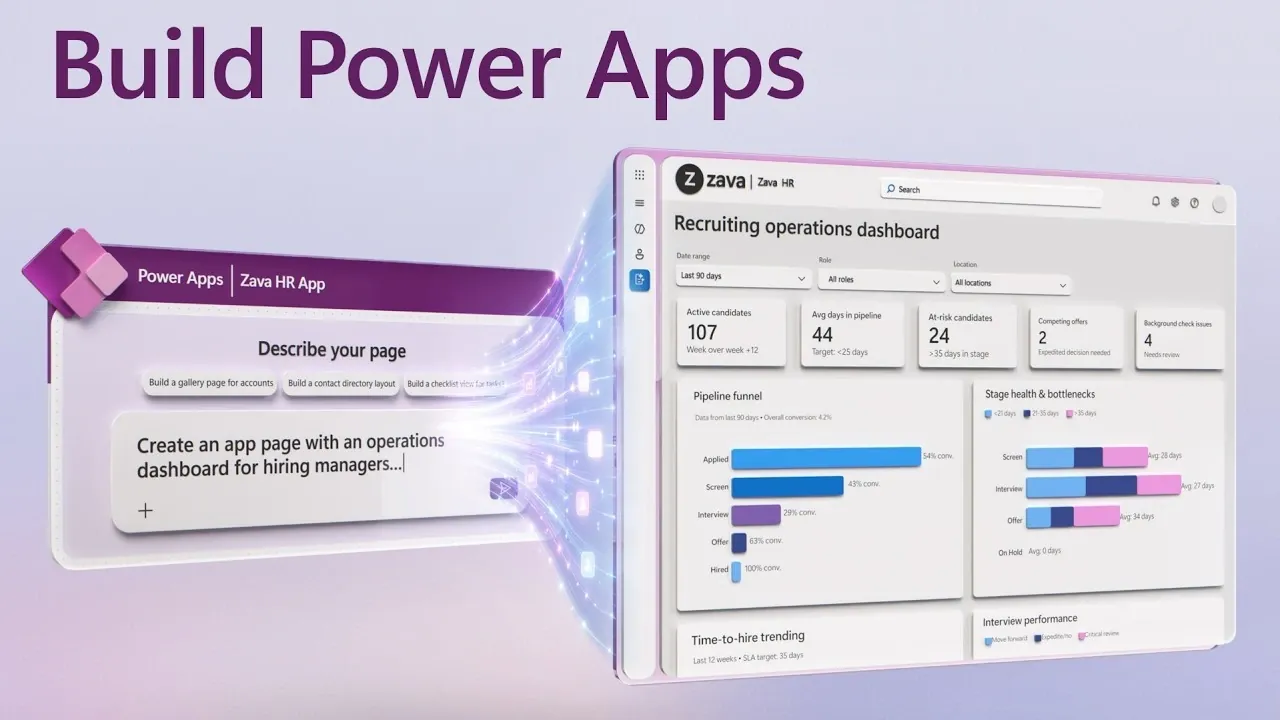
Creating your first app doesn’t have to be a daunting process, especially with the low-code capabilities of Power Apps. In a recent breakdown by Microsoft Mechanics, you’ll see how to build an app directly from your existing data in just a few steps. For instance, if you’re working with customer data stored in an Excel spreadsheet, Power Apps can automatically generate an app complete with interactive forms and dashboards, eliminating the need to manually design core components. This approach makes it possible to turn raw data into functional applications without requiring advanced technical skills.
Dive into this guide to discover how to connect data sources like SharePoint or SQL Server, customize the app’s interface and integrate features such as AI-driven insights. You’ll also learn how to enhance workflows by automating repetitive tasks and creating tailored solutions that align with your business needs. Whether you’re modernizing legacy systems or starting from scratch, this overview offers practical tips to help you streamline app development and unlock new efficiencies.
Create Apps Directly from Your Data
TL;DR Key Takeaways :
- Power Apps is a low-code platform that simplifies app development, allowing users of all skill levels to create and modernize applications using existing business data.
- The platform integrates seamlessly with Microsoft 365 tools like Outlook, Teams and SharePoint, streamlining workflows and enhancing productivity.
- AI and Microsoft 365 Copilot provide intelligent assistance, automating tasks, generating features and offering data-driven insights for faster decision-making.
- Power Apps supports the modernization of legacy systems by adding AI-generated features, dashboards and visualizations to improve usability and efficiency.
- Users can build apps directly from data sources like Excel, SharePoint and SQL Server, with automated app structures that save time and effort.
This platform is designed to simplify app development, making it accessible to users of all skill levels. Whether you’re a seasoned developer or a business professional with no coding experience, Power Apps provides the tools to bring your ideas to life efficiently.
Power Apps streamlines the app creation process by allowing you to build model-driven applications directly from your existing data sources. These sources can include Dataverse, SharePoint, Excel, SQL Server, or even CSV files. The platform automatically generates essential app structures, such as screens, navigation and data relationships, saving you significant time and effort.
For example, if you manage customer data in an Excel spreadsheet, Power Apps can instantly transform it into a fully functional app complete with interactive forms and dashboards. This approach eliminates the need to start from scratch, allowing you to focus on customizing the app to meet your unique business requirements. By automating much of the initial setup, Power Apps ensures that you can quickly move from concept to execution.
Modernize Existing Applications
If your organization already relies on existing applications, Power Apps provides tools to enhance their functionality without requiring a complete rebuild. With simple prompts, you can add AI-generated pages, dashboards, or features to improve usability and efficiency. This capability is particularly valuable for modernizing legacy systems, making sure they remain relevant and effective in today’s fast-paced business environment.
For instance, you can use Power Apps to create visualizations or actionable insights tailored to your specific needs. These enhancements allow you to make data-driven decisions more effectively, making sure your applications continue to deliver value. By modernizing existing systems, Power Apps helps businesses adapt to evolving challenges without the need for costly overhauls.

Here is a selection of other guides from our extensive library of content you may find of interest on Excel.
- The Hidden Excel Shortcuts Missing from Your Standard Cheat Sheet
- The Only Microsoft Excel Tutorial Beginners Need In 2026
- 17 New Excel Features for 2026 to Speed up Your Work
- 4 Excel AI Tools Tested and Microsoft Copilot Finished Last
- Master Advanced Excel Functions BYROW vs MAP vs SCAN vs REDUCE
- Why Excel’s FILTER Function Outperforms VLOOKUP for Complex Data
- Say Goodbye to Complex Excel Formulas with New TRIMRANGE Function
- How to Unlock Excel Sheets Without a Password
- How to use the Excel FILTER function
- Excel Formatting : Simple Tricks for Stunning Spreadsheets in 2025
AI and Copilot: Your Intelligent Assistants
AI and Microsoft 365 Copilot are integral components of the Power Apps experience, offering intelligent assistance to simplify app development and management. These tools allow you to interact with the platform using natural language. By simply describing what you need, Power Apps can generate the desired features or functionality for you.
For example, you can automate repetitive tasks such as extracting data from emails or documents and integrating it into your app. Additionally, AI-driven insights help you analyze data, identify trends and suggest solutions, allowing faster and more informed decision-making. These features ensure that Power Apps not only simplifies app creation but also enhances the overall efficiency of your business processes.
Proactive Management with Agent Features
Power Apps includes agent feed features designed to boost productivity by surfacing critical actions and decisions. These proactive AI agents can highlight urgent tasks, such as overdue deadlines or critical updates, making sure you stay on top of your priorities. By providing real-time alerts and actionable insights, these agents help you manage complex operations more effectively.
You can customize these agent feeds to align with your workflow, making them particularly useful for teams handling high volumes of tasks or data. Whether you’re managing a project, tracking customer interactions, or overseeing operations, these features ensure that you remain organized and focused on what matters most.
Seamless Integration with Microsoft 365
One of the standout features of Power Apps is its seamless integration with Microsoft 365 tools like Outlook, Teams and SharePoint. This integration allows you to interact with app data directly within these tools, streamlining your workflow and reducing the need to switch between platforms.
For instance, you can automate processes such as adding candidate details from an email directly into an HR app or updating inventory records from a Teams message. By minimizing repetitive tasks and reducing the risk of errors, this integration ensures that your apps work harmoniously with the tools you already use. The result is a more efficient and cohesive work environment that enhances overall productivity.
Accessible for All Skill Levels
Power Apps is designed to be user-friendly, making it accessible to individuals with varying levels of technical expertise. Its intuitive interface allows you to create, deploy and iterate apps quickly, whether you’re building a new app or enhancing an existing one. This accessibility ensures that businesses of all sizes and industries can use the platform to address their unique challenges.
The platform’s flexibility supports a wide range of use cases, from managing inventory to automating customer service workflows. Whether you’re a developer looking to streamline your processes or a business user aiming to solve specific challenges, Power Apps provides the tools and support needed to succeed.
Real-World Applications
Power Apps excels at addressing specific business challenges through tailored solutions. For example, you can create an HR app to manage candidate data and streamline recruitment processes. Features like automated data entry, recruiting dashboards and AI-driven insights simplify hiring and improve decision-making.
Similarly, businesses can use Power Apps to optimize workflows, reduce manual effort and enhance overall efficiency. Whether it’s tracking customer interactions, managing inventory, or automating internal processes, the platform adapts to your unique needs. By using Power Apps, organizations can achieve greater productivity and operational excellence.
Media Credit: Microsoft Mechanics
Disclosure: Some of our articles include affiliate links. If you buy something through one of these links, Geeky Gadgets may earn an affiliate commission. Learn about our Disclosure Policy.
