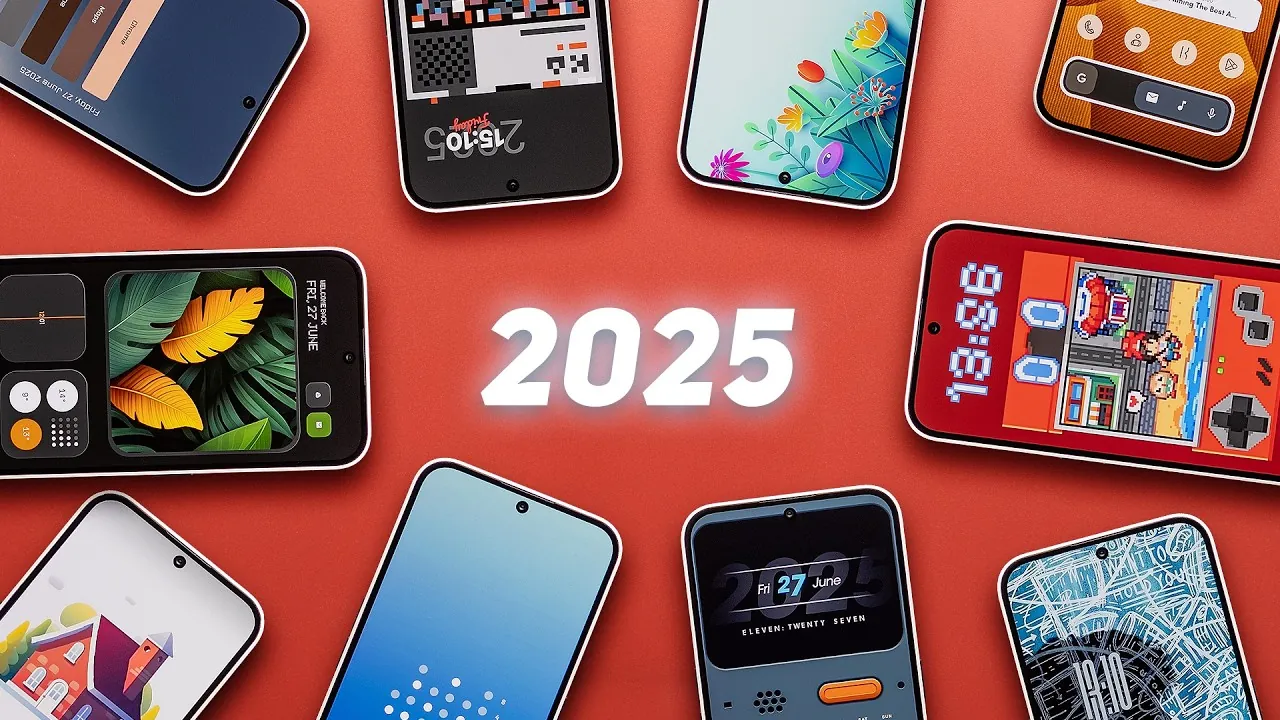
Customizing your Android home screen allows you to merge aesthetics with practicality, transforming your device into a personalized tool that reflects your style and preferences. By carefully selecting launchers, wallpapers, widgets, and icon packs, you can create a home screen that is both visually appealing and highly functional. Below, we explore ten thoughtfully curated Android home screen setups, sourced from the Pallet app, that cater to a wide range of tastes. Whether you prefer minimalism, bold designs, or retro vibes, these setups offer inspiration for everyone. The video below from Sam Beckman gives us a look at some of the best Android home screen setups.
Digital Detox: A Minimalist Approach
The “Digital Detox” setup is designed for users seeking a clutter-free and focused digital space. This setup emphasizes simplicity while maintaining a polished aesthetic. Using Nova Launcher, it features:
- A calming wallpaper available on the Pallet app, designed to reduce visual distractions.
- Widgets from the Sun and Sea for KWGT and Koda for Custom packs, offering essential information at a glance.
- The Taco Loco icon pack adds a playful yet clean touch to the overall design.
This setup is ideal for those who want to prioritize focus and productivity without sacrificing style.
Pallet: Subtle Gradients for a Modern Look
The “Pallet” setup focuses on gradient-style wallpapers that create a visually soothing yet modern design. It is perfect for users who appreciate vibrant but understated visuals. Key features include:
- A primary wallpaper sourced from the Pallet app, with free alternatives available for added flexibility.
- A free widget backup file makes it easy to replicate the setup on your own device.
This setup strikes a balance between elegance and simplicity, making sure your home screen remains functional and visually appealing.
Tropical Leaf Yellow Edition: Bold and Vibrant
For those who enjoy bright, nature-inspired themes, the “Tropical Leaf Yellow Edition” setup offers a bold and energetic aesthetic. Using Nova Launcher includes:
- A striking wallpaper downloadable via Pallet, featuring vibrant tropical elements.
- Glass Dot Widgets for KWGT, customized with accent colors to complement the theme.
- A premium icon pack (paid) that enhances the overall look with cohesive, high-quality icons.
This setup is perfect for users who want their home screen to exude energy and creativity.
Contour Chaos: Sleek Minimalism
The “Contour Chaos” setup is designed for those who value sleek and modern minimalism. Using the Niagara Launcher, it creates a streamlined and cohesive design. Its features include:
- A wallpaper and backup file are available on Pallet, making sure easy set up and replication.
- The Niagara Watercolor icon pack, which auto-themes for a consistent and polished appearance.
- A “Chasing Embers” custom font paired with a widget from the Sheer KWGT pack for added sophistication.
This setup is ideal for users who prefer a clean, distraction-free home screen with a contemporary edge.
Floral Harmony: Elegance Meets Functionality
The “Floral Harmony” setup combines sophistication with usability, creating a harmonious design that enhances both form and function. Launch Air includes:
- A serene wallpaper sourced from the Lush Walls app, offering a calming visual experience.
- Premium icon packs and widgets from the Lost KWGT pack add a touch of elegance to the setup.
This setup is perfect for users who appreciate a refined and balanced design that complements their device’s functionality.
ROM Dex: A Nostalgic Retro Vibe
For fans of vintage aesthetics, the “ROM Dex” setup delivers a retro-inspired design that evokes nostalgia. Key elements include:
- A retro-style wallpaper uploaded to Pallet, featuring classic design elements.
- A custom clock widget was created by the designer, adding a unique and personal touch.
- The free Verticons icon pack offers accessibility without compromising on style.
This setup is ideal for users who enjoy a nostalgic, old-school vibe with a modern twist.
Home Sweet Home: Warm and Inviting
The “Home Sweet Home” setup creates a cozy and welcoming atmosphere, making your device feel like an extension of your personal space. Launch Air features:
- A wallpaper and icon pack from the Cream Adaptive app, offering a soft and inviting color palette.
- A time and date widget from the Slick Adaptive Icon Pack, ensuring functionality without clutter.
This setup is perfect for users who want their home screen to feel warm and inviting while remaining practical.
Honey Comp: Dynamic and Playful
The “Honey Comp” setup is for those who enjoy a visually engaging and dynamic design. Using Nova Launcher it includes:
- A wallpaper from the Nothing But Wallpapers app, featuring bold and vibrant patterns.
- Widgets from the Think KWGT and Stricks KWGT packs, offering customizable functionality.
- The Lawncons icon pack adds a polished yet playful touch to the overall design.
This setup is ideal for users who want their home screen to stand out with vibrant visuals and interactive elements.
Minimalistic: Clean and Uncluttered
The “Minimalistic” setup is designed for users who prioritize simplicity and organization. It delivers a clean and distraction-free design. Key features include:
- An animated widget from the Minima KWGT pack, providing essential information in a sleek format.
- A wallpaper from Luminina Walls, available on Pallet, offering a subtle yet stylish backdrop.
- The Dots icon pack, making sure a cohesive and minimalist aesthetic.
This setup is perfect for users who prefer a streamlined and organized home screen.
KO: Bold and Contemporary
The “KO” setup offers a striking and modern design for users who want their home screen to make a statement. Using Nova Launcher, it includes:
- A wallpaper from MKBHD’s Panels Wallpaper app, featuring bold geometric patterns.
- Widgets from the Time Widgets for KWGT pack, providing both style and functionality.
- A Retro Mode icon pack, completing the bold and contemporary look.
This setup is perfect for users who enjoy an innovative design that captures attention while remaining functional.
Gain further expertise in Android Home Screen Setups by checking out these recommendations.
- The Ultimate iPhone Home Screen Setup (Video)
- Elevate Your Android: Top Nova Launcher Setups for 2024
- One UI 7 Home Screen Mastery: The Definitive Setup Guide
- Insane iOS 18.2 Home Screen Setups (with Tutorials!)
- Get the Most Out of iOS 18.1: 5 Awesome Home Screen Setups
Source & Image Credit: Sam Beckman
Disclosure: Some of our articles include affiliate links. If you buy something through one of these links, Geeky Gadgets may earn an affiliate commission. Learn about our Disclosure Policy.
