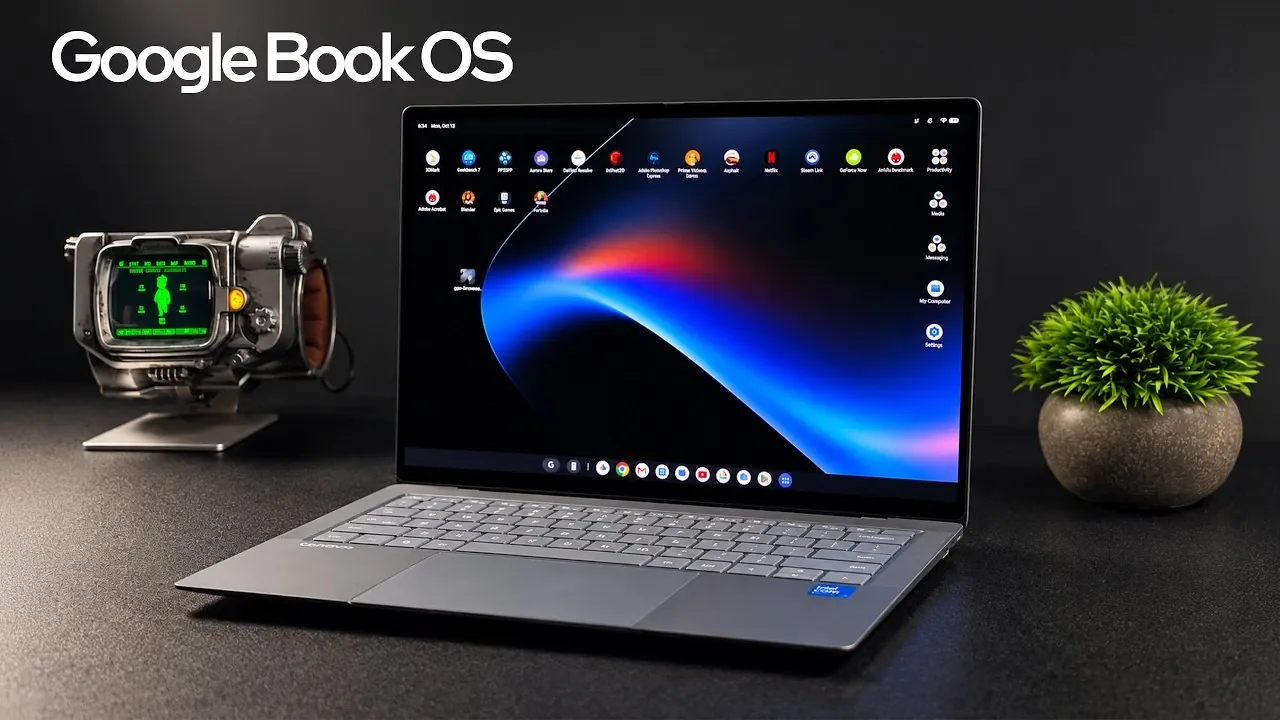
The Asus GoogleBook 14 introduces a unique approach to lightweight computing by combining Android and Chrome OS into a single platform called GoogleBook OS. As explored by ETA Prime, this hybrid operating system aims to balance portability with media-focused features, supported by standout hardware such as a 14-inch 3K OLED touchscreen with HDR and a 120Hz refresh rate. While the device excels in delivering vivid visuals and smooth multitasking with its Intel Core Ultra 5325 processor, it faces notable challenges in app compatibility and gaming performance. These limitations raise important questions about its suitability for users seeking advanced productivity or gaming capabilities.
Dive into this breakdown to understand how the Asus GoogleBook 14 performs across key areas. You’ll gain insight into the strengths and weaknesses of GoogleBook OS, including its multi-window support and app sideloading constraints. Explore how the device handles gaming through streaming services and retro emulation and learn why its integrated graphics may not meet the needs of demanding users. This guide provides a clear look at whether the Asus GoogleBook 14 aligns with your everyday computing needs or if its hybrid design falls short for more intensive tasks.
Hardware Features: A Blend of Portability and Performance
TL;DR Key Takeaways :
- The Asus GoogleBook 14 introduces GoogleBook OS, a hybrid operating system combining Android and Chrome OS, but faces significant app compatibility challenges.
- The device features a stunning 14-inch 3K OLED touchscreen display with HDR support, 120Hz refresh rate and 100% DCI-P3 color accuracy, ideal for media consumption and casual creative tasks.
- Powered by the Intel Core Ultra 5325 processor and integrated Intel XE3 graphics, it delivers smooth performance for basic tasks but struggles with demanding workloads and advanced gaming.
- Gaming capabilities are limited, with restricted native Android game support, but game streaming services and retro emulation provide alternative options for casual gaming enthusiasts.
- Best suited for portability and media consumption, the device excels in design and display quality but falls short for professionals, power users and gamers requiring high performance or advanced software tools.
The Asus GoogleBook 14 is designed with portability and media consumption in mind, offering a premium hardware experience. Its standout feature is the 14-inch 3K OLED touchscreen display, which delivers vivid visuals with HDR support, a 120Hz refresh rate and 100% DCI-P3 color accuracy. This makes it an excellent choice for streaming, content viewing and casual creative tasks. The display’s sharpness and color fidelity are particularly appealing for users who value high-quality visuals.
Under the hood, the device is powered by the Intel Core Ultra 5325 processor, an 8-core, 8-thread CPU paired with integrated Intel XE3 graphics. While the processor ensures smooth multitasking and responsive performance for everyday tasks, the GPU is less suited for demanding graphical workloads. Weighing just 2.18 pounds and measuring a slim 10.9 mm, the laptop is highly portable, making it convenient for users on the go. Additional hardware features include a backlit keyboard for comfortable typing, a force-sensing touchpad for precise navigation and 16GB of RAM to handle multiple applications simultaneously.
Connectivity options such as Wi-Fi 7 and Bluetooth 6.0 ensure fast and reliable wireless connections, while the 70Wh battery provides decent longevity, supporting extended use without frequent recharging. However, the absence of a dedicated GPU and limited internal storage options may deter users with more demanding performance needs.
GoogleBook OS: A Hybrid Operating System
At the heart of the Asus GoogleBook 14 is GoogleBook OS, codenamed Aluminum OS, which integrates elements of Android and Chrome OS into a single platform. This hybrid operating system offers access to the Google Play Store, allowing users to download and use a variety of Android apps. However, app compatibility remains a significant hurdle. Popular applications like Minecraft and Photoshop are either unavailable or require sideloading, which can be inconvenient for users who rely on a diverse range of apps.
Despite these limitations, GoogleBook OS introduces productivity-focused features such as multi-window support and dual-screen app usage, catering to multitasking needs. These features enhance the device’s usability for light productivity tasks, such as document editing and web browsing. However, the absence of advanced productivity software, such as full-featured desktop applications, limits its appeal for professionals seeking a robust work device. For users accustomed to the flexibility of traditional laptops or tablets, the hybrid nature of GoogleBook OS may feel restrictive.

Here are more detailed guides and articles that you may find helpful on Google products.
- Google Pixel 11 Pro Teaser Unveils the Pixel Glow Camera Bar
- 55% Charge in 5 Minutes: New Google Pixel 11 Pro XL Leak
- Google Pixel 11 Pro vs Google Pixel 10 Pro: Expected Updates
- Google Preps Gemini 4 Pro Content Creation for October 2026
- Sneak Peek at the Unconfirmed Google Pixel 11 Pro Smartphone
- Google Rebrands NotebookLM to Gemini Notebook with Drive Sync
- Massive Google Pixel 11 Leak Reveals Every Major Specification
- Leaked Google Pixel 11 Pro XL Renders Show a Radical Camera Bar Redesign
- Google Pixel 11 Pro: Leaks, Specs, Tensor G6, and Everything We Know
- Google Pixel 11 Pro XL: Everything We Know So Far
Performance: Smooth for Basics, Limited for Demanding Tasks
The Asus GoogleBook 14 delivers a responsive and smooth user experience for basic tasks, thanks to its powerful processor and optimized software. Benchmark tests indicate competitive CPU performance, making it suitable for activities such as web browsing, video streaming and light office work. However, the integrated Intel XE3 graphics fall short when compared to ARM-based alternatives like the Galaxy S26 Ultra. This limits the device’s ability to handle graphically intensive tasks such as video editing, 3D rendering, or advanced creative work.
For users with modest performance requirements, the Asus GoogleBook 14 offers a reliable and efficient experience. However, those seeking a device capable of handling demanding workloads may find its performance insufficient. The lack of a dedicated GPU further underscores its limitations in this regard, making it better suited for casual users rather than professionals or power users.
Gaming and Emulation: A Mixed Bag
Gaming on the Asus GoogleBook 14 presents a mixed experience. Native Android game compatibility is limited, with popular titles like Fortnite unavailable on the platform. However, the device supports game streaming services such as GeForce Now and Steam Link, providing access to a broader range of games. These services allow users to play high-quality games without relying on the device’s internal hardware, mitigating some of its performance constraints.
Additionally, the Asus GoogleBook 14 offers emulation capabilities for retro gaming, supporting platforms like PSP and GameCube/Wii. This feature appeals to enthusiasts of classic games, providing a nostalgic gaming experience. However, the integrated GPU’s performance limitations affect the overall gaming experience, particularly for graphically demanding titles. While game streaming and emulation expand the device’s gaming potential, it is not an ideal choice for dedicated gamers seeking a seamless and high-performance gaming experience.
Strengths and Weaknesses
The Asus GoogleBook 14 offers a mix of strengths and weaknesses, making it suitable for specific use cases while falling short in others.
- Strengths: Premium build quality, stunning 3K OLED display, lightweight and portable design, smooth touchpad and backlit keyboard for enhanced usability.
- Weaknesses: Limited app compatibility, restricted gaming options, lack of advanced productivity software and underwhelming GPU performance for demanding tasks.
Who is It For?
The Asus GoogleBook 14 is best suited for users who prioritize portability and media consumption. Its vibrant OLED display and lightweight design make it an excellent choice for streaming videos, browsing the web and performing light office tasks. Casual users who value a sleek and visually appealing device will appreciate its design and functionality.
However, the device is less suitable for professionals requiring advanced productivity tools or users who depend on a wide range of Android apps. Gamers seeking a seamless and high-performance experience may also find its limitations restrictive. For those with more demanding needs, alternative devices with dedicated GPUs and broader software compatibility may be more appropriate.
Media Credit: ETA PRIME
Disclosure: Some of our articles include affiliate links. If you buy something through one of these links, Geeky Gadgets may earn an affiliate commission. Learn about our Disclosure Policy.
