Amazon has this week announced the launch of a new browser extension created for its Send to Kindle service, which is now available to download and install on your Mozilla Firefox browser.
The new Firefox browser extension enables you to easily send articles or other web content directly to your Kindle device with the simple click of a button.
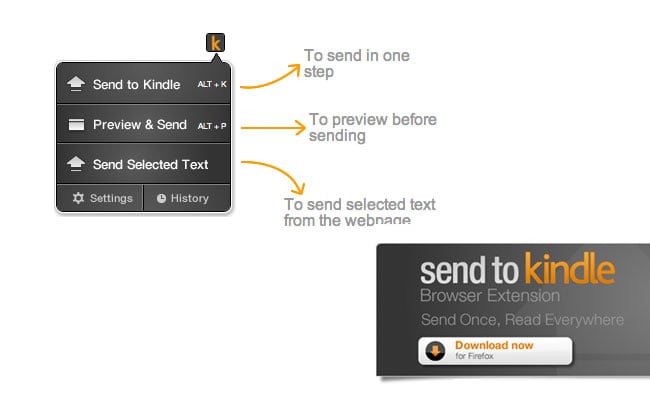
Features and Benefits of the Send to Kindle Extension
The new Send to Kindle Firefox extension allows you to select text or web content and send it to your Kindle either in one step or via a preview if preferred. This feature is particularly useful for those who enjoy reading long-form articles, research papers, or any other web content that they may not have time to read immediately. By sending it to your Kindle, you can archive content to read later within your Kindle library, which can be accessed at a more convenient time.
One of the standout features of this extension is its simplicity and ease of use. With just a single click, users can send entire web pages or selected text to their Kindle devices. This is especially beneficial for students, researchers, and avid readers who often come across valuable content online but prefer reading on their Kindle devices due to the e-ink display, which is easier on the eyes compared to traditional screens.
How to Use the Send to Kindle Extension
To get started with the Send to Kindle extension, you need to download and install it from the Firefox Add-ons store. Once installed, you will see a Kindle icon in your browser toolbar. Here’s a step-by-step guide on how to use it:
1. Select the Content: Navigate to the web page you want to send to your Kindle. You can either select specific text or choose to send the entire page.
2. Click the Kindle Icon: Click on the Kindle icon in your browser toolbar. A pop-up will appear giving you the option to send the content directly or preview it first.
3. Send or Preview: If you choose to preview, you can see how the content will look on your Kindle before sending it. This is useful for ensuring that the formatting is to your liking.
4. Access on Kindle: Once sent, the content will appear in your Kindle library, ready for you to read at your convenience.
For more information, jump over to the Amazon Send to Kindle webpage and to download the extension for Firefox. To be able to use the new Firefox extension, you will require Firefox version 6 or higher.
Additional Use Cases and Examples
The Send to Kindle extension is not just limited to articles and web pages. It can also be used for a variety of other purposes. For instance, if you are a student working on a research project, you can send academic papers and journal articles to your Kindle for easier reading and annotation. Similarly, professionals can send important reports and documents to their Kindle to read during commutes or travel.
Moreover, the extension supports multiple languages, making it a versatile tool for users around the world. Whether you are reading a French novel, a Spanish news article, or a German research paper, you can easily send it to your Kindle and enjoy reading in your preferred language.
Another great feature is the ability to customize the reading experience. Users can adjust the font size, background color, and other settings on their Kindle to make reading more comfortable. This is particularly beneficial for those with visual impairments or reading difficulties.
The Send to Kindle Firefox extension is a powerful tool that enhances the reading experience by allowing users to easily transfer web content to their Kindle devices. Whether you are a student, professional, or casual reader, this extension offers a convenient way to save and read content at your own pace. So why wait? Download the extension today and start enjoying your favorite web content on your Kindle.
Source:
Disclosure: Some of our articles include affiliate links. If you buy something through one of these links, Geeky Gadgets may earn an affiliate commission. Learn about our Disclosure Policy.
