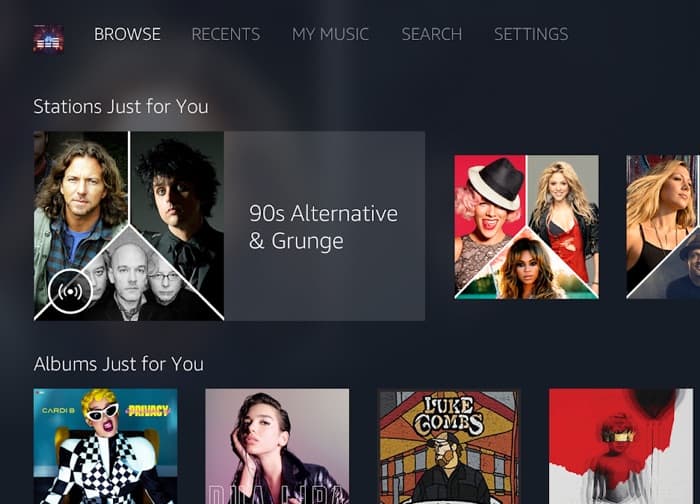
Apple is bringing Apple Music to Amazon’s Alexa devices and now Amazon is bringing their Amazon Music to Google’s Android TV devices.
Amazon Music is available for free to Amazon Prime members and it is also available as a standalone subscription service.
Amazon Music on Android TV
The integration of Amazon Music with Android TV marks a significant step in the collaboration between tech giants Amazon and Google. This move allows users to enjoy a seamless music experience on their Android TV devices, bringing millions of songs directly to their living rooms. The Amazon Music app for Android TV offers a user-friendly interface, making it easy to navigate through a vast library of music.
With the Amazon Music app for Android TV you get access to millions of songs, ad-free, with unlimited skips.
With Amazon Music Unlimited you get unlimited access to 50 Million songs. Enjoy all the new releases and thousands of playlists and stations.
Are you an Amazon Prime member? Enjoy a curated selection of 2 Million songs, curated playlists and stations, ad-free. Prime Music is included with your Prime membership.
Benefits of Amazon Music
Amazon Music offers several tiers of service to cater to different user needs. For Amazon Prime members, the service includes access to over 2 million songs, curated playlists, and stations, all ad-free. This is a great addition to the existing benefits of a Prime membership, which includes free shipping, Prime Video, and more.
For those who want an even more extensive music library, Amazon Music Unlimited is available. This premium service provides access to over 50 million songs, including the latest releases and thousands of playlists and stations. Users can enjoy their favorite music without any ads and with unlimited skips, making it a highly customizable and enjoyable experience.
The app also supports voice commands through Google Assistant, allowing users to control their music hands-free. This feature is particularly useful for those who want to change songs, adjust the volume, or find specific playlists without having to navigate through menus.
How to Get Started
Getting started with Amazon Music on Android TV is straightforward. Users can download the app from the Google Play Store and sign in with their Amazon account. Once logged in, they can start exploring the vast library of music available to them. The app’s interface is designed to be intuitive, making it easy for users to find their favorite songs, create playlists, and discover new music.
For those who are not yet Amazon Prime members, the app offers a free trial of Amazon Music Unlimited. This allows users to experience the full range of features and decide if the premium service is right for them.
You can find out more details about Amazon Music for Google’s Android TV over at the Google Play store at the link below.
Disclosure: Some of our articles include affiliate links. If you buy something through one of these links, Geeky Gadgets may earn an affiliate commission. Learn about our Disclosure Policy.
