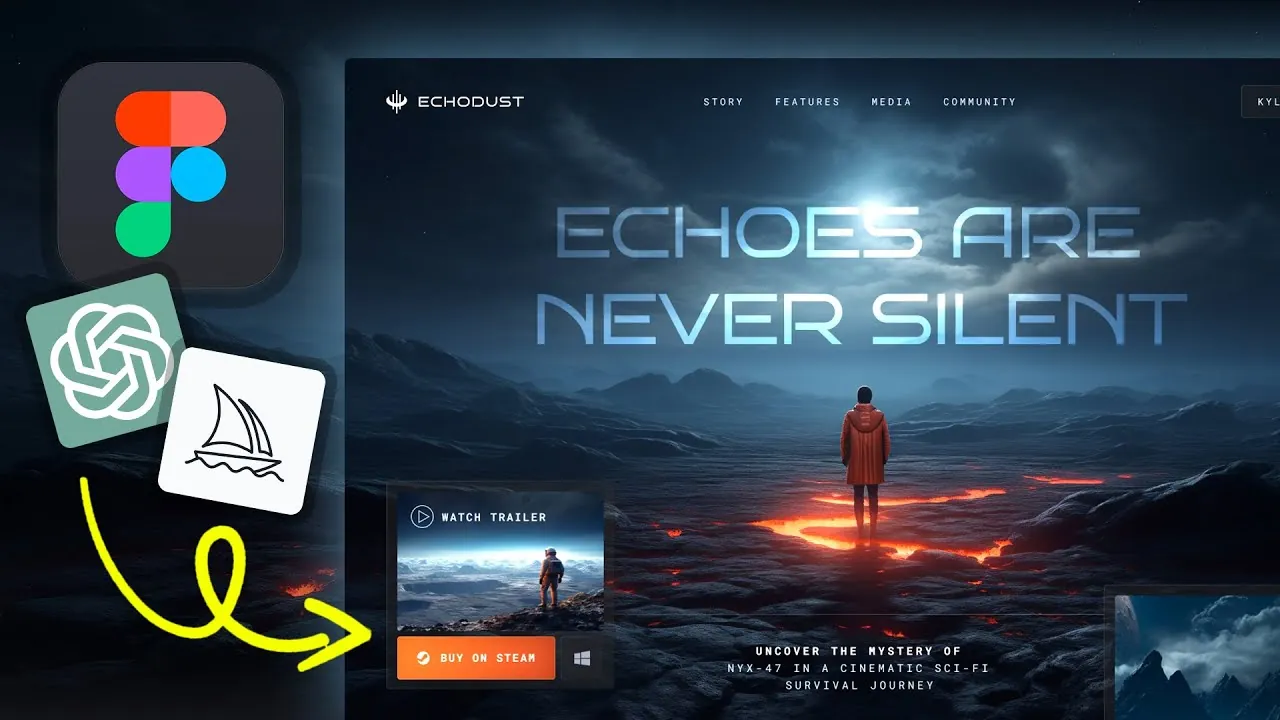
Imagine creating a stunning, fully functional website without writing a single line of code. Sounds too good to be true? Think again. Thanks to the powerful synergy between Figma and innovative AI tools like ChatGPT and Midjourney, website design has entered a new era—one where creativity takes center stage, and technical barriers fade into the background. Whether you’re a seasoned designer or a complete beginner, this no-code revolution is transforming how websites are built, making professional-grade results accessible to everyone. The days of wrestling with complex coding languages are over; now, all you need is a vision and the right tools to bring it to life.
Kyle Skelly reveals how to harness the combined power of Figma and AI to design a website that’s not only visually captivating but also functional and user-friendly. From brainstorming ideas with ChatGPT to crafting bespoke visuals in Midjourney and prototyping layouts in Figma, this no-code approach will guide you step-by-step through the process. Along the way, you’ll discover how AI can amplify your creativity—suggesting unique color palettes, generating interactive elements, and even animating static images to create dynamic visuals. By the end, you’ll see how this streamlined workflow can empower you to turn your ideas into reality, all while saving time and effort. What could you create if the only limit was your imagination?
No-Code Website Design Guide
TL;DR Key Takeaways :
- AI tools like ChatGPT and Midjourney, combined with Figma, enable a no-code approach to website design, making it accessible and efficient for users without coding expertise.
- ChatGPT assists in brainstorming design ideas, such as themes, color palettes, and text, while Midjourney generates high-quality visuals that can be seamlessly integrated into Figma.
- Figma serves as the central platform for prototyping, allowing users to import AI-generated visuals, create responsive layouts, and design essential website elements like navigation menus and call-to-action buttons.
- AI tools enhance creativity by allowing experimentation with typography, color schemes, and layout adjustments, making sure a cohesive and polished final design.
- Incorporating dynamic visuals, such as AI-animated videos, can elevate user engagement and aesthetic appeal, while frequent iteration and feedback help refine the design process for optimal results.
How AI Enhances the Design Process
AI tools are transforming the way websites are designed, offering innovative solutions to generate ideas, visuals, and even interactive elements. Here’s how you can integrate AI into your design process:
- ChatGPT for Ideation: ChatGPT can help you brainstorm design ideas tailored to your project. For instance, if you’re creating a website for a fictional game like “Echo Dust,” ChatGPT can suggest themes, color palettes, and even text for headers, buttons, or calls to action. This ensures your design aligns with your vision from the start.
- Midjourney for Visuals: Use Midjourney to transform your ideas into unique, high-quality images. By feeding prompts generated by ChatGPT into Midjourney, you can create visuals that match your concept. Additionally, Midjourney allows you to upscale images, making sure they remain sharp and responsive across various screen sizes—a critical feature for modern web design.
Once you have your visuals, refine them to match your aesthetic and branding. This iterative process ensures your design remains cohesive, engaging, and tailored to your audience.
Prototyping Your Website in Figma
Figma serves as the central hub for your no-code website creation, offering a versatile platform to bring your ideas to life. Here’s how to get started:
- Import AI-Generated Visuals: Begin by uploading the images you created in Midjourney into Figma. This allows you to integrate your visuals seamlessly into your design.
- Set Up Layouts: Use Figma’s tools to create frames, grids, and layouts. These features ensure your design is both responsive and user-friendly, providing a solid foundation for your website.
- Design Key Elements: Focus on creating essential components such as logos, navigation menus, and call-to-action buttons. For example, the homepage of “Echo Dust” could feature a hero image generated in Midjourney, paired with a bold button inviting users to “Explore the World of Echo Dust.”
Figma’s prototyping features allow you to link pages, simulate interactions, and test user flows. This gives you a clear sense of how your website will function before it goes live, allowing you to make adjustments as needed.
How to Make Websites Using Figma and AI (No Code)

Check out more relevant guides from our extensive collection on AI-Assisted Design that you might find useful.
- Understanding Copyright Rules for AI-Generated Content
- Vibe Coding with Gemini AI From UI Design to a Live Next.JS App
- Streamline Your Web Design Workflow with AI Coding Platforms
- AI Game Development: From Concept to Reality AI Coding Demo
- Learn how to use WindSurf AI the Powerful AI Coding Assistant
- What is Vibe Coding? A Beginner’s Guide to AI-Assisted
- Databutton AI : Build Apps Without Coding, Full-Stack Development
- AI Writing Secrets: Create High-Quality Books Faster Than Ever
- Microsoft Copilot PC Keynote 2024 (Full Presentation)
- How AI Agents are Changing Engineering Task Management
Exploring Design Concepts with AI
AI tools empower you to experiment with multiple design concepts quickly and effectively. This flexibility allows you to refine your ideas and create a polished final product. Here’s how you can explore and enhance your design concepts:
- Typography: Experiment with font pairings that reflect your brand’s personality and message. AI tools can suggest combinations that balance readability with aesthetic appeal.
- Color Schemes: Use AI-generated palettes to establish a cohesive visual identity. For a project like “Echo Dust,” a muted, earthy palette could evoke a sense of mystery and adventure, aligning with the theme of the game.
- Layout Adjustments: Fine-tune spacing, alignment, and interactive elements such as buttons or hover effects. These adjustments enhance user engagement and ensure a seamless browsing experience.
This iterative approach allows you to test various design elements and refine them until they align perfectly with your vision and goals.
Incorporating Video for Dynamic Visuals
Adding video elements to your website can significantly enhance its visual appeal and user engagement. AI tools like Midjourney can animate static images, creating subtle motion effects that bring your design to life. Additionally, AI-powered upscaling tools can improve the quality of low-resolution videos, making sure they appear sharp and professional on all devices.
For example, a looping animation of a misty forest could serve as the background for your “Echo Dust” homepage. This dynamic visual element reinforces the theme of the game and captivates users from the moment they land on your site. Incorporating such features can elevate your website’s overall aesthetic and leave a lasting impression on visitors.
Tips for Maximizing Your Design Process
To make the most of your website design process, consider these practical tips:
- Iterate Frequently: Continuously test different layouts, colors, and design elements. Iteration allows you to refine your website and ensure it meets your objectives.
- Use AI Tools: Use AI to simplify complex tasks and explore creative possibilities. Whether you’re a beginner or an experienced designer, AI tools can help you achieve professional results more efficiently.
- Seek Feedback: Share your designs with peers, clients, or on social media platforms. Constructive feedback can provide valuable insights and help you identify areas for improvement.
By following these tips, you can create a website that is not only visually compelling but also user-friendly and aligned with your goals.
Empowering Creativity with No-Code Tools
The combination of Figma and AI tools like ChatGPT and Midjourney has transformed the way websites are designed. This no-code approach enables you to focus on creativity and innovation, eliminating the need for coding expertise. From generating visuals to prototyping layouts, these tools enable you to deliver professional-grade results efficiently. Whether you’re working on a personal project or designing for a client, this streamlined process allows you to bring your ideas to life with ease and precision.
Media Credit: Kyle Skelly
Disclosure: Some of our articles include affiliate links. If you buy something through one of these links, Geeky Gadgets may earn an affiliate commission. Learn about our Disclosure Policy.
