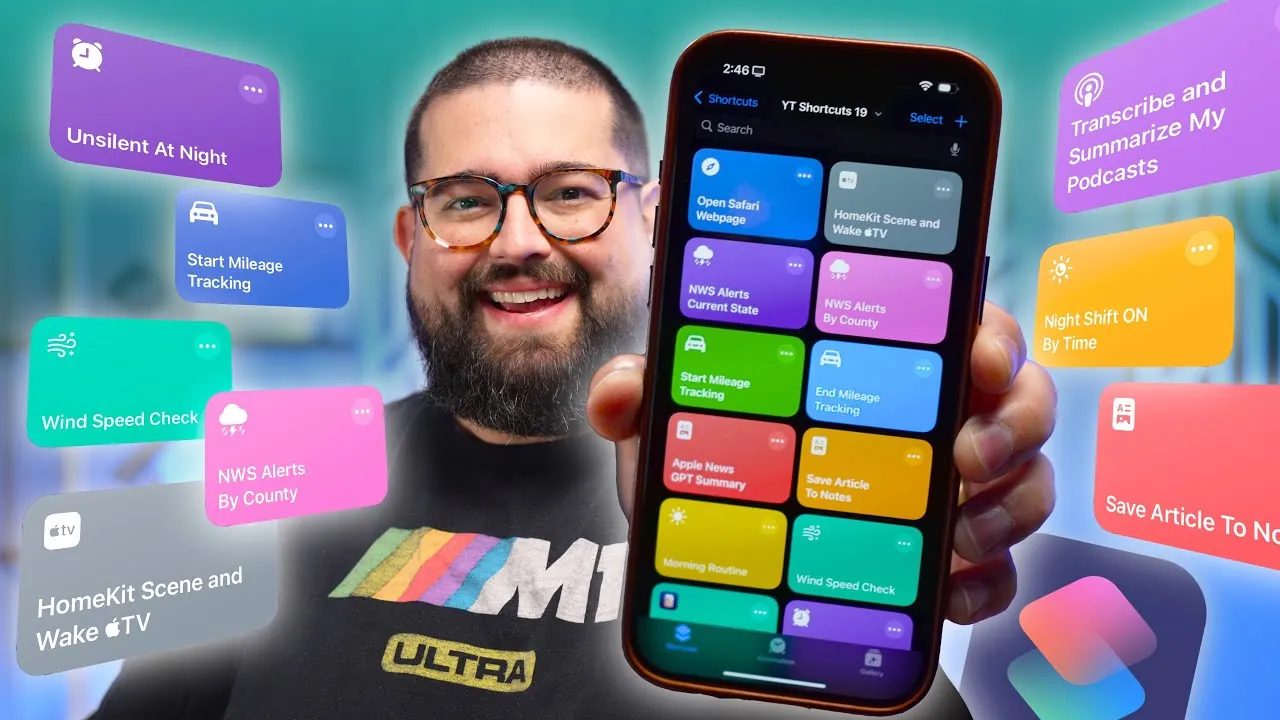
Looking to make your iPhone work smarter for you? These 13 shortcuts from Stephen Robles are designed to streamline your daily tasks and boost productivity. By using iOS automation, they save time and effort while offering practical solutions for everyday challenges. Each shortcut is fully customizable, allowing you to tailor them to your specific needs and preferences. Whether you’re managing your schedule, automating your smart home, or staying informed, these tools can transform how you use your device.

1. Podcast Transcription and Summarization
Effortlessly transcribe and summarize your favorite podcast episodes with this shortcut. It processes podcasts, even if they lack embedded transcripts in their RSS feeds, and saves the results—both transcripts and summaries—directly to Apple Notes. This ensures you can easily access key insights without additional effort. Whether you’re catching up on industry trends, educational content, or entertainment, this tool helps you retain valuable information while saving time.
2. Mileage Tracking Made Easy
Tracking mileage for work or personal use can be tedious, but this shortcut simplifies the process. By using your iPhone’s location data, it logs start and end points, calculates the distance traveled, and saves the data to a Numbers spreadsheet. You can trigger it manually, via Bluetooth, or through CarPlay, making it a versatile and reliable solution for drivers who need accurate mileage records for tax purposes, reimbursements, or personal tracking.
3. Smarter Apple TV Automation
Enhance your Apple TV experience with this shortcut, which allows you to wake your Apple TV, open specific apps, and activate HomeKit scenes. Whether you’re preparing for a movie night, starting a workout, or setting up a gaming session, this tool ensures a seamless and personalized experience. By automating these tasks, you can focus on enjoying your entertainment without unnecessary setup steps.
4. Real-Time Weather Alerts
Stay informed and prepared for severe weather with this shortcut. It pulls real-time alerts from the National Weather Service API and notifies you of significant weather changes in your area. Additionally, it can trigger smart home devices, such as adjusting light colors or activating specific scenes, based on the alerts. This integration ensures you’re always ready for unexpected conditions, whether it’s a storm, heatwave, or sudden temperature drop.
5. Daily Webpage Notifications
Keep up with important updates from your favorite websites using this shortcut. It sends a notification at a set time, prompting you to open a designated webpage. Fully automatable, this tool is perfect for staying on top of news, stock market updates, or any other regularly visited site. By eliminating the need for manual reminders, it ensures you never miss critical information.
6. Apple News and Safari Article Summaries
Simplify article management with this shortcut, which uses ChatGPT to summarize Apple News articles. It also saves full Safari articles, including text and images, to Apple Notes for easy access. Whether you’re conducting research, saving content for later, or simply staying informed, this tool helps you stay organized and ensures you can quickly review the main points of any article.
7. Morning Routine Overview
Start your day with a comprehensive overview of your schedule. This shortcut compiles calendar events, weather updates, travel time, and reminders into a single, easy-to-read report. You can choose to have it displayed on your screen or read aloud, providing a convenient way to prepare for the day ahead. By consolidating essential information, it helps you stay focused and organized from the moment you wake up.
8. Smart Home Automation
Elevate your smart home experience with this shortcut, which adjusts settings based on environmental conditions. For example, it can retract window shades during high winds, turn on lights when it gets dark, or activate specific HomeKit scenes based on your preferences. By automating these tasks, you can create a more responsive and efficient living space that adapts to your needs.
9. Social Media Volume Control
Avoid being startled by loud social media notifications with this shortcut. It mutes social media apps upon opening and restores your preferred volume settings when you revisit the app. Using Data Jar to track the last opened app, this tool ensures a quieter browsing experience without compromising functionality. It’s an ideal solution for maintaining focus and reducing distractions.
10. Silent Mode Automation
Never forget to adjust your phone’s sound settings again. This shortcut automatically disables silent mode at night and re-enables it in the morning. Triggered by connecting or disconnecting your phone from a charger, it offers a hassle-free way to manage your device’s sound settings. This ensures you won’t miss important notifications during the day while maintaining a quiet environment at night.
11. Night Shift Automation
Protect your eyes and improve sleep quality with this shortcut, which enables or disables Night Shift mode based on the time of day or app usage. By reducing blue light exposure, it helps you wind down in the evening and stay focused during the day. This tool is particularly useful for maintaining a healthy balance between screen time and rest.
12. Podcast Automation
For podcast enthusiasts, this shortcut takes convenience to the next level. It automatically downloads and transcribes podcast episodes into Apple Notes, making sure you never miss important details. You can schedule it to run daily for specific shows, making it a valuable tool for staying informed and organized. Whether you’re following educational content or entertainment, this shortcut enhances your listening experience.
13. Customizable Shortcuts for Every Need
These shortcuts are designed with flexibility in mind, allowing you to adapt them to your unique requirements. For instance, you can add new podcasts or RSS feeds to the transcription shortcut, making sure it evolves with your interests. Resources for finding RSS feeds are also included, making it easy to expand your automation capabilities. By customizing these tools, you can create a personalized and efficient workflow that suits your lifestyle.
Explore further guides and articles from our vast library that you may find relevant to your interests in iPhone Shortcuts.
- Top 15 iPhone Shortcuts to Save Time and Stay Organized
- 23 iPhone Shortcuts That Will Blow Your Mind
- 13 Awesome iPhone Shortcuts in iOS 18
- BLOW UP Your iPhone: Epic Shortcuts for Wallpapers & Icons
- 15 Awesome iPhone Shortcuts To Try Out
Source & Image Credit: Stephen Robles
Disclosure: Some of our articles include affiliate links. If you buy something through one of these links, Geeky Gadgets may earn an affiliate commission. Learn about our Disclosure Policy.
