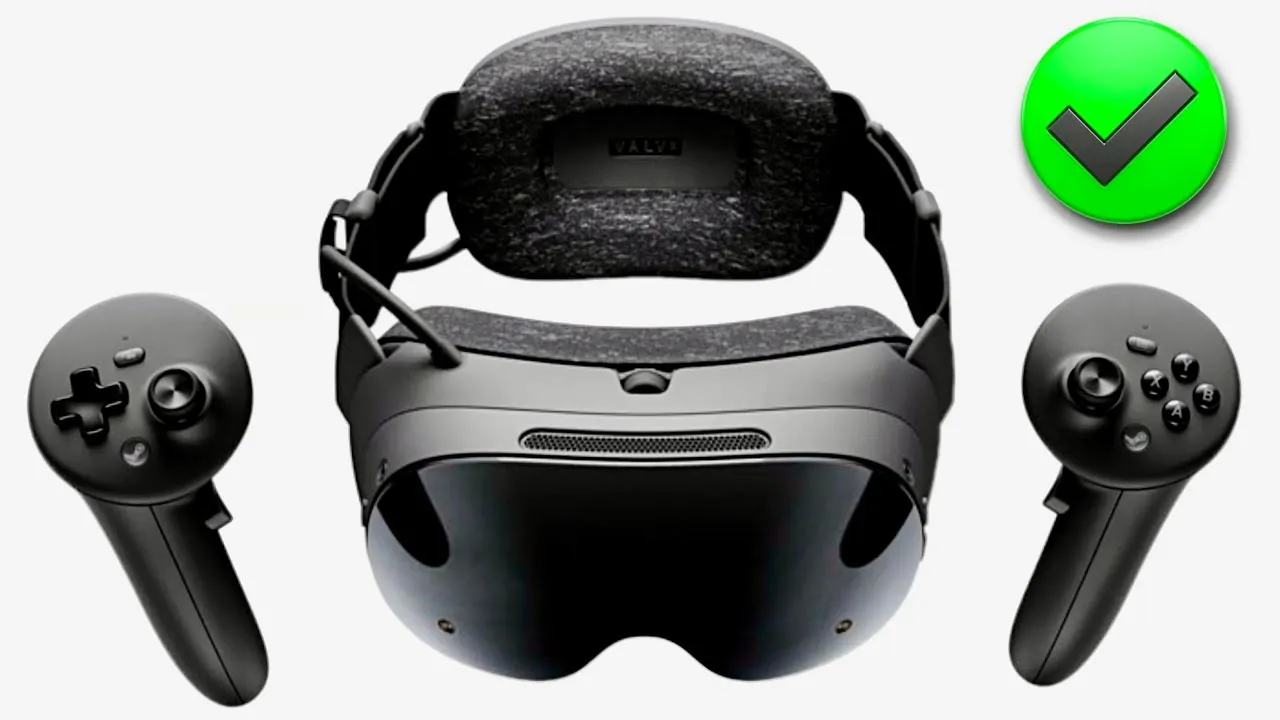
Valve’s new “Steam Frame Verified” standard sets a clear benchmark for standalone VR games, requiring a minimum frame rate of 90 FPS to ensure smoother visuals and reduce motion sickness. This initiative, highlighted by Gamertag VR, emphasizes the importance of consistent performance in maintaining immersion, especially in fast-paced or graphically demanding games. By introducing this verification system, Valve not only enhances the user experience but also provides developers with a clear framework to optimize their titles for the standalone VR ecosystem.
In this explainer, you’ll learn how the 90 FPS standard impacts both developers and players, from the technical requirements it imposes to the broader implications for game quality. You’ll also discover how Valve’s integration of Proton expands the platform’s compatibility with PCVR titles and why the hardware powering Steam Frame plays a crucial role in maintaining these performance standards. Whether you’re a gamer or a developer, understanding these details offers valuable insight into the evolving landscape of VR gaming.
Valve’s 90 FPS VR Standard
TL;DR Key Takeaways :
- Valve has introduced the “Steam Frame Verified” badge, requiring standalone VR games to achieve a minimum of 90 FPS, enhancing user experience and minimizing motion sickness.
- The Steam Frame platform is powered by advanced hardware, including the Qualcomm Snapdragon Gen 3 chip and 16GB of RAM, supporting refresh rates up to 144 Hz for smoother gameplay.
- Proton integration allows x86 PC games to run on the ARM-based Steam Frame platform, expanding the game library while making sure optimized performance for verified titles.
- The platform supports both standalone VR and PCVR games, allowing wireless streaming of high-quality PCVR titles and broadening access to immersive gaming experiences.
- In addition to VR, the platform supports non-VR and 2D games, requiring a minimum performance of 30 FPS at 720p, making sure versatility and inclusivity for a wide range of gamers.
- Full Valve Presentation
The Importance of 90 FPS in VR
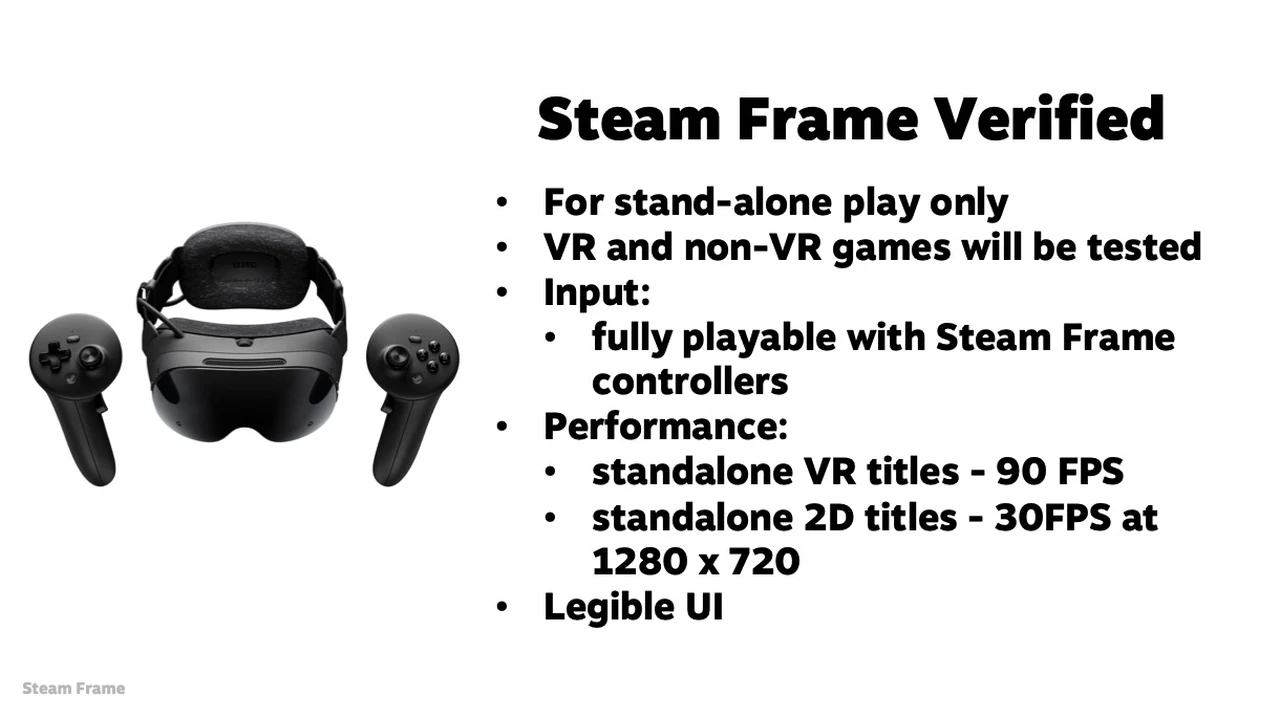
Valve’s decision to enforce a 90 FPS minimum for standalone VR games is a deliberate move to improve gameplay fluidity and user comfort. In VR, where the immersive experience depends on seamless visuals, even minor lag or stuttering can cause motion sickness and disrupt the sense of presence. By adhering to this standard, games deliver smoother visuals and more responsive interactions, particularly in fast-paced or graphically demanding scenarios. The “Steam Frame Verified” badge acts as a seal of quality, assuring users that a game has been optimized to meet these performance criteria. This standard not only enhances the gaming experience but also builds trust in the platform’s commitment to quality.
Advanced Hardware Supporting the Standard
The Steam Frame platform is built on innovative hardware, including the Qualcomm Snapdragon Gen 3 chip and 16GB of RAM. This configuration supports refresh rates of up to 144 Hz in experimental mode, providing performance that rivals or surpasses other standalone VR headsets like the Meta Quest 3. While the platform’s resolution improvements are incremental, its robust processing power ensures smoother gameplay and better support for resource-intensive titles. This hardware foundation is critical for maintaining the 90 FPS standard across a wide variety of games, making sure a consistent and high-quality experience for users.
Proton Integration and Game Compatibility
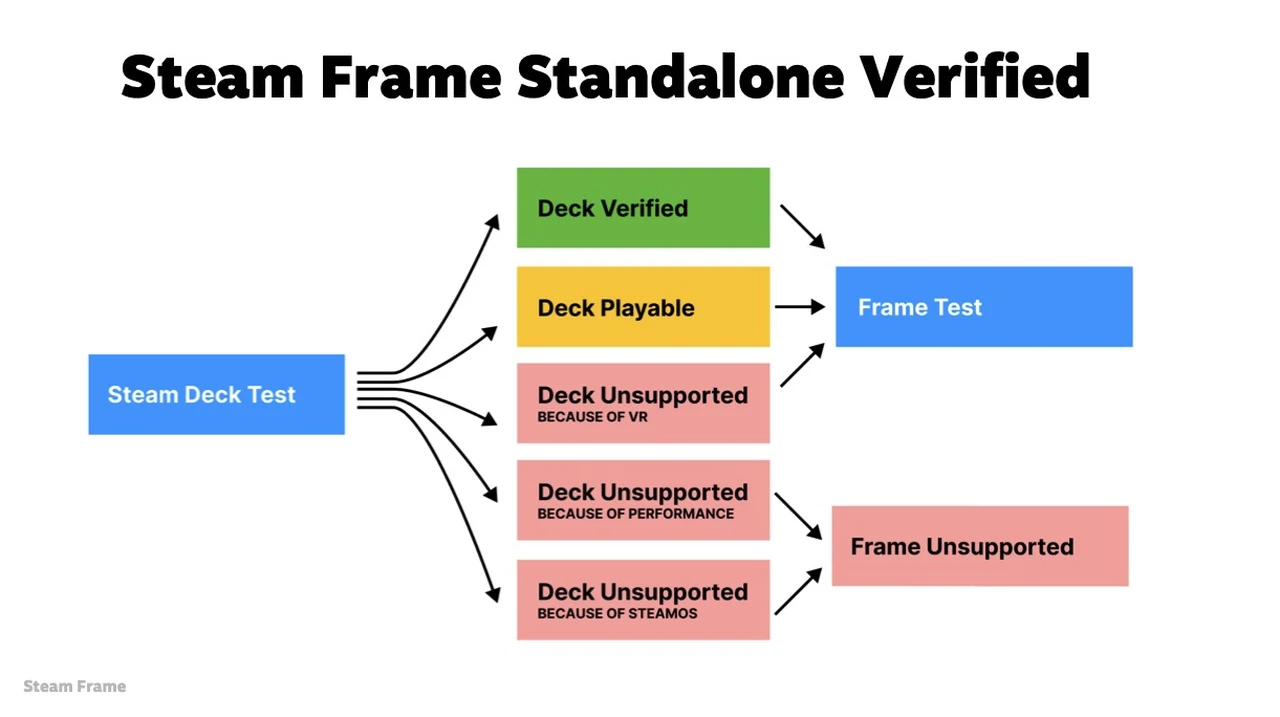
A key feature of the Steam Frame platform is its integration of Proton, a compatibility layer that enables x86 PC games to run on its ARM-based architecture. This innovation significantly expands the platform’s game library by allowing users to access their existing Steam collections. However, performance may vary for titles not specifically optimized for the platform. Games that meet the “Steam Frame Verified” criteria, whether standalone or PCVR, deliver a more reliable and consistent experience. Proton’s inclusion highlights Valve’s dedication to bridging the gap between traditional PC gaming and standalone VR, offering gamers greater flexibility and choice.
Expanding the VR Ecosystem with PCVR Support
The Steam Frame platform also supports PCVR games, allowing developers to optimize their titles for the device without the need to create entirely new standalone versions. Verified PCVR games can be streamed wirelessly, eliminating the requirement for a high-end gaming PC. This feature enhances the platform’s versatility, granting users access to a broader library of high-quality VR experiences. By adhering to the 90 FPS standard, developers can ensure that their PCVR games perform as smoothly as native standalone titles, further enriching the platform’s appeal to a diverse audience.

Below are more guides on SteamOS from our extensive range of articles.
- Budget SteamOS Mini PC for Living Room Gaming and Streaming
- SteamOS Update Boosts Performance for Older Games on Steam Deck
- MinisForum V3 Gaming Tablet Running SteamOS 3.8 with 165Hz Display
- Worlds Smallest DIY Steam Machine : Ryzen 7840U for Steady 1080p Play
- Full Guide to Installing SteamOS 3.8 on Legion Go S
- Steam Machine Pricing Tipped at $600 to $650 with Supply Tight
- Build a Budget Steam Machine That Easily Hits 1440p
- Anti-cheat is coming to Steam Hardware & SteamOS
- SteamOS Beta Update Fixes 1,000 Game Library Bug on Steam Deck
- ROG Flow Z13 Tablet Loaded with SteamOS 3.9, 1440p Gaming & More
Standards for Non-VR and 2D Games
In addition to VR, the Steam Frame platform accommodates non-VR and 2D games. To earn the verification badge, these titles must meet a minimum performance threshold of 30 FPS at 720p resolution, aligning with the standards set by the Steam Deck. This ensures that users can enjoy a wide range of gaming experiences, from immersive VR adventures to traditional 2D games, without compromising on performance or quality. This inclusivity broadens the platform’s appeal, making it a versatile choice for gamers with varied preferences.
Developer Tools and Opportunities
Valve provides developers with a suite of tools to help optimize their games for the Steam Frame platform. By meeting the 90 FPS standard, developers can tap into a growing standalone VR audience while maintaining compatibility with the broader Steam ecosystem. While standalone versions of games may prioritize performance over graphical fidelity compared to their PCVR counterparts, this trade-off ensures a smoother and more enjoyable experience for players. This balance between accessibility and quality is a cornerstone of the platform’s success, offering developers a unique opportunity to expand their reach and engage with a dedicated VR community.
What the Standard Means for Gamers
For gamers, the “Steam Frame Verified” badge serves as a clear and reliable indicator of a game’s performance and quality. Whether exploring a standalone VR title or streaming a PCVR game wirelessly, verified games guarantee an optimized and consistent experience. This transparency enables users to make informed decisions about which games to play, enhancing their overall satisfaction with the platform. By prioritizing performance and compatibility, Valve has created a user-centric ecosystem that caters to both casual players and dedicated VR enthusiasts, making sure that everyone can enjoy a seamless and immersive gaming experience.
Shaping the Future of VR Gaming
Valve’s introduction of the 90 FPS standard for Steam Frame Verified games represents a significant step forward in standalone VR gaming. By combining state-of-the-art hardware, innovative compatibility solutions like Proton and a rigorous verification process, the platform delivers a seamless and high-quality experience. At the same time, it opens new opportunities for developers to optimize their games and reach a broader audience. Whether you are a seasoned VR gamer or new to the medium, the Steam Frame platform offers a glimpse into the future of immersive gaming, setting a new benchmark for performance and quality in the VR landscape.
Media Credit: Gamertag VR
Disclosure: Some of our articles include affiliate links. If you buy something through one of these links, Geeky Gadgets may earn an affiliate commission. Learn about our Disclosure Policy.
