If you are looking for an inexpensive way to create your very own tablet, then this hack using a $170 Infocast Viewer might be of interest to you.
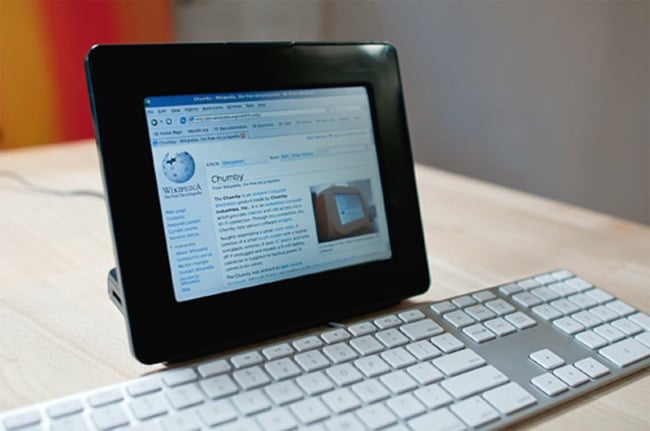
The Insignia Infocast is available to purchase for $170 and is equipped with an 800-MHz processor, 2 GB memory, an 8-inch LCD touchscreen, Wi-Fi connectivity, and two USB 2.0 ports. It runs the Linux 2.6 operating system. The only thing the Insignia doesn’t have is a battery pack, so you will need to stay tethered to a wall socket.
Features and Capabilities
The versatility of this little viewer allows the possibility of many ports to be loaded. An example of the versatility of the platform is hb’s recent port of the Qt UI framework running webkit to the Infocast, pictured running above. This means that you can potentially run a variety of applications and interfaces on the Infocast, making it a flexible tool for developers and hobbyists alike.
The Infocast’s 8-inch touchscreen is quite responsive, and the 800-MHz processor, while not the fastest on the market, is sufficient for basic tasks and applications. The 2 GB of memory allows for decent multitasking capabilities, and the Wi-Fi connectivity ensures that you can stay connected to the internet for browsing, streaming, and downloading content.
Expanding the Infocast’s Potential
One of the most exciting aspects of the Infocast is its potential for customization. By leveraging the Linux operating system, users can install a variety of software and tools to enhance the device’s functionality. For instance, you can install a web browser, media player, or even use it as a digital photo frame. The two USB 2.0 ports provide additional flexibility, allowing you to connect peripherals such as keyboards, mice, or external storage devices.
For those interested in hacking and modifying the Infocast, full instructions on how to prepare the hack are available from the bunnie website and the Chumby Wiki. These resources provide detailed guides on how to get started, including the necessary software and steps to follow. By following these instructions, you can unlock the full potential of the Infocast and transform it into a versatile and powerful device.
In addition to the resources mentioned above, there are also various online communities and forums where you can find support and share your experiences with other Infocast users. Websites like Wired and Hack-a-day often feature articles and discussions about similar projects, providing valuable insights and inspiration for your own Infocast hack.
The Insignia Infocast offers a cost-effective and flexible platform for creating your own tablet or customized device. With its responsive touchscreen, decent processing power, and the ability to run a variety of software, the Infocast is an excellent choice for hobbyists and developers looking to experiment and innovate. By following the available guides and tapping into the online community, you can unlock the full potential of this versatile device and create something truly unique.
Disclosure: Some of our articles include affiliate links. If you buy something through one of these links, Geeky Gadgets may earn an affiliate commission. Learn about our Disclosure Policy.
