Samsung has officially launched the One UI 9 update, starting with the Galaxy S26 series and gradually expanding to other Galaxy devices in the coming months. This update introduces a range of features designed to enhance personalization, productivity, security, and overall usability. Whether you own a Galaxy S26 Ultra or a Galaxy Z Fold8 Ultra, One UI 9 aims to provide a more seamless and intuitive experience, making sure that your device adapts to your needs.
Which Devices Are Getting One UI 9?
The initial rollout of One UI 9 includes the Galaxy S26, S26+, and S26 Ultra, alongside the Galaxy Z Fold8 Ultra, Fold8 and Flip8. Samsung has confirmed plans to extend the update to additional Galaxy devices in the coming months. This phased approach reflects Samsung’s commitment to supporting its diverse Galaxy ecosystem, making sure that users across a wide range of devices can benefit from the latest features.
By prioritizing compatibility across its lineup, Samsung continues to demonstrate its dedication to delivering consistent updates that enhance the user experience for both flagship and older devices.
Personalization Features: Making Your Device Truly Yours
One UI 9 introduces advanced tools that allow you to customize your device to better fit your lifestyle. These features are designed to make your Galaxy device feel more personal and intuitive:
- My FanCam: A dynamic video-tracking tool that keeps a selected person centered in the frame, ideal for content creators capturing movement or live events.
- Now Brief: A customizable daily summary powered by generative AI, offering editable cards with updates on health, weather and other key information tailored to your preferences.
- Warranty and Care: A built-in feature in the settings menu that allows you to check your device’s warranty status, run diagnostics and schedule repairs directly from your phone.
These personalization tools are designed to simplify how you interact with your device, giving you greater control over its functionality while making sure it aligns with your daily routines.
Boosting Productivity: Tools for Everyday Efficiency
Samsung has placed a strong emphasis on productivity with One UI 9, introducing features that streamline tasks and reduce manual effort. These updates are particularly useful for users who rely on their devices for work, creativity, or organization:
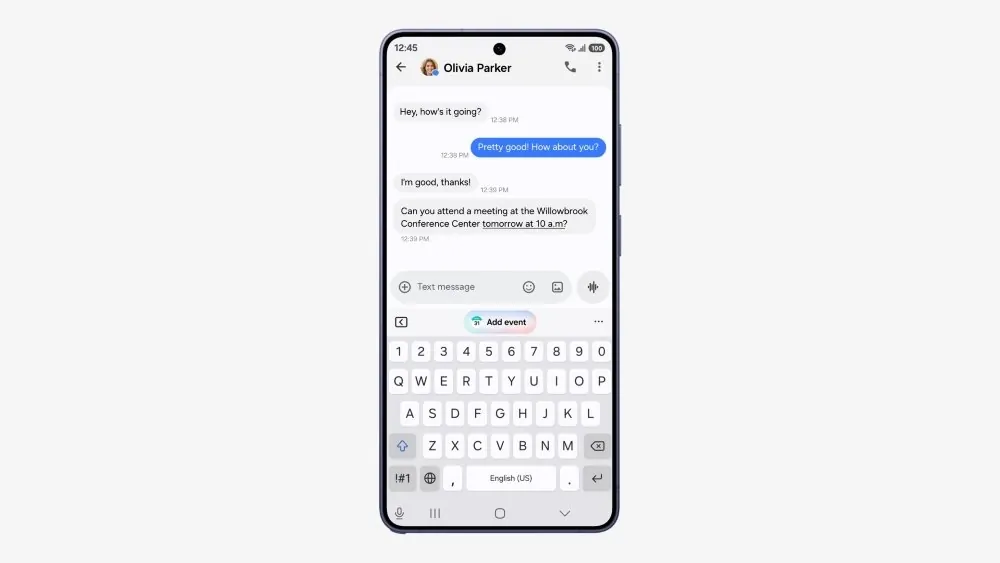
- Now Nudge: A context-aware assistant that suggests actions like saving a location, accessing a reservation, or setting reminders during conversations, helping you stay organized effortlessly.
- Creative Studio: A tool for creating personalized images, greetings, or designs, with event-based prompts to inspire creativity and simplify the design process.
- Interpreter: An upgraded real-time language translation tool with a new Thread View for easier navigation of multilingual conversations and faster playback when paired with Galaxy Buds.
- Document Scan: Optimized for curved or folded materials, this feature offers improved editing options and enhanced usability on larger screens, such as foldable devices.
- Voice Recorder: Now equipped with clearer, structured summaries, making it easier to review and extract key points from your recordings.
These tools are designed to enhance your productivity, whether you’re managing work tasks, creating content, or staying organized in your personal life.
Enhanced Security and Privacy: Keeping Your Data Safe
Security and privacy remain a cornerstone of Samsung’s One UI updates and One UI 9 is no exception. The update introduces several new features aimed at protecting your data and giving you greater control over your device’s security:
- Security Brief: Provides alerts about malware, unknown apps and unnecessary permissions, helping you maintain a secure device environment.
- Privacy Alerts: Powered by on-device AI, this feature identifies potential risks, such as unauthorized background access to sensitive permissions and notifies you immediately.
- Scam Detection: Expanded to cover additional countries, including Japan, Canada and India, offering broader protection against fraudulent activities and phishing attempts.
These features work together to ensure your device remains secure while empowering you with tools to manage your privacy effectively.
AI-Powered Usability: Smarter Interactions Across Devices
One UI 9 uses artificial intelligence to make your interactions with Galaxy devices more intuitive and efficient. AI plays a central role in reducing repetitive tasks, streamlining everyday activities and enhancing usability across the Galaxy ecosystem. Whether you’re using a smartphone, foldable device, or wearable, these AI-driven improvements ensure a consistent and seamless experience.
For example, AI integration in features like Now Nudge and Privacy Alerts not only simplifies tasks but also enhances your device’s ability to anticipate your needs. This smarter approach to usability ensures that your Galaxy device adapts to your habits, making it a more effective tool in your daily life.
What’s Next for Galaxy Users?
The One UI 9 update represents a significant step forward in Samsung’s ongoing efforts to deliver user-centric innovations. By combining enhanced personalization, productivity, security and AI-driven usability, this update ensures that your Galaxy device evolves to meet your needs. As the rollout continues to reach more devices, One UI 9 is poised to redefine how you interact with your technology, making it smarter, safer and more efficient.
Samsung’s commitment to providing meaningful updates across its ecosystem ensures that users can look forward to a more connected and intuitive experience, regardless of the device they use. With One UI 9, Samsung continues to set a high standard for mobile software, offering features that enhance both functionality and user satisfaction.
Source: Samsung
Disclosure: Some of our articles include affiliate links. If you buy something through one of these links, Geeky Gadgets may earn an affiliate commission. Learn about our Disclosure Policy.
