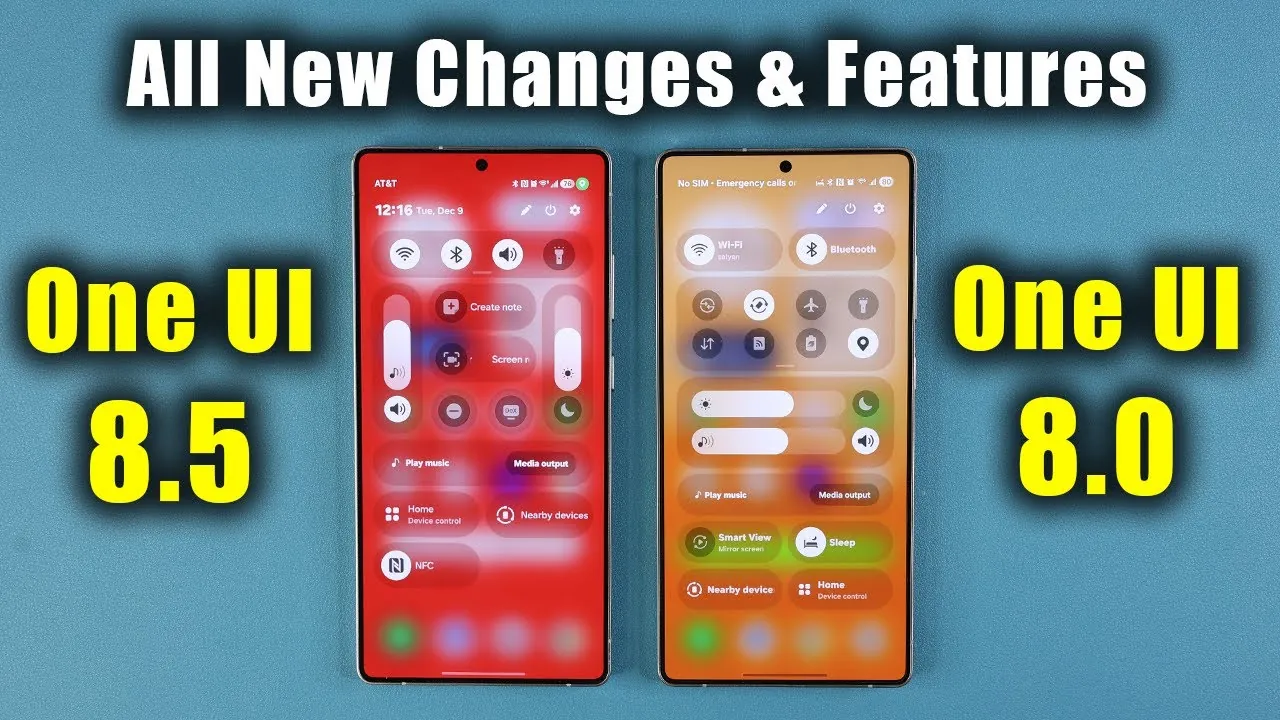
Samsung has introduced One UI 8.5, an evolution of its custom Android interface, building upon the foundation laid by One UI 8.0. This latest update focuses on enhancing usability, personalization, and seamless integration within the Samsung ecosystem. With features ranging from dynamic wallpapers to AI-powered tools, One UI 8.5 delivers a more refined and intuitive user experience. Below is an in-depth look at the most notable updates and features. The video below from Sakitech gives us more details.

Streamlined Settings and Interface
One UI 8.5 brings a more organized and visually appealing settings menu, designed to simplify navigation and reduce unnecessary complexity. By removing descriptions for menu items, the interface feels less cluttered and more user-friendly. Key improvements include:
- A redesigned software update menu that simplifies the process of checking for and installing updates.
- A slimmer battery icon, contributing to a sleeker and more modern appearance.
- Standardized search bar designs across apps and settings, making sure a consistent and cohesive user experience.
These changes are aimed at making everyday interactions with your device faster, more intuitive, and visually harmonious.
Dynamic Wallpapers and Weather Features
Personalization takes a significant leap forward with the introduction of dynamic wallpapers. A new “Weather” toggle in the wallpaper menu allows users to apply live weather effects to their home screens, creating a more interactive and visually engaging experience. Enhancements to the weather app further elevate its utility:
- Detailed allergy breakdowns, offering valuable health insights tailored to your location.
- Redesigned widgets that provide quick access to essential weather data, such as temperature, precipitation, and air quality.
These updates combine functionality with aesthetic appeal, offering a more immersive and personalized experience for users.
Clock and Alarm Redesigns
The clock and alarm interfaces have been reimagined to enhance both usability and visual appeal. Notable updates include:
- A refreshed stopwatch interface featuring graphical updates and a floating menu bar for easier navigation and control.
- Live weather backgrounds integrated into alarms and timers, adding a dynamic and informative touch to these everyday tools.
These improvements make time management tools not only more functional but also more engaging and visually appealing.
Enhanced Control Panel Customization
Customization remains a core focus in One UI 8.5, particularly within the control panel. Users now have greater flexibility to tailor the interface to their preferences. Key enhancements include:
- The ability to resize and reposition quick toggles and widgets, allowing for a more personalized layout.
- Smoother animations and improved interaction options, creating a more seamless and responsive experience.
These updates empower users to create a control panel that aligns with their unique needs and preferences, enhancing both functionality and ease of use.
Revamped Folder and App Drawer Design
Navigation and aesthetics have been refined in the folder and app drawer interfaces, making it easier to organize and access your apps. Key changes include:
- Relocated color and opacity settings for folders, making customization more accessible and intuitive.
- A more prominent search bar in the app drawer, improving visibility and usability for quicker app searches.
These updates streamline navigation and contribute to a more polished and user-friendly interface.
Device Care and Storage Innovations
The device care menu in One UI 8.5 has been updated with subtle design tweaks to improve readability and usability. Information is now compartmentalized with drop shadows, creating a cleaner and more organized appearance. A standout addition is the “Storage Share” feature, which enables users to:
- Seamlessly share files across Samsung devices within the ecosystem.
- Assist collaboration and simplify data transfer between devices.
These innovations enhance device management and strengthen the integration of Samsung’s ecosystem, making it easier to manage and share data across devices.
AI-Powered Gallery Tools
The gallery app has been upgraded with advanced AI-powered tools designed to simplify photo editing while giving users greater control. Key features include:
- A “Keep Editing” option, allowing users to refine AI-based edits without starting over, making sure a smoother editing process.
- An editing history view, providing a clear overview of changes and allowing users to revert or adjust edits as needed.
These tools strike a balance between automation and user control, making photo editing more efficient and flexible for users of all skill levels.
Additional Enhancements
Several smaller updates further enhance the One UI 8.5 experience, contributing to a more cohesive and user-friendly interface. These include:
- A redesigned phone app with a floating menu bar, simplifying navigation between tabs and improving usability.
- Improved widget search bars, allowing quicker access to widgets and easier customization of the home screen.
While subtle, these refinements collectively enhance the overall user experience, making the interface more intuitive and visually appealing.
Final Thoughts on One UI 8.5
Samsung’s One UI 8.5 builds upon the strengths of its predecessor, delivering a more streamlined, customizable, and integrated experience. With its focus on design consistency, enhanced personalization options, and deeper ecosystem integration, this update caters to a wide range of users, from casual smartphone owners to tech enthusiasts. Whether you’re drawn to the dynamic wallpapers, AI-powered gallery tools, or simplified settings, One UI 8.5 offers meaningful improvements that make your device more intuitive, functional, and visually engaging.
Enhance your knowledge on Samsung One UI 8.5 Features by exploring a selection of articles and guides on the subject.
- How Samsung One UI 8.5 Enhances Your Smartphone Experience
- Samsung One UI 8.5: Everything You Need to Know
- Samsung Galaxy S26 Ultra: Features, Specs, and More
- Samsung Galaxy S26 Ultra Leaks: Charging, Colors, One UI 8.5
- Major Security Enhancements Planned for Samsung One UI 8
Source & Image Credit: sakitech
Disclosure: Some of our articles include affiliate links. If you buy something through one of these links, Geeky Gadgets may earn an affiliate commission. Learn about our Disclosure Policy.
