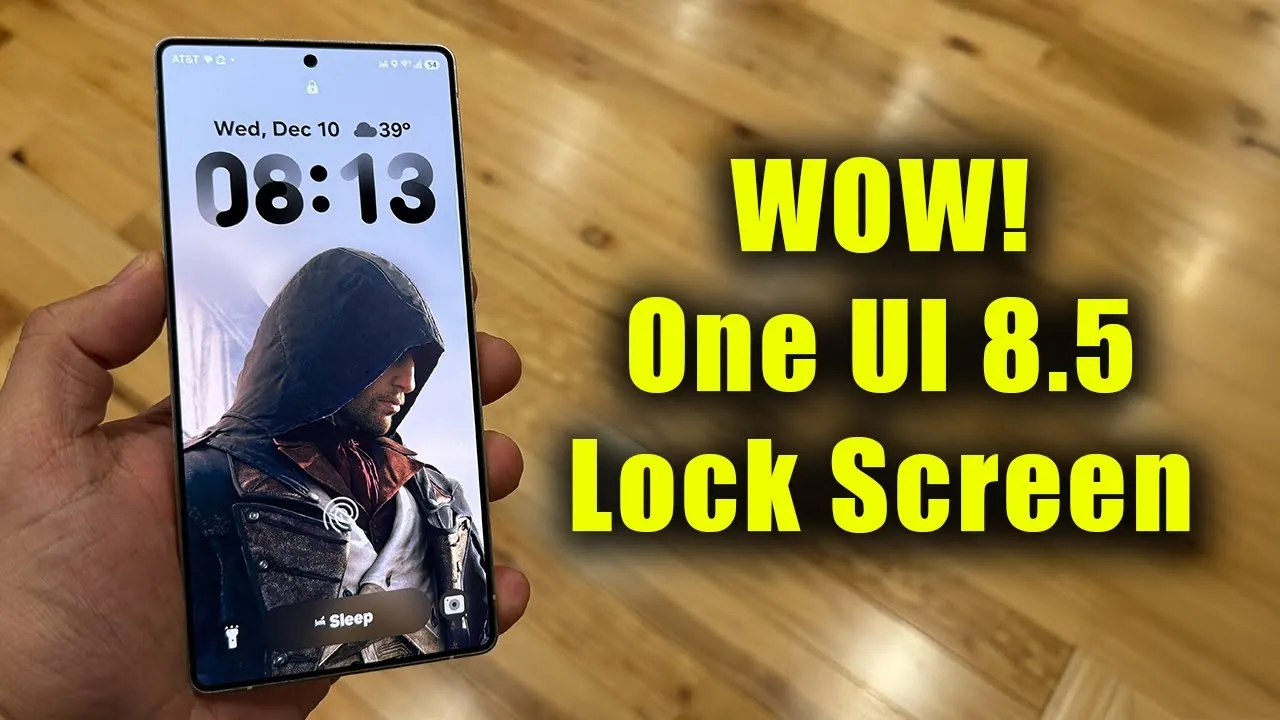
Samsung’s One UI 8.5 update introduces a fantastic approach to lock screen customization, combining advanced technology with a user-focused design philosophy. This update reflects Samsung’s commitment to creating a more dynamic, visually appealing, and personalized experience for its users. By integrating features such as AI-powered adjustments, dynamic blur effects, and enhanced clock customization, Samsung strikes a balance between automation and user control, making sure that the lock screen is both functional and aesthetically pleasing. The video below from Sakitech gives us a look at the new One UI 8.5.

Dynamic Blur Effects: Enhancing Depth and Focus
A standout feature of the One UI 8.5 update is the dynamic blur effect, which adds depth and clarity to lock screen backgrounds. This feature intelligently adjusts the blur intensity based on the wallpaper’s position, making sure that key elements like the clock and notifications remain in focus.
- The blur effect dynamically adapts as you reposition the wallpaper, maintaining readability and reducing visual clutter.
- This functionality enhances the aesthetic appeal of the lock screen while improving usability by emphasizing essential information.
The result is a polished and functional lock screen that seamlessly blends form and function, offering users a visually engaging experience without compromising practicality.
AI-Powered Adjustments: Intelligent Customization
The One UI 8.5 update uses artificial intelligence to streamline lock screen organization. By analyzing the visual elements of your chosen wallpaper, the system automatically optimizes the placement of key components, such as the clock, to ensure a clean and organized layout.
- The AI ensures that the clock remains centered and unobstructed, eliminating the need for manual adjustments.
- This feature is particularly beneficial for users who prefer a hands-off approach, delivering a polished lock screen effortlessly.
This intelligent functionality not only saves time but also ensures that the lock screen maintains a professional and cohesive appearance, catering to users who value simplicity and efficiency.
Clock Customization: Adaptive Colors and Gradients
Samsung has introduced significant enhancements to clock customization, focusing on both functionality and design. The clock now adapts its color to complement the wallpaper, making sure optimal legibility while maintaining a harmonious visual aesthetic.
- Adaptive colors allow the clock to blend seamlessly with the background, enhancing readability without disrupting the overall design.
- Subtle gradients add a layer of sophistication, elevating the lock screen’s visual appeal without overwhelming its simplicity.
These refinements transform the clock from a purely functional element into a design feature that enhances the overall user experience, making the lock screen both practical and visually engaging.
User-Controlled Customization: Empowering Personalization
While the update incorporates AI-driven automation, it also caters to users who prefer hands-on control. The One UI 8.5 update allows you to manually reposition the wallpaper and clock, offering a high degree of customization to suit individual preferences.
- This balance between automation and manual control ensures a lock screen experience that feels uniquely tailored to each user.
- Whether you prefer a minimalist layout or a more dynamic design, the interface adapts to your personal style.
By empowering users with greater flexibility, Samsung ensures that the lock screen remains as individual as the person using it, providing a platform for creative expression and personalization.
Enhanced Clock-Shifting Functionality: Greater Design Freedom
The update also introduces improvements to clock-shifting functionality, offering users greater freedom in arranging lock screen elements. This feature allows for precise adjustments to the clock’s position, allowing users to align it with their aesthetic preferences.
- The improved functionality supports a variety of styles, from clean and minimalist layouts to bold and dynamic designs.
- Users can position the clock at the center, offset, or aligned with other elements, making sure a cohesive and visually appealing lock screen.
This enhancement highlights Samsung’s dedication to providing a user-friendly interface that adapts to diverse tastes and preferences, making the lock screen a canvas for individual creativity.
Refined Aesthetic Enhancements: Subtle Yet Impactful
The One UI 8.5 update places a strong emphasis on refined aesthetic improvements, making sure that every detail contributes to a cohesive and visually appealing lock screen. From dynamic blur effects to adaptive clock gradients, each feature is designed to enhance the overall user experience.
- The focus on subtle details ensures a polished and professional look that aligns with modern design trends.
- These refinements reflect Samsung’s commitment to balancing functionality with design, creating a lock screen that is both intuitive and visually harmonious.
By prioritizing small yet meaningful improvements, Samsung delivers a lock screen experience that feels modern, sophisticated, and user-centric.
A New Standard in Lock Screen Design
Samsung’s One UI 8.5 update represents a significant step forward in lock screen customization, offering a thoughtful blend of AI-driven automation and user-controlled flexibility. With features like dynamic blur effects, adaptive clock customization, and enhanced clock-shifting functionality, the update caters to a wide range of user preferences, making sure that the lock screen is both functional and aesthetically pleasing.
Whether you prioritize convenience, personalization, or a combination of both, this update delivers a refined solution that enhances the lock screen’s visual and functional aspects. By focusing on subtle yet impactful improvements, Samsung continues to set a high standard for user interface design, reaffirming its position as a leader in the mobile technology industry.
Check out more relevant guides from our extensive collection on One UI 8.5 update that you might find useful.
- How Samsung One UI 8.5 Enhances Your Smartphone Experience
- One UI 8.5 Beta Features, Eligible Devices, and More
- Samsung One UI 8.5: Everything You Need to Know
- Samsung Galaxy S26 Ultra Leaks: Charging, Colors, One UI 8.5
- Samsung Drops One UI 8.5 Beta: Here’s What’s New
Source & Image Credit: sakitech
Disclosure: Some of our articles include affiliate links. If you buy something through one of these links, Geeky Gadgets may earn an affiliate commission. Learn about our Disclosure Policy.
