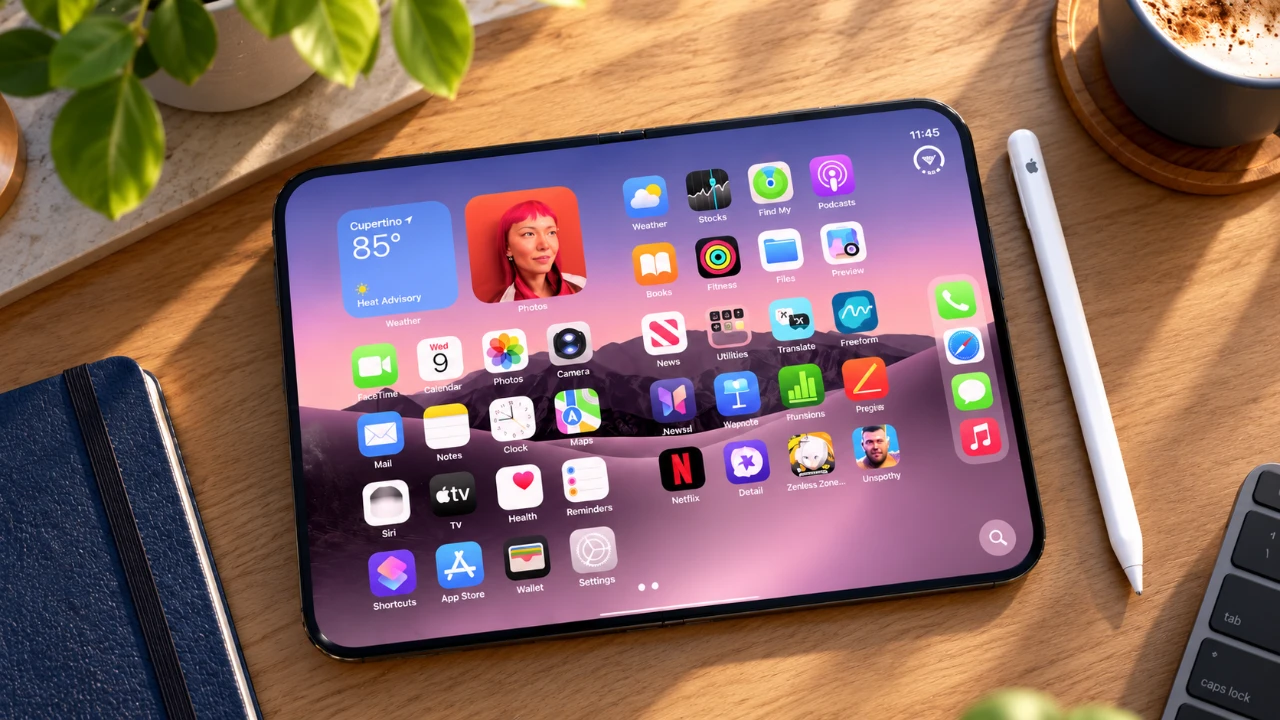
With the release of iOS 27.2, Apple has expanded the functionality of its devices by introducing Apple Pencil support for the iPhone Duo. This update is particularly appealing to creative professionals, students, and productivity enthusiasts who value precision tools for tasks like sketching, note-taking, and document markup. However, this feature comes with certain limitations, including compatibility restrictions and usability quirks. By examining the key aspects of this update, you can determine whether this functionality aligns with your specific needs and expectations. The video below from MacRumors gives us more details.

Compatibility: A USB-C Exclusive
If you’re considering using the Apple Pencil with the iPhone Duo, it’s essential to understand its compatibility limitations. Only the USB-C version of the Apple Pencil is supported, leaving older models with Lightning connectors incompatible. This restriction may be inconvenient for users who already own previous-generation Apple Pencils, as they will need to invest in the newer version.
Pairing and charging the Apple Pencil require a USB-C cable, which simplifies the process for those already using USB-C accessories. However, for users transitioning from older Apple devices, this shift may necessitate additional adapters or upgrades. Understanding these compatibility requirements is crucial before deciding to incorporate the Apple Pencil into your workflow.
Setup and Features: Streamlined Integration
Connecting the Apple Pencil to the iPhone Duo is a seamless process. Once plugged in via USB-C, an on-screen prompt appears, guiding you through the pairing process. iOS 27.2 introduces a dedicated settings menu for the Apple Pencil, offering several customization options to enhance usability. Key features include:
- “Only Draw with Apple Pencil”: This feature prevents accidental input from your hand while writing or drawing, making sure precision and reducing frustration.
- “Scribble”: Converts your handwriting into text, making note-taking faster and more efficient for students and professionals alike.
- Battery Monitoring: Displays the Apple Pencil’s charge level, so you’re always aware of its battery status and can plan accordingly.
These features are designed to provide a smooth and intuitive experience, catering to both casual users and professionals who rely on precision tools for their work.
Usability: Optimized for the Foldable Inner Display
The iPhone Duo’s foldable inner display is where the Apple Pencil truly shines. When unfolded, the larger screen offers ample space for tasks such as sketching, annotating documents, and detailed note-taking. This makes the device particularly appealing to artists, designers and professionals who require a portable yet versatile workspace.
However, the design is not without its challenges. Writing or drawing near the camera area on the inner screen can cause slight wobbling, which may affect precision during intricate tasks. For users who prioritize accuracy, this is an important consideration.
The outer cover screen, while functional, is less suited for extended use with the Apple Pencil. Its smaller size limits its practicality for detailed work, making it better suited for quick tasks like jotting down notes, signing documents, or making annotations on the go. Despite these constraints, the Apple Pencil remains a valuable tool for users who prioritize portability and convenience.
Screen Durability and Enhanced Writing Experience
The foldable inner display introduces durability concerns over time. Regular use of the Apple Pencil may result in faint lines appearing on the screen, though these can typically be removed with a polishing cloth. To address this, Apple has incorporated nano-texture technology into the inner display, providing a paper-like feel that enhances the writing experience. This tactile improvement makes using the Apple Pencil more comfortable and precise, particularly for extended writing or drawing sessions.
While this innovation is a welcome addition, the long-term durability of the foldable screen remains a potential concern. Users who plan to use the Apple Pencil extensively should consider investing in screen protectors or other accessories to maintain the display’s condition.
Magnetic Attachment: Practical Portability
Although not officially advertised, the Apple Pencil can magnetically attach to the hinge of the iPhone Duo. This unexpected feature adds a layer of convenience, allowing users to securely store the stylus when not in use. For professionals who frequently annotate documents or creatives who sketch on the go, this magnetic attachment enhances portability and ensures the Apple Pencil is always within reach.
This small but practical detail underscores Apple’s focus on user convenience, even in features that may not be prominently highlighted.
Limitations and Considerations
While the addition of Apple Pencil support to the iPhone Duo is a significant enhancement, it’s important to be aware of its limitations. Key factors to consider include:
- Wobble Issues: Writing near the camera area on the inner screen can disrupt precision, which may be problematic for detailed work.
- Outer Screen Constraints: The smaller cover screen is less practical for extended use, limiting its functionality for creative tasks.
- Compatibility Restrictions: Only the USB-C Apple Pencil is supported, excluding older models and potentially requiring additional investment.
These limitations may influence your overall satisfaction with the device, depending on how you intend to use it. For some users, these constraints may be minor inconveniences, while for others, they could outweigh the benefits.
Is the Apple Pencil on iPhone Duo Right for You?
The integration of Apple Pencil support with the iPhone Duo represents a step forward for users seeking a versatile tool for creativity and productivity. The foldable inner display, combined with features like nano-texture technology and magnetic attachment, makes the iPhone Duo a compelling option for on-the-go professionals, students and artists.
However, the limitations, such as compatibility with only the USB-C Apple Pencil, usability challenges on the outer screen and potential durability concerns, may not suit everyone. If you prioritize portability, precision, and the ability to annotate or draw on a foldable display, the iPhone Duo with Apple Pencil support could be a valuable investment. For others, these constraints might outweigh the benefits, making it essential to carefully evaluate your specific needs and preferences before deciding.
Here are more guides from our previous articles and guides related to iPhone Duo that you may find helpful.
- Early iPhone Duo 2 Leaks Reveal Major Hardware Upgrades
- iPhone Duo: Key Details Apple Barely Mentioned on Stage
- Apple’s iPhone Duo 2 Just Leaked: Everything Changing With the Next Foldable
- iPhone Duo Buyer’s Guide: How to Choose Without Regrets
- iPhone Duo vs. Galaxy Z Fold 8: Did Apple Just Catch Samsung?
- iPhone Duo: 5 Features That Make It Worth the Price
Source: MacRumors
Disclosure: Some of our articles include affiliate links. If you buy something through one of these links, Geeky Gadgets may earn an affiliate commission. Learn about our Disclosure Policy.
