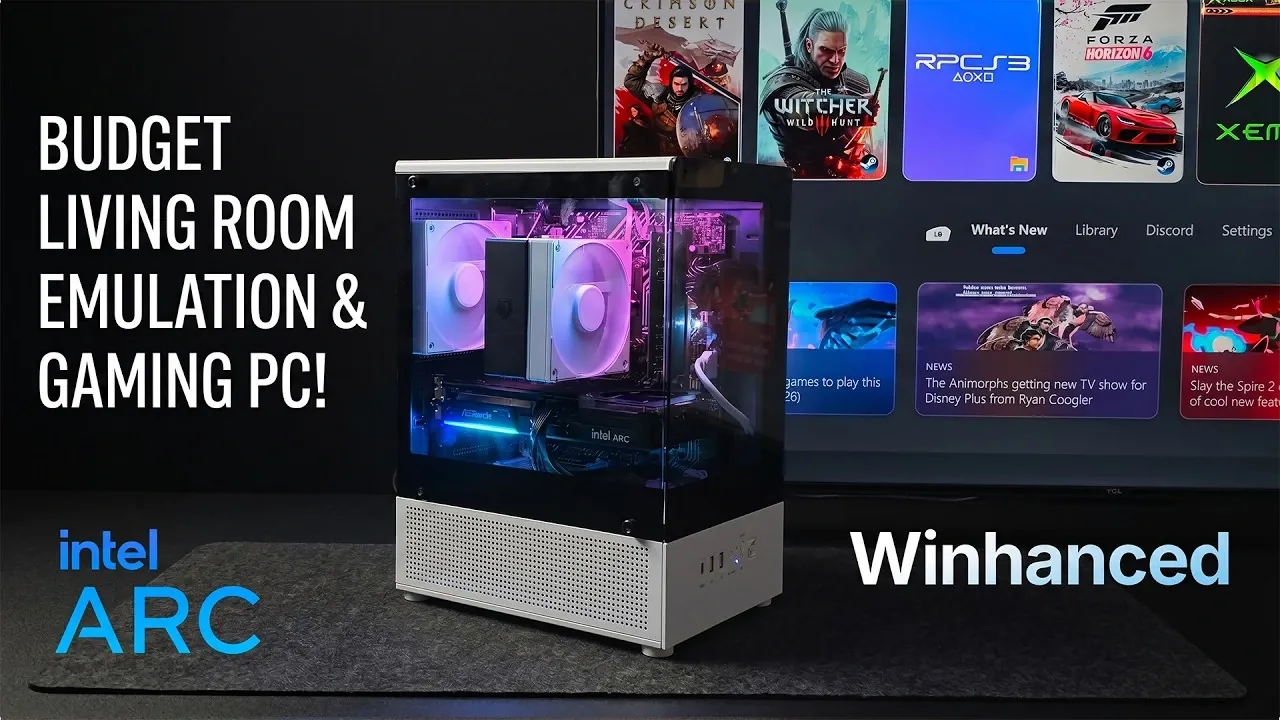
Building a gaming and emulation PC for your living room can be both affordable and effective. ETA Prime outlines a setup featuring the Intel Core i7-10700 processor and Intel Arc B570 GPU, which together provide reliable performance for 1440p gaming and advanced retro emulation. With 16GB of DDR4 RAM and a 512GB M.2 SSD, this build ensures quick load times and responsive gameplay, all while staying within a reasonable budget. The compact Cubix Mini Tower case adds a living room-friendly design, making it a practical choice for shared spaces.
Discover how to assemble this system with a focus on balancing performance and cost, including tips on selecting components like a semi-modular 600W PSU for future upgrades. Gain insight into configuring a custom “Win Enhanced” interface for gamepad-friendly navigation and optimizing the setup for both modern gaming and retro emulation. This overview provides the steps and considerations needed to create a functional and versatile entertainment system.
Key Components for Performance
TL;DR Key Takeaways :
- Build a cost-effective gaming and emulation PC with components like the Intel Core i7-10700 CPU, Intel Arc B570 GPU and 16GB DDR4 RAM, supporting 1440p gaming and high-end emulation.
- Efficient cooling is ensured with the ID Cooling IS-120 CPU cooler and a compact Cubix Mini Tower case with mesh panels and RGB fans for aesthetics and airflow.
- A 600W semi-modular power supply provides stable operation, reduced cable clutter and upgrade potential for future components like GPUs or storage.
- Enjoy smooth performance for modern AAA games and retro emulation, with technologies like Intel XESS and FSR enhancing frame rates and visuals.
- Optimize for living room use with a custom “Win Enhanced” interface for a console-like experience, offering affordability, upgradeability and seamless integration into your entertainment setup.
The foundation of any gaming and emulation PC lies in its core components. This build prioritizes performance and affordability by including:
- Processor: The Intel Core i7-10700, with its 8 cores and 16 threads, offers a strong balance of power and cost-effectiveness. It handles gaming, multitasking and emulation with ease.
- Motherboard: The ASUS B560 motherboard provides built-in Wi-Fi for seamless connectivity and a robust platform for your components.
- Memory: 16GB of DDR4 RAM ensures smooth performance for demanding games, emulators and multitasking scenarios.
- Storage: A 512GB M.2 SSD delivers fast load times and ample space for your game library, with room to expand as needed.
- Graphics Card: The Intel Arc B570 GPU, featuring 10GB of VRAM, supports 1440p gaming at high settings and excels in emulation tasks. Its Intel XESS technology enhances frame rates, making sure a fluid gaming experience.
This combination of components strikes a balance between performance and cost, making it ideal for gamers and retro enthusiasts alike.
Efficient Cooling and Compact Design
Thermal management is critical for maintaining system stability and longevity, especially in a compact living room setup. This build incorporates effective cooling solutions:
- CPU Cooler: The ID Cooling IS-120, equipped with an RGB fan, keeps the processor cool while adding a touch of visual flair.
- Case: The Cubix Mini Tower case, available in sleek black or white finishes, features mesh panels for improved airflow. Additional RGB fans not only enhance cooling but also contribute to the system’s aesthetics.
These components ensure that your PC remains cool and quiet, even during extended gaming or emulation sessions, making it a perfect fit for a living room environment.

Deep dive into the latest in DIY Steam Machine builds by exploring our other resources and articles.
- Don’t Wait for Valve: Build Your Own Steam Machine in 2026
- DIY Steam Machine : Why This Corsair Mini PC is the Ultimate Blueprint
- DIY Steam Machine Build : Skip the Mini PC, This Linux Steam Build Hits 1440p with Headroom
- The Secret to Getting the Ultimate Steam Machine? Build It Yourself
- Guide to Building Your Own Steam Machine : Zac Builds
- Why This 9-Liter DIY Steam Machine is the Ultimate Linux Gaming Console
- How to Recreate Valve’s Delayed Steam Machine at Home Today
- Why Building a Custom Steam Machine Beats Buying a Console
- Building Your Own DIY Steam Machine is Easier Than You Think
- How to Build a Console-Killing Steam Machine for Just $450
Power Supply and Upgrade Potential
A reliable power supply is essential for stable operation and future-proofing. This build includes:
- Power Supply: A 600W semi-modular Aiva PSU provides sufficient power for the Intel Arc GPU and other components. Its semi-modular design reduces cable clutter, improving airflow and simplifying the assembly process.
With dual 8-pin PCIe connectors and extra power headroom, this PSU supports potential upgrades, such as a more powerful GPU or additional storage, making sure the system remains versatile and adaptable over time.
Gaming and Emulation Performance
This system is designed to deliver exceptional performance for both modern gaming and retro emulation. Here’s what you can expect:
- Modern Games: Play AAA titles like Cyberpunk 2077, Red Dead Redemption 2, and Forza Horizon 6 at 1440p resolution with high settings, enjoying smooth frame rates and stunning visuals.
- Retro Emulation: Experience high-end emulation for platforms such as PS2, PS3 and the original Xbox, with many games running at resolutions up to 4K.
The inclusion of Intel XESS and FSR (FidelityFX Super Resolution) technologies further enhances performance, improving frame rates and visual quality for a more immersive gaming experience.
Living Room Optimization
A living room gaming PC should prioritize ease of use and comfort. This build achieves that by incorporating:
- Custom Interface: Replace the default Windows 11 interface with “Win Enhanced,” a streamlined, controller-friendly layout. This customization transforms the PC into a console-like experience, allowing you to navigate games and emulators effortlessly using a gamepad.
This feature ensures that the system integrates seamlessly into your living room setup, offering a relaxed and intuitive gaming experience from the comfort of your couch.
Affordability and Upgradeability
This build is designed with affordability and future upgrades in mind. By selecting cost-effective components and considering used parts where appropriate, you can achieve excellent performance without overspending. Key strategies include:
- Opting for the non-K version of the Intel Core i7-10700 to save on costs while maintaining strong performance.
- Leaving room for future upgrades, such as additional storage, enhanced cooling, or a more powerful GPU, to extend the system’s lifespan and capabilities.
This flexibility makes the build an excellent choice for gamers who want to maximize value while keeping their options open for future improvements.
By following this ETA Prime guide, you can assemble a versatile and budget-friendly gaming and emulation PC tailored for living room use. With carefully chosen components like the Intel Core i7 processor, Intel Arc GPU and DDR4 RAM, this system delivers a balance of performance and affordability. Whether you’re diving into modern AAA games at 1440p or revisiting retro classics through emulation, this build ensures a smooth and enjoyable experience. Its customizable interface and upgrade potential make it a practical and adaptable solution for gamers and retro enthusiasts looking to enhance their living room entertainment setup.
Media Credit: ETA PRIME
Disclosure: Some of our articles include affiliate links. If you buy something through one of these links, Geeky Gadgets may earn an affiliate commission. Learn about our Disclosure Policy.
