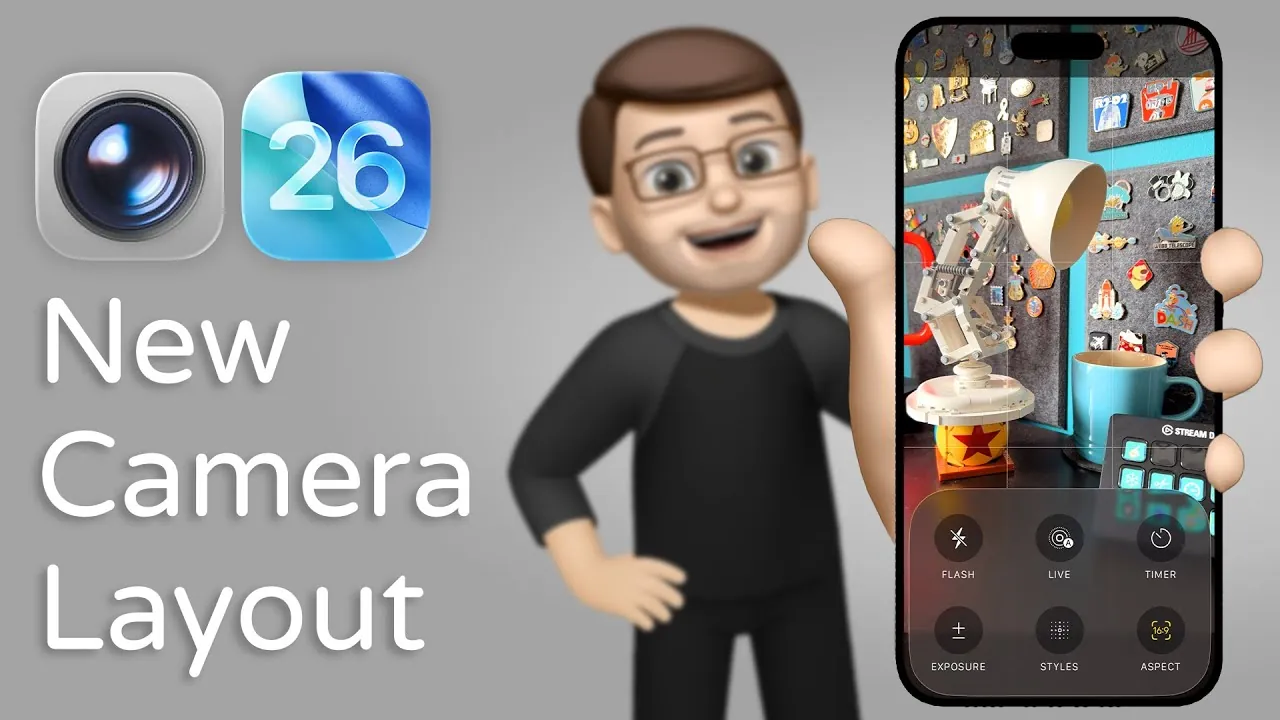
Apple’s iOS 26 brings a comprehensive redesign to the iPhone Camera app, focusing on usability, accessibility, and creative control. Whether you’re capturing moments casually or working on professional-grade content, the update reorganizes essential features, introduces new tools, and simplifies workflows. This enhanced design ensures that users can achieve high-quality results with minimal effort, making the app more versatile and efficient than ever. The video below from Jacob’s QuickTips gives us more details.
Faster and Intuitive Mode Navigation
Navigating between camera modes has been made significantly faster and more intuitive in iOS 26. By default, the app opens in either Photo or Video mode, catering to the most frequently used options. To switch to other modes such as Panorama, Portrait, or the newly introduced Spatial Photos mode, you can simply swipe sideways. This gesture-based navigation eliminates unnecessary steps, allowing you to adapt quickly to different shooting scenarios. The streamlined design ensures that you can focus on capturing the moment without being hindered by complex menus.
Direct Access to Key Controls
The redesigned interface prioritizes accessibility by placing essential controls directly within the app. Tapping the active mode, such as Photo or Video, reveals a dedicated control panel where you can adjust critical settings, including:
- Flash: Easily toggle between on, off, or auto settings.
- Exposure: Fine-tune brightness levels for optimal lighting.
- Style Adjustments: Apply filters or tone adjustments in real-time.
- Aspect Ratio: Choose between 4:3, 16:9, or square formats.
This centralized approach eliminates the need to navigate through multiple menus, making sure that frequently used tools are always within reach. The result is a more efficient and user-friendly experience.
Refined Photo and Video Settings
Photo and video settings have been restructured to provide greater control and simplicity. In the top-left corner of the app, users can now quickly adjust:
- Photo Format: Select between HEIF or JPEG for your images.
- Resolution: Choose the desired resolution for your photos or videos.
- File Type: Opt for standard or high-efficiency formats based on your storage needs.
For video recording, on-screen controls allow you to toggle between resolutions such as 1080p and 4K, as well as frame rates like 30fps or 120fps for slow-motion effects. The Action Mode, designed for capturing smooth footage during movement, is now directly accessible from the control panel. These enhancements empower users to produce professional-quality content without the need for external tools or extensive post-processing.
Improved Usability with Quick Toggles
Usability has been a central focus of the iOS 26 Camera app redesign. Previously, many settings required navigating to the iPhone’s Settings app, but now, most adjustments can be made directly within the Camera app itself. Quick toggles for commonly used features, such as:
- Gridlines: Enable or disable gridlines to assist with composition.
- HDR: Quickly toggle High Dynamic Range for balanced exposures.
- Live Photos: Activate or deactivate Live Photos with a single tap.
These quick-access options minimize interruptions, allowing you to focus entirely on capturing the perfect shot. The improved layout ensures that even advanced features are easy to find and use.
New and Enhanced Camera Modes
The iOS 26 update introduces significant improvements to existing camera modes while debuting innovative features that expand creative possibilities. Highlights include:
- Panorama Mode: Enhanced stitching technology ensures seamless wide-angle shots, even in challenging lighting conditions.
- Portrait Mode: Improved edge detection delivers more precise subject isolation, resulting in professional-quality depth-of-field effects.
- Spatial Photos Mode: A new feature that uses advanced hardware to create immersive, multi-dimensional images, offering a new way to capture and experience moments.
These updates push the boundaries of what the iPhone Camera can achieve, giving users more tools to explore their creativity. Whether you’re capturing sweeping landscapes, detailed portraits, or experimenting with immersive photography, the redesigned app provides the flexibility and precision needed to bring your vision to life.
Elevating the iPhone Camera Experience
The iOS 26 Camera app redesign represents a significant leap forward in functionality and user experience. By simplifying navigation, integrating advanced controls, and introducing innovative features like Spatial Photos, Apple has created a tool that caters to both casual users and professionals. The emphasis on accessibility and creative control ensures that anyone can capture stunning photos and videos with ease. Whether you’re fine-tuning settings for a specific shot or exploring new creative possibilities, the updated Camera app equips you with everything you need to produce high-quality content effortlessly.
Here are more guides from our previous articles and guides related to the iOS 26 Camera app that you may find helpful.
- iOS 26: Liquid Glass & The TOP Features You Need to See!
- A Complete Overhaul: iOS 26 Transforms Your iPhone Camera
- iOS 26 Public Beta: A Complete Guide to Apple’s Latest Update
- iOS 26 Beta 2: Full Breakdown of New Features and Fixes
- What’s New in iOS 26 Public Beta 2: Features and Updates
Source & Image Credit: Jacob’s QuickTips for iPhone
Disclosure: Some of our articles include affiliate links. If you buy something through one of these links, Geeky Gadgets may earn an affiliate commission. Learn about our Disclosure Policy.
