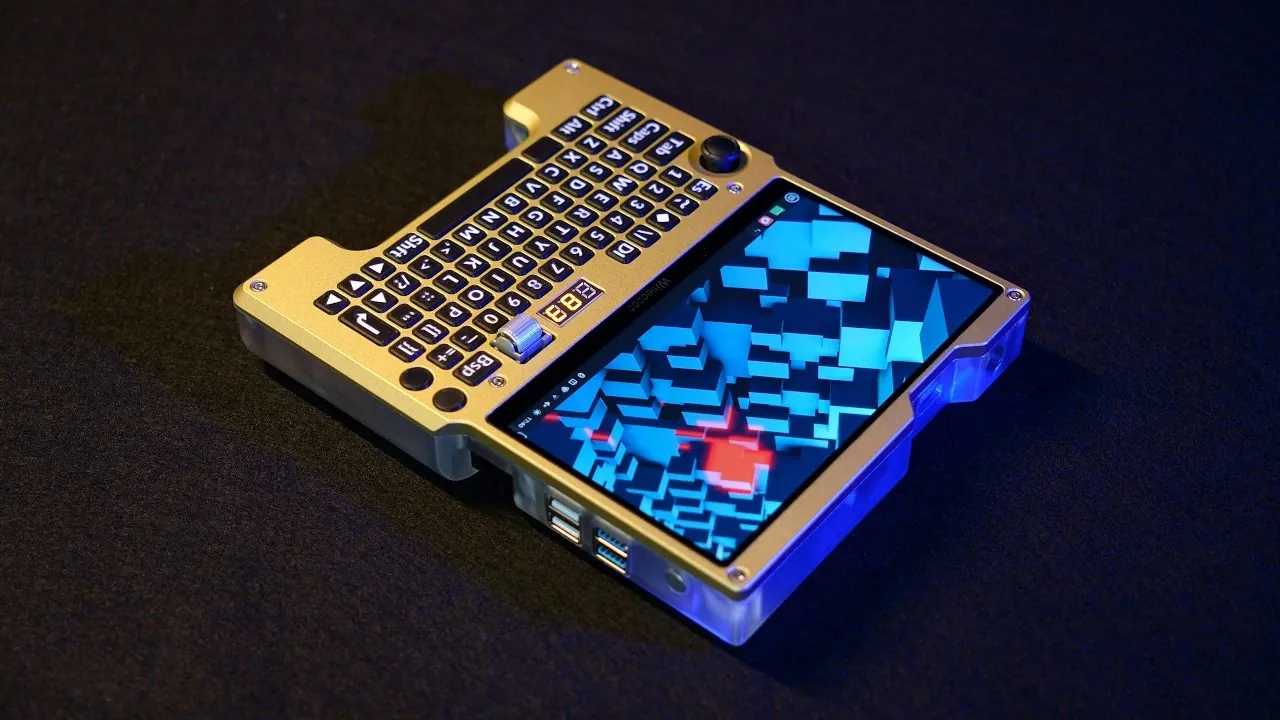
Building a Cyberdeck is a fascinating blend of engineering, design and creativity, as demonstrated by Ben Makes Everything in their latest project. At its core, this DIY endeavor involves constructing a portable x86 computer using components like the LattePanda μ single-board computer and a custom-built battery management system. Housed in a sleek 36 mm case with a durable aluminum faceplate and translucent resin shell, the Cyberdeck balances portability with functionality. The integration of a 7-inch 1080p touchscreen and a thumb-typing keyboard highlights the focus on usability, making this device suitable for tasks ranging from light gaming to productivity.
Dive into this detailed breakdown to uncover how each element contributes to the Cyberdeck’s performance and adaptability. Explore the intricacies of its custom power system, designed for efficiency and safety and learn how the assembly process combines 3D modeling with thoughtful material choices. Gain insight into the challenges faced during development, such as touchscreen calibration and PCB redesigns and see how these hurdles were overcome. Whether you’re seeking inspiration for your own build or simply curious about the process, this guide offers a comprehensive look at what it takes to bring a Cyberdeck to life.
LattePanda Linux Cyberdeck
TL;DR Key Takeaways :
- Building a Cyberdeck involves combining modern hardware, custom components and innovative design to create a portable x86 Linux-based computer with desktop-level functionality.
- Key hardware includes a LattePanda μ single-board computer, a 7-inch 1080p touchscreen, a custom keyboard, a 1 TB SSD and robust connectivity options like Wi-Fi and USB audio.
- The power system features a 4S lithium-ion battery pack with USB-C charging, custom voltage regulation and a dedicated PCB for battery health and safety management.
- The design process emphasizes functionality and aesthetics, using 3D modeling, durable materials like aluminum and resin and a compact 36 mm thick case for portability.
- The Cyberdeck supports desktop applications, light gaming, multitasking and versatile I/O options, including USB ports, HDMI output and a custom docking station, making it adaptable for various use cases.
The concept of a handheld computer has existed for decades, with early ultra-mobile PCs from the 2000s offering portability but falling short in performance and usability. A Cyberdeck takes this idea further, using advancements in hardware and software to create a versatile, compact device. The goal is to build a computer capable of running desktop applications, light gaming and even serving as a portable workstation, all while fitting comfortably in your hands.
Unlike traditional laptops or tablets, a Cyberdeck is a fully customizable device, tailored to meet specific needs. Whether you’re a tech enthusiast, a maker, or someone seeking a unique computing solution, building a Cyberdeck offers an opportunity to combine functionality with personal design preferences.
Key Hardware Components
The foundation of any Cyberdeck lies in its hardware. For this project, the LattePanda μ single-board computer serves as the core, thanks to its x86 architecture and compatibility with Linux Mint. This choice ensures a balance between performance and portability. Below is a breakdown of the essential components:
- Display: A 7-inch 1080p, 120 Hz eDP touchscreen provides crisp visuals and smooth responsiveness, ideal for both productivity and entertainment.
- Input: A custom keyboard with a thumb-typing layout and joystick-based mouse control ensures intuitive navigation in a compact form factor.
- Storage: A 1 TB SSD offers ample space for operating systems, applications and personal files.
- Connectivity: A Wi-Fi card and USB audio device enable seamless networking and high-quality sound output.
These components work in harmony to deliver a powerful, portable computing experience, making the Cyberdeck suitable for a wide range of tasks.
Browse through more resources below from our in-depth content covering more areas on cyberdecks.
- Build a Modular Cyberdeck for Ultimate Portable Computing Power
- Awesome Backpack Cyberdeck powered by overclocked Raspberry Pi
- Razer Edge Cyberdeck Runs Android 12 and Handles GameCube, PS2 and Cloud Gaming
- How to Build an Awesome LattePanda Mu Cyberdeck
- LattePanda Iota Review : Tiny Windows and Linux PC Built for 4K Thrills
- ClockworkPi uConsole Linux handheld PC from $139
- Inside the Cyberdeck-Inspired Smartphone Designed Entirely Around a Physical Keyboard
- Cyberdeck Windows PC made from Framework modular components
- Awesome Raspberry Pi Cyberdeck : Modular Design and Dual Screens
Powering the Cyberdeck
Power management is a critical aspect of building a reliable Cyberdeck. This project incorporates a custom battery management system designed for efficiency and safety. The power system includes the following features:
- Battery Pack: A 4S lithium-ion battery pack with USB-C charging ensures convenience and compatibility with modern charging standards.
- Voltage Regulation: Custom circuitry regulates voltage to support all components, maintaining stable performance.
- Custom PCB: A dedicated printed circuit board monitors battery health, prevents overcharging and ensures overall safety.
This setup strikes a balance between portability and power efficiency, allowing extended use without compromising reliability.
Design and Assembly Process
The design of the Cyberdeck prioritizes both functionality and aesthetics, resulting in a device that is as visually appealing as it is practical. The assembly process involves several key steps:
- 3D Modeling: Iterative design processes are used to optimize the internal layout, making sure all components fit seamlessly within the case.
- Material Selection: An aluminum faceplate provides durability, while a translucent resin rear shell adds a modern, stylish touch.
- Compact Build: The entire system is housed in a 36 mm thick case, maintaining portability without sacrificing performance.
The result is a sleek, robust design that reflects careful planning and attention to detail, making the Cyberdeck both functional and visually distinctive.
Software and Performance
Linux Mint was chosen as the operating system for its stability, lightweight nature and compatibility with x86 architecture. This combination ensures smooth performance across a variety of use cases. The Cyberdeck is capable of handling:
- Desktop Applications: Productivity tools such as word processors, spreadsheets and web browsers run seamlessly.
- Light Gaming: The device supports casual gaming, providing entertainment on the go.
- Multitasking: With its powerful hardware, the Cyberdeck can handle multiple applications simultaneously, making it suitable for both work and leisure.
This software-hardware synergy ensures a user experience that is both efficient and enjoyable.
Input/Output Capabilities
To maximize versatility, the Cyberdeck includes a range of input/output options, allowing it to adapt to various scenarios. Key features include:
- USB Ports: Four USB ports provide connectivity for peripherals such as external drives, keyboards and mice.
- HDMI Output: A full-size HDMI port enables connection to external displays, transforming the Cyberdeck into a desktop workstation.
- Power Output: A barrel jack allows the device to supply power to external devices.
- Docking Station: A custom desktop docking station expands functionality, offering additional ports and a stable platform for extended use.
These features enhance the Cyberdeck’s adaptability, making it suitable for a wide range of applications, from mobile computing to professional workflows.
Overcoming Challenges
Building a Cyberdeck is not without its challenges. Throughout the process, several obstacles were encountered and resolved, including:
- Touchscreen Issues: Troubleshooting and calibrating the touchscreen to ensure accurate input and responsiveness.
- Keyboard Short Circuits: Addressing electrical issues and redesigning the PCB to prevent future failures.
- Battery Management: Iterating on the design of the power system to achieve optimal performance and safety.
Each challenge provided valuable insights, highlighting the importance of testing, patience and iterative design in custom hardware projects.
The Final Product
The completed Cyberdeck is a fully functional, portable x86 computer with a unique design and versatile features. While the project successfully achieved its primary goals, there remains room for improvement, such as refining touchscreen functionality and enhancing keyboard ergonomics.
This endeavor demonstrates the potential of modern hardware, custom components and innovative design to create a powerful, portable computing solution. Whether you’re a hobbyist or a professional, building a Cyberdeck is a challenging yet rewarding project that showcases the possibilities of custom hardware design.
Media Credit: Ben Makes Everything
Disclosure: Some of our articles include affiliate links. If you buy something through one of these links, Geeky Gadgets may earn an affiliate commission. Learn about our Disclosure Policy.
