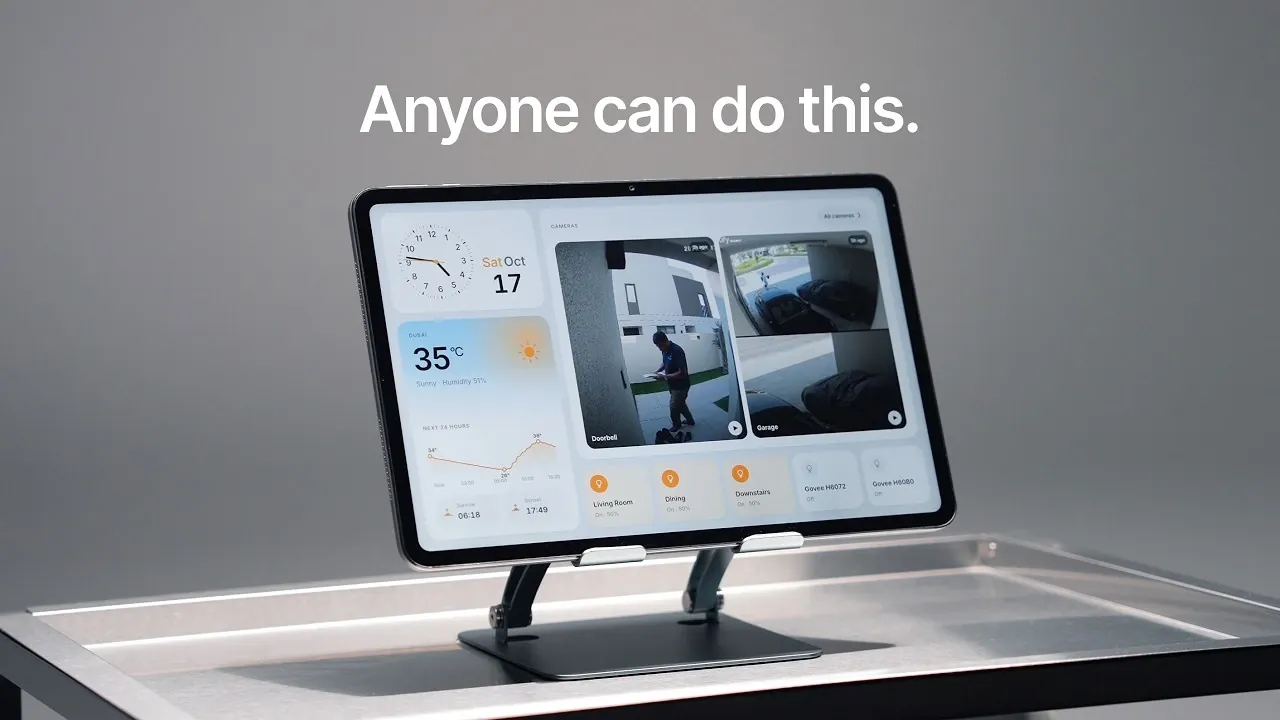
Building a custom smart home dashboard can address the limitations of prebuilt systems like Apple’s HomeView by offering greater flexibility and control. Oliur demonstrates how combining a 13-inch Android tablet with the open source Home Assistant platform creates a personalized interface for managing connected devices. Key considerations include using non-OLED screens to avoid burn-in and employing software like Kiosk Satellite to lock the tablet into a dedicated mode. This setup not only supports extensive customization but also resolves issues like regional restrictions and device compatibility.
Discover how to integrate live camera feeds, Spotify controls and smart device management into a cohesive dashboard. Gain insight into overcoming challenges such as bypassing app installation restrictions and optimizing layouts for better usability. This breakdown also explores advanced features like swipeable screens and potential upgrades, including multi-tablet configurations, to help you design a system tailored to your needs.
Why Build Your Own Dashboard?
TL;DR Key Takeaways :
- Creating a personalized smart home dashboard is achievable using an Android tablet, Home Assistant and AI tools like Claude, offering a flexible alternative to Apple’s HomeView.
- Key hardware considerations include affordability, portability, avoiding OLED screens to prevent burn-in and making sure optimal size, resolution and battery life for continuous use.
- Home Assistant serves as the core platform, allowing seamless integration with various smart devices, while tools like Claude and Kiosk Satellite streamline setup and customization.
- The dashboard features essential controls and information, including time, weather, live camera feeds and smart device management, with additional swipeable screens for music, clocks and custom widgets.
- Future enhancements include integrating AI voice assistants, upgrading hardware with stands or mounts and exploring multi-tablet setups for room-specific dashboards.
Finding a portable and customizable smart home interface can be a daunting task. Many existing solutions, such as Apple’s HomeView, are polished but come with significant drawbacks. These include unavailability in certain regions and limited compatibility with non-Apple devices. Building your own dashboard addresses these challenges by providing:
- Seamless integration with a wide range of smart devices.
- Extensive customization options to suit your preferences.
- A cost-effective alternative to proprietary systems.
This project enables you to create a smart home interface that aligns with your specific needs, offering both flexibility and control.
Choosing the Right Hardware
Selecting the right hardware is a critical first step in building your custom dashboard. For this project, a 13-inch Android tablet was chosen due to its affordability, portability and adaptability. Unlike premium devices like iPads, Android tablets offer greater freedom for software modifications, making them ideal for this purpose.
To ensure durability and usability, certain considerations were made:
- OLED screens were avoided to prevent screen burn-in, a common issue with always-on displays.
- The tablet’s size and resolution were selected to ensure the interface is visually appealing and easy to navigate.
- Battery life and charging options were evaluated to support continuous operation.
This careful selection process ensures the hardware is optimized for its role as a dedicated smart home dashboard.

Become an expert in smart home with the help of our in-depth articles and helpful guides.
- IKEA Fixes BILRESA Battery Life with Quiet Hardware Revisions
- Apple’s Leaked Home Hub Looks Ready to Rival the Echo Show
- Apple Event Confirmed for October 13: New Smart Display, Apple TV 4K, and More
- Inside Apple’s Massive, Secretive Smart Home Takeover
- Apple’s Smart Home Revolution Is Finally Here: Here’s What’s Changing
- Inside Apple’s Upcoming HomePad Launch: Everything Leaked So Far
- Home Hub, New Apple TV, and More: Fresh Leaks Detail Apple’s October 13 Event
- Apple’s “Welcome Home” Event: Everything Apple is Announcing Today
- Apple Quietly Preps a New Screen for the Center of Your Home
- Why Apple’s October Push Into Smart Home Tech Changes Everything
Key Software and Tools
The foundation of this setup is Home Assistant, a powerful and open source platform for smart home automation. Home Assistant enables seamless integration with a wide variety of devices, from lights and cameras to thermostats and speakers. Its flexibility allows you to create a unified control interface tailored to your home.
To simplify the setup process, the AI tool Claude was employed. Claude provided step-by-step guidance for:
- Installing and configuring Home Assistant.
- Creating automations to streamline daily tasks.
- Customizing the dashboard interface for optimal usability.
Additionally, Kiosk Satellite was installed to lock the tablet into a single-purpose mode. This tool eliminates distractions by restricting access to other apps, making sure a streamlined and focused user experience. Browser-based customization tools further enhanced the dashboard, allowing for remote adjustments and updates as needed.
Customizing Your Dashboard
The dashboard was designed to provide essential information and controls at a glance, making sure a balance between functionality and simplicity. Key features included:
- Time and weather updates for quick reference.
- Live camera feeds for real-time security monitoring.
- Smart device controls for managing connected devices like lights, thermostats and locks.
To avoid clutter and enhance usability, additional swipeable screens were incorporated. These screens provided access to:
- Spotify controls for managing music playback seamlessly.
- A dedicated clock interface for timekeeping and alarms.
- Custom widgets for quick access to frequently used features.
This multi-screen approach ensures that the dashboard remains intuitive and easy to navigate while offering a wide range of functionalities.
Overcoming Challenges
Building a custom smart home dashboard is not without its challenges. One significant hurdle was app installation, which was initially blocked by Google Play Protect. With the help of Claude, clear instructions were provided to bypass these restrictions and complete the installation process successfully.
Other challenges included debugging automation scripts and optimizing the dashboard layout for better usability. AI tools like Claude played a crucial role in troubleshooting these issues, streamlining the setup process and making sure a smooth user experience.
Looking Ahead: Future Enhancements
While the current setup is fully functional, there are several opportunities for further improvement. Planned enhancements include:
- Integrating an AI-powered voice assistant for hands-free control of smart devices.
- Upgrading the hardware by adding a sturdy stand or wall mount for improved usability and aesthetics.
- Exploring a multi-tablet setup to create dedicated dashboards for different rooms or functions, such as security, entertainment, or energy management.
These upgrades will enhance the system’s versatility and usability, making it even more effective in managing your smart home.
Final Outcome
In just a few hours, a fully operational smart home dashboard was created, offering a practical and personalized alternative to Apple’s HomeView. By combining affordable hardware, robust software and AI tools, this project demonstrates how you can take control of your smart home experience. With endless possibilities for customization and expansion, this approach enables you to design a solution that perfectly fits your lifestyle and needs.
Media Credit: Oliur / UltraLinx
Disclosure: Some of our articles include affiliate links. If you buy something through one of these links, Geeky Gadgets may earn an affiliate commission. Learn about our Disclosure Policy.
