Apple has just launched their new MobileMe interface along with an updated ‘Find My iPhone’ app, which helps you locate your iPhone or iPad when lost or stolen. A MobileMe subscription is required to use the ‘Find My iPhone’ app, but after you’ve logged in, your device is located and displayed on a map.
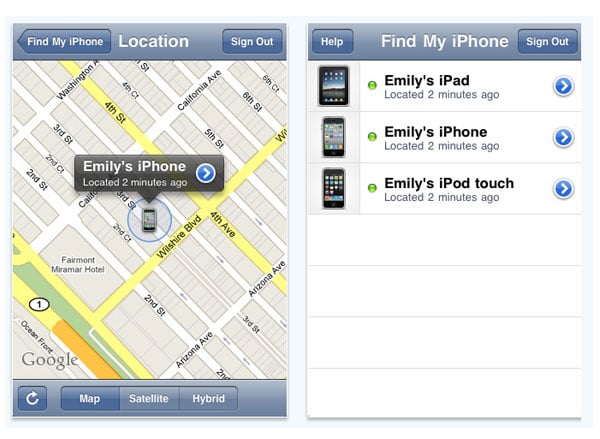
Features of the ‘Find My iPhone’ App
The ‘Find My iPhone’ app offers several features that make it an invaluable tool for anyone who owns an Apple device. Once your device is located on the map, you have the option to remotely lock your device to prevent unauthorized access. This is particularly useful if you believe your device has been stolen and you want to protect your personal information.
In addition to locking your device, the app also allows you to remotely wipe the contents from it if you think the possibility of recovery is zero. This ensures that your sensitive data, such as emails, contacts, and photos, do not fall into the wrong hands. The ability to wipe your device remotely provides peace of mind in situations where your device is irretrievably lost.

Setting Up ‘Find My iPhone’
For the app to work, you must first set up your MobileMe account and turn on Find My iPhone on each device you want to locate. This involves going into the settings of your iPhone or iPad, navigating to the iCloud section, and enabling the Find My iPhone feature. It’s important to note that installing the app is not required for the service to function; the feature can be managed directly through the iCloud settings.
The ‘Find My iPhone’ app requires iOS 3.1.3 or later, making it compatible with a wide range of Apple devices. This ensures that even older models can benefit from the security features provided by the app.
Additional Benefits and Considerations
Beyond the basic functionality of locating, locking, and wiping your device, the ‘Find My iPhone’ app also offers additional benefits. For instance, you can play a sound on your device to help locate it if it’s nearby. This feature is particularly useful if you’ve misplaced your device within your home or office.
Moreover, the app can display a custom message on the lock screen of your lost device. This can be used to provide contact information for anyone who might find your device, increasing the chances of its return.
It’s also worth mentioning that the ‘Find My iPhone’ app has evolved over the years. Apple has integrated this functionality into the broader ‘Find My’ app, which now includes the ability to locate friends and family members who have shared their location with you. This makes the app even more versatile and useful in a variety of situations.
The ‘Find My iPhone’ app is a powerful tool for anyone who owns an Apple device. Its ability to locate, lock, and wipe your device remotely provides a significant layer of security and peace of mind. By setting up your MobileMe account and enabling the Find My iPhone feature, you can ensure that your personal information remains protected, even if your device is lost or stolen.
Via Engadget
Disclosure: Some of our articles include affiliate links. If you buy something through one of these links, Geeky Gadgets may earn an affiliate commission. Learn about our Disclosure Policy.
