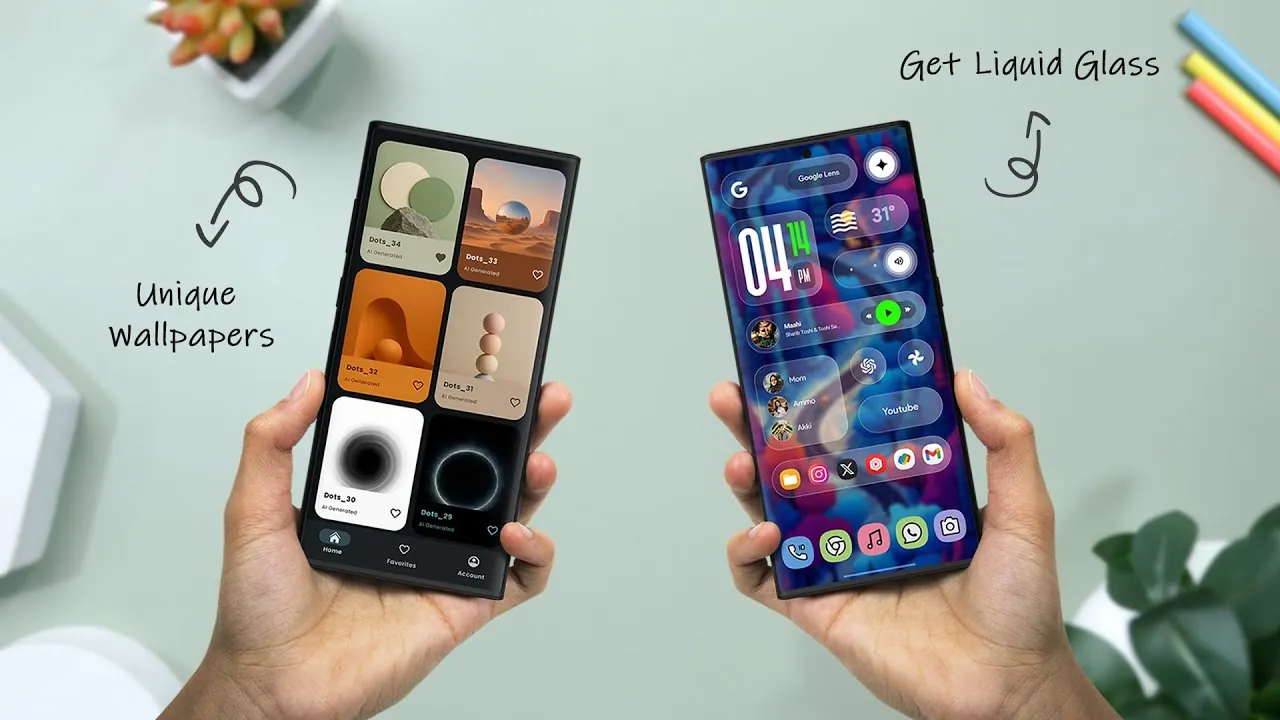
Android devices are celebrated for their unparalleled flexibility, allowing you to tailor your smartphone to suit your unique preferences and lifestyle. Whether you aim to enhance the visual appeal, improve functionality, or streamline daily tasks, a wide range of apps can help you achieve a truly personalized experience. From widgets and icon packs to wallpapers and launchers, these tools empower you to create a device that is both visually stunning and highly efficient. The video below from Xtream Droid explores some of the best customization apps available, offering practical insights to help you transform your Android experience.
Widgets: Combining Functionality with Style
Widgets are one of the most distinctive features of Android, seamlessly blending utility with aesthetics. They allow you to access essential information or perform tasks directly from your home screen. A standout option is the Glass Widget, inspired by the sleek liquid glass design of iOS. This app offers over 350 pre-made widgets, including clocks, weather updates, and to-do lists. Each widget is fully customizable, allowing you to adjust colors, fonts, and layouts to complement your wallpaper or theme. By incorporating widgets like these, you can make your home screen not only more functional but also visually appealing.
For users seeking a more dynamic approach, KWGT Kustom Widget Maker provides a platform to design widgets from scratch. This app offers advanced customization options, allowing you to create unique widgets tailored to your specific needs. Whether you prefer minimalistic designs or intricate layouts, widgets can enhance your Android experience by combining practicality with style.
Icon Packs: Redefining Your App Interface
Icon packs are a simple yet effective way to transform the appearance of your app icons, creating a cohesive and polished look across your device. The Color Bit Icon Pack is a popular choice, featuring over 4,500 icons in soft pastel tones with rounded shapes inspired by material design principles. It also includes matching wallpapers, making sure a unified aesthetic for your home screen.
For those who prefer a darker, more modern vibe, the One Pro Dark Icon Pack offers over 4,700 neon-accented icons and 400 wallpapers, optimized for AMOLED screens. These options allow you to redefine your phone’s interface with ease, giving it a fresh and personalized appearance. By experimenting with different icon packs, you can create a visual identity for your device that reflects your personality.
Wallpapers: Setting the Tone for Your Device
Wallpapers are a fundamental aspect of Android customization, offering a quick and impactful way to personalize your device. Wallpapers by IDTR provides a curated collection of clean, aesthetic designs, updated weekly with 12 new options. The app also includes built-in editing tools, allowing you to tweak wallpapers to better suit your style and preferences.
For users who enjoy dynamic visuals, Wallpix offers an extensive library of 4K live wallpapers, HD backgrounds, and charging animations. With themes ranging from serene nature scenes to abstract art, these wallpapers ensure your screen always feels fresh and engaging. By selecting wallpapers that resonate with your mood or interests, you can create a more immersive and enjoyable user experience.
Launchers: Transforming Your Device’s Interface
Launchers are powerful tools that can completely change how you interact with your Android device. They offer new layouts, features, and customization options, allowing you to create an interface that aligns with your needs and preferences. The Oasis Launcher is a minimalist option designed to boost productivity. It includes features such as app hiding, notification filtering, and a productivity hub, all within a clean, ad-free interface. This launcher is ideal for users seeking a distraction-free experience while maintaining a sleek and modern design.
For those who prefer a more feature-rich experience, the Nova Launcher offers extensive customization options, including gesture controls, custom app drawer layouts, and advanced theme settings. By experimenting with different launchers, you can find the perfect balance between functionality and aesthetics, transforming your Android device into a tool that works seamlessly for you.
Enhancing Connectivity and Privacy
In addition to visual and functional customization, many apps focus on enhancing connectivity and privacy. Widget Share is a unique tool that allows you to share live photos, chat, and customize widgets collaboratively with friends. Its cross-platform compatibility ensures seamless integration with both Android and iOS devices, making it a versatile choice for users with diverse tech ecosystems.
Privacy-focused features are also becoming increasingly important. Apps like Oasis Launcher help you manage distractions and protect your data with tools such as notification filtering and app hiding. Similarly, Widget Share prioritizes user privacy by avoiding intrusive ads and limiting data collection. These features not only enhance your digital experience but also help you maintain a healthier relationship with technology.
Crafting Your Ideal Android Experience
Customizing your Android device is about more than just aesthetics—it’s about creating a smartphone that aligns with your lifestyle and preferences. From the sleek and functional widgets of Glass Widget to the productivity-focused features of Oasis Launcher, these apps provide the tools you need to design a device that is uniquely yours. By integrating widgets, icon packs, wallpapers, and launchers, you can elevate your Android experience, making it both visually captivating and highly efficient. Explore these customization options today and unlock the full potential of your device.
Enhance your knowledge on Android Customization Apps by exploring a selection of articles and guides on the subject.
- 10 Android Customization Apps You Need in 2024
- Level Up Your Android: 10 Must-Have Customization Apps
- 7 Android Customization Apps You Need to Check Out
- 8 Awesome Android Customization Apps
- Supercharge Your Android: 20 Must-Have Apps
Source & Image Credit: Xtream Droid
Disclosure: Some of our articles include affiliate links. If you buy something through one of these links, Geeky Gadgets may earn an affiliate commission. Learn about our Disclosure Policy.
