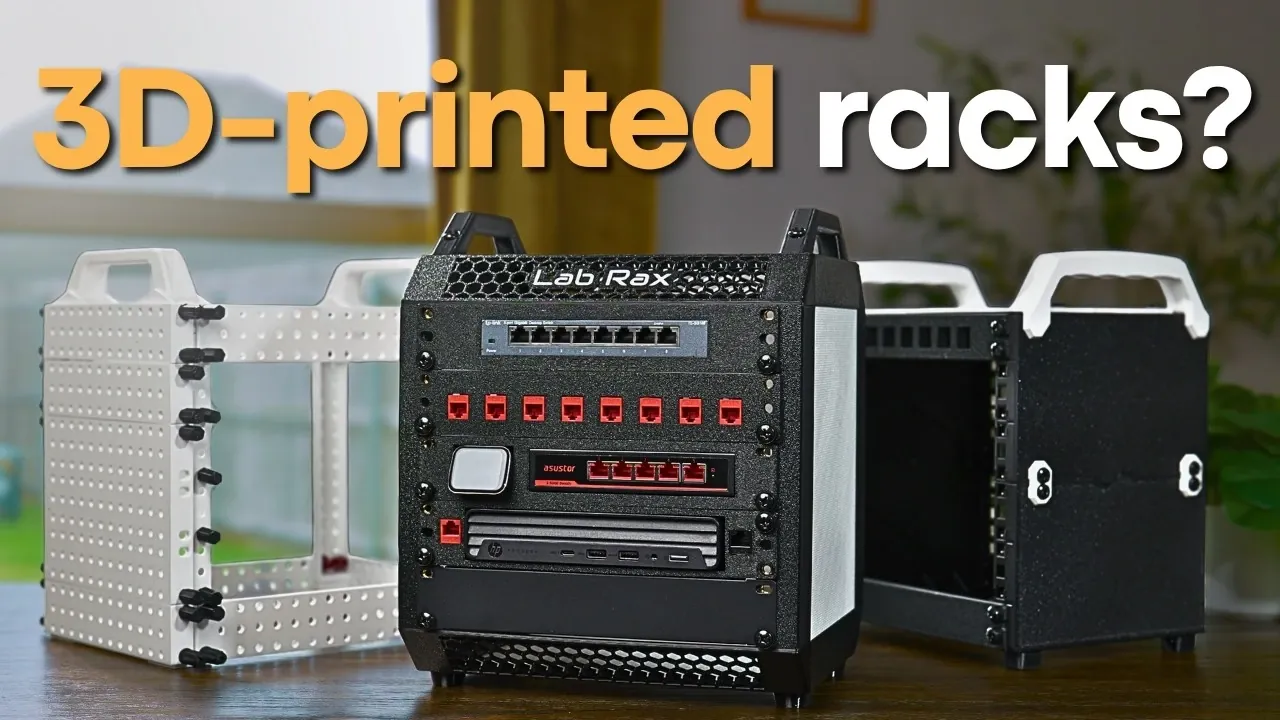
What if you could transform your cluttered home server setup into a sleek, organized system for a fraction of the cost of traditional solutions? Enter the world of 3D printed mini server racks—a fantastic option for tech enthusiasts and DIYers alike. These compact, customizable racks not only save you money but also provide a tailored fit for your specific hardware needs. Whether you’re housing switches, routers, or mini PCs, these designs offer a unique blend of practicality and creativity. But with so many options out there, how do you choose the perfect one? That’s where this perspective comes in, to help you navigate the possibilities and find the rack that truly fits your setup.
Hardware Haven test out three standout designs, Mod 10, Lab Rax, and Galaxy, each offering distinct advantages, from ease of assembly to modularity and expandability. You’ll discover how these racks compare in terms of printability, aesthetics, and usability, empowering you to make an informed choice. Whether you’re a beginner looking for simplicity or a seasoned tinkerer craving customization, there’s a design here for you. So, what makes a 3D-printed rack not just good, but great? Let’s unpack the details and find out.
3D Printed Mini Server Racks
TL;DR Key Takeaways :
- 3D-printed 10-inch mini server racks are cost-effective, customizable, and ideal for small spaces, offering a practical alternative to expensive pre-built racks.
- The top three designs, Mod 10, Lab Rax, and Galaxy, differ in durability, aesthetics, modularity, and cable management, catering to various user needs.
- Mod 10 is the most durable and beginner-friendly option, while Lab Rax excels in aesthetics, and Galaxy offers superior modularity and cable management.
- 3D printing these racks significantly reduces costs, with prices ranging from $10 to $40, compared to pre-built racks costing over $100.
- Key factors to consider before printing include printability, assembly requirements, expandability, usability, and aesthetic fit for your setup.
Why Choose 10-Inch Mini Server Racks?
The growing appeal of 10-inch mini server racks lies in their versatility and practicality. Their compact size makes them ideal for small spaces, such as home offices or server closets, while their customizable designs allow you to tailor them to your specific hardware needs. Whether you need to house switches, routers, or mini PCs, these racks provide a flexible solution.
Another significant advantage is cost savings. Pre-built racks often exceed $100, while 3D printed alternatives typically cost between $10 and $40, depending on the materials and components used. By printing your own rack, you not only reduce expenses but also gain the ability to modify the design as your setup evolves. This adaptability ensures that your rack can grow alongside your hardware requirements, making it a sustainable and economical choice.
Top 3 Designs: A Detailed Comparison
To help you decide which rack best suits your needs, let’s explore the features, strengths, and limitations of three leading designs: Mod 10, Lab Rax, and Galaxy.
- Mod 10: Renowned for its simplicity and durability, the Mod 10 is a reliable option for most users. It supports up to 6U of equipment and uses cage nuts for mounting, making sure a secure fit for your hardware. The cost to print and assemble this rack is approximately $38. While its sturdy construction is a major advantage, its cable management options are somewhat limited, which may pose challenges for users with more complex setups.
- Lab Rax: The Lab Rax stands out for its polished appearance and deeper design, making it suitable for larger hardware. It uses heat-set inserts for assembly, which contribute to its professional finish. At around $22, it is a cost-effective choice for those who prioritize aesthetics. However, its smaller handles and slightly less rigid structure may not be ideal for all users, particularly those requiring maximum stability.
- Galaxy: If modularity and expandability are your top priorities, the Galaxy rack is the most versatile option. Its open design assists easy cable management, and it can be assembled using rack studs or 3D-printed bolts. With costs ranging from $10 to $20, it is the most affordable choice. However, its lightweight construction sacrifices some rigidity, which may be a concern for users with heavier hardware.
3 Awesome 3D Printed Mini Racks Tested
Expand your understanding of 3D printing with additional resources from our extensive library of articles.
- Toybox 3D Printer Deluxe Bundle with 8 Printer Food Colors
- X-MAKER JOY Smart 3D Printer for Kids & Beginners | StackSocial
- SUNLU FilaDryer S2 3D printing filament dryer
- Moto 360 Pocket Watch Created With a Little 3D Printing
- What is Stack 3D printing and how can you use it?
- DXC-A4G miniature 3D printer hits Kickstarter
- PolySmoother lets you easily polish your 3D prints
- Second-generation Cerambot Eazao ceramic 3D printer hits
- BambooFill Wood 3D Printing Filament Demonstrated (video)
- How Volumetric 3D Printing Works & Why It’s So Fast Printing
The Cost-Saving Benefits of 3D Printing
One of the most compelling reasons to opt for a 3D-printed mini server rack is the significant cost savings it offers. Pre-built racks, such as the DeskPie T0, can cost upwards of $110, while 3D-printed designs are far more affordable. The cost of materials, such as PLA filament, is relatively low, and additional components like cage nuts, heat-set inserts, or rack studs are widely available at minimal expense.
By choosing to 3D print your rack, you not only save money but also gain the flexibility to customize the design to suit your specific needs. This approach allows you to create a functional and tailored solution for your home server setup without exceeding your budget.
Assembly and Usability: Key Considerations
The ease of assembly is a crucial factor when selecting a 3D-printed rack. Each design offers a different level of complexity:
- Mod 10: The straightforward design of the Mod 10 makes it the easiest to assemble. It requires minimal tools and effort, making it an excellent choice for beginners or those seeking a hassle-free setup.
- Lab Rax: The Lab Rax requires more precision during assembly due to its use of heat-set inserts. This process may necessitate additional tools, such as a soldering iron, which could be a consideration for users with limited experience or resources.
- Galaxy: The modular components of the Galaxy rack provide the most flexibility but may require extra effort to ensure stability. Its open design simplifies cable management, making it ideal for users with complex setups.
Cable management is another critical aspect to consider. The Galaxy excels in this area, offering ample space for organizing and routing cables. In contrast, the Mod 10 and Lab Rax provide more limited cable management options, which may be a drawback for users with extensive hardware configurations.
Choosing the Right Rack for Your Needs
After evaluating the features of the Mod 10, Lab Rax, and Galaxy designs, the Mod 10 emerges as the most well-rounded option for the majority of users. Its durability, expandability up to 6U, and ease of assembly make it a versatile and reliable choice. However, the best rack for you will ultimately depend on your specific requirements:
- Choose the Mod 10 if you prioritize durability and straightforward assembly.
- Opt for the Lab Rax if aesthetics and compatibility with larger hardware are important to you.
- Go with the Galaxy if modularity, expandability, and superior cable management are essential for your setup.
Important Factors to Consider Before Printing
Before committing to a design, consider the following factors to ensure the rack meets your needs:
- Printability: Confirm that the design is compatible with your 3D printer’s specifications, including build volume and filament type.
- Assembly Requirements: Assess your skill level and the tools needed for assembly, such as heat-set inserts or cage nuts.
- Aesthetic Fit: Consider how the rack’s design and finish will integrate into your workspace or home environment.
- Expandability: Ensure the rack can accommodate future hardware additions or upgrades as your setup evolves.
- Usability: Evaluate features like cable management and overall functionality to match the complexity of your hardware configuration.
3D-printed mini server racks provide a practical, customizable, and cost-effective solution for home server setups. By carefully considering your needs and comparing the features of the Mod 10, Lab Rax, and Galaxy designs, you can confidently select the rack that best aligns with your requirements. Whether you prioritize durability, aesthetics, or modularity, these designs offer the flexibility to create a tailored solution for your hardware, making sure a functional and efficient setup.
Media Credit: Hardware Haven
Disclosure: Some of our articles include affiliate links. If you buy something through one of these links, Geeky Gadgets may earn an affiliate commission. Learn about our Disclosure Policy.
