What if you could transform your workflow automation from functional to exceptional with just a handful of tools? In the world of n8n, a powerful open source automation platform, certain nodes stand out as indispensable for creating efficient and adaptable workflows. These nodes aren’t just popular, they’re the backbone of countless automations, allowing users to streamline processes, integrate with external systems, and maintain clarity in even the most complex setups. Whether you’re a seasoned automation expert or just starting out, understanding these essential building blocks can unlock new levels of productivity and creativity in your projects.
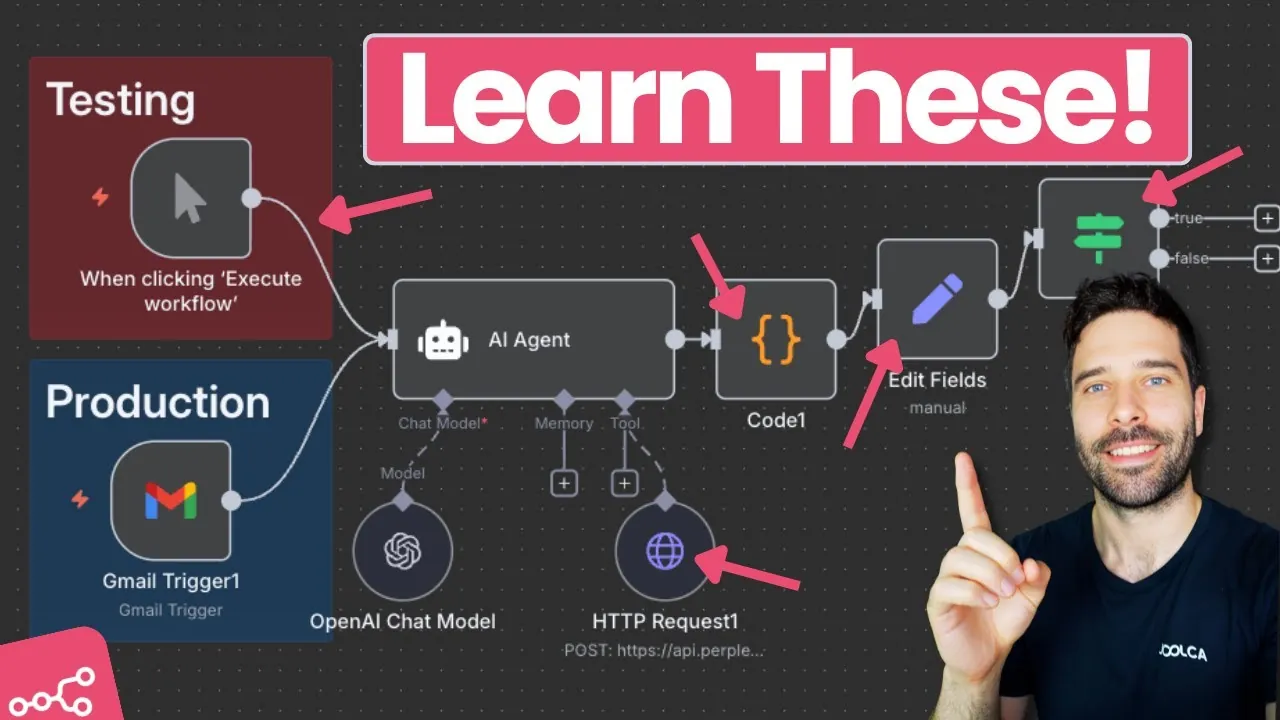
Bart Slodyczka explains the top five most popular n8n nodes that users rely on to build dynamic and responsive workflows. From the simplicity of Sticky Notes for enhanced collaboration to the advanced customization power of the Code Node, each of these tools brings unique value to the table. You’ll discover how these nodes can help you manage data, integrate APIs, and introduce conditional logic, all while keeping your workflows clean and efficient. By the end, you’ll not only know what makes these nodes indispensable but also gain insights into how they can elevate your automation game. After all, the right tools don’t just make workflows easier, they make them smarter.
Popular n8n Nodes for Automation
TL;DR Key Takeaways :
- Sticky Notes Node: Enhances workflow clarity and collaboration by allowing annotations, instructions, and reminders directly within workflows, supporting Markdown for styled text and media embedding.
- HTTP Request Node: Assists seamless API integration by allowing secure and structured communication with external systems through HTTP requests like GET, POST, PUT, and DELETE.
- Set Node: Simplifies data handling by creating variables, mapping data, and adding dynamic elements, making sure clean and efficient workflows with reduced errors.
- Code Node: Provides advanced customization options for users with programming knowledge, allowing complex data manipulations and tailored workflows using JavaScript.
- If Node: Introduces conditional logic to workflows, allowing decision-making based on specific conditions to create adaptable and responsive automation processes.
Sticky Notes: Enhancing Workflow Organization
The Sticky Notes node is a straightforward yet highly effective tool for improving workflow clarity and collaboration. It allows you to add annotations, instructions, or reminders directly into your workflow, making sure that all contributors remain aligned. This feature is particularly valuable during client handovers or when multiple team members are involved in workflow development.
Markdown formatting is supported within Sticky Notes, allowing you to style text, include hyperlinks, or embed media. For example, you can use a Sticky Note to document the purpose of a specific workflow section or outline governance rules for future reference. By incorporating this node, you ensure that workflows remain clear, accessible, and easy to manage, even as they grow in complexity.
HTTP Request Node: Facilitating API Integration
The HTTP Request node is a cornerstone of n8n workflows, allowing seamless integration with external systems. It allows you to send HTTP requests, such as GET, POST, PUT, or DELETE, to third-party platforms like Slack, Salesforce, or Facebook. This makes it indispensable for retrieving, updating, or deleting data from external APIs.
With robust options for configuring authentication, headers, and body parameters, the HTTP Request node ensures secure and structured communication with APIs. For instance, you might use it to fetch user data from a CRM, post updates to a Slack channel, or send notifications to a project management tool. Its flexibility and compatibility with numerous APIs make it a vital tool for building connected, dynamic workflows that can adapt to various use cases.
n8n Nodes for Smarter Workflow Automation

Here are additional guides from our expansive article library that you may find useful on n8n workflows.
- How to Use Claude AI to Copy & Replicate n8n Workflows Instantly
- Connecting Google Docs to n8n Workflows for Automation
- 7 Essential AI Agent Tools to Supercharge Your n8n Workflows
- Easily Copy and Create n8n Workflow with Claude AI
- Advanced n8n Workflow Tips to Save Time and Boost Efficiency
- 25 Essential n8n Hacks to Streamline Workflow Automation
- How to Automate Zoom Meeting Management with n8n Workflows
- How to Connect Slack to n8n for Workflow Automation
- OpenAI o3-Mini Integration Guide for n8n Workflow Automation
- n8n’s Model Context Protocol: The Future of Workflow Automation
Set Node: Simplifying Data Handling
The Set Node is designed to streamline data management within workflows. It allows you to create new variables, map existing data, or add dynamic elements such as timestamps. This node is particularly useful for preparing data for subsequent steps in your workflow, making sure that the information is formatted and structured correctly.
For example, you can use the Set Node to format user input before passing it to another node or to generate a timestamp for logging purposes. By reducing the complexity of data handling, the Set Node helps you maintain clean and efficient workflows, making sure smoother automation processes and reducing the likelihood of errors.
Code Node: Allowing Advanced Customization
The Code Node is a powerful tool for users with programming knowledge, offering unparalleled flexibility within workflows. It allows you to write JavaScript code to handle complex data manipulations, implement custom logic, or address edge cases that other nodes cannot manage.
For instance, you might use the Code Node to parse a JSON response from an API, restructure the data, and pass it to another node in a specific format. While it requires coding skills, the Code Node can replace the functionality of multiple nodes, allowing you to create tailored workflows that meet unique requirements with precision. This makes it an invaluable resource for advanced users looking to push the boundaries of what n8n can achieve.
If Node: Introducing Conditional Logic
The If Node is essential for adding decision-making capabilities to your workflows. It allows you to split workflows based on specific conditions, such as comparing strings, numbers, or dates. This node supports a wide range of conditions, including “exists,” “is empty,” and “is after,” making it highly versatile for various scenarios.
For example, you can use the If Node to route data differently based on user input, handle errors by checking for missing or invalid data, or trigger specific actions when certain conditions are met. By incorporating conditional logic, the If Node ensures that workflows remain adaptable and responsive to diverse requirements, enhancing their overall effectiveness.
Maximizing Workflow Efficiency with n8n Nodes
Mastering these five nodes, Sticky Notes, HTTP Request, Set Node, Code Node, and If Node, can significantly improve your ability to build effective workflows in n8n. Each node serves a distinct purpose, from enhancing collaboration and integrating APIs to simplifying data management, allowing advanced scripting, and introducing conditional logic. By using these tools, you can create workflows that are not only efficient but also tailored to your specific needs, making sure seamless automation and improved productivity across your projects.
Media Credit: Bart Slodyczka
Disclosure: Some of our articles include affiliate links. If you buy something through one of these links, Geeky Gadgets may earn an affiliate commission. Learn about our Disclosure Policy.
