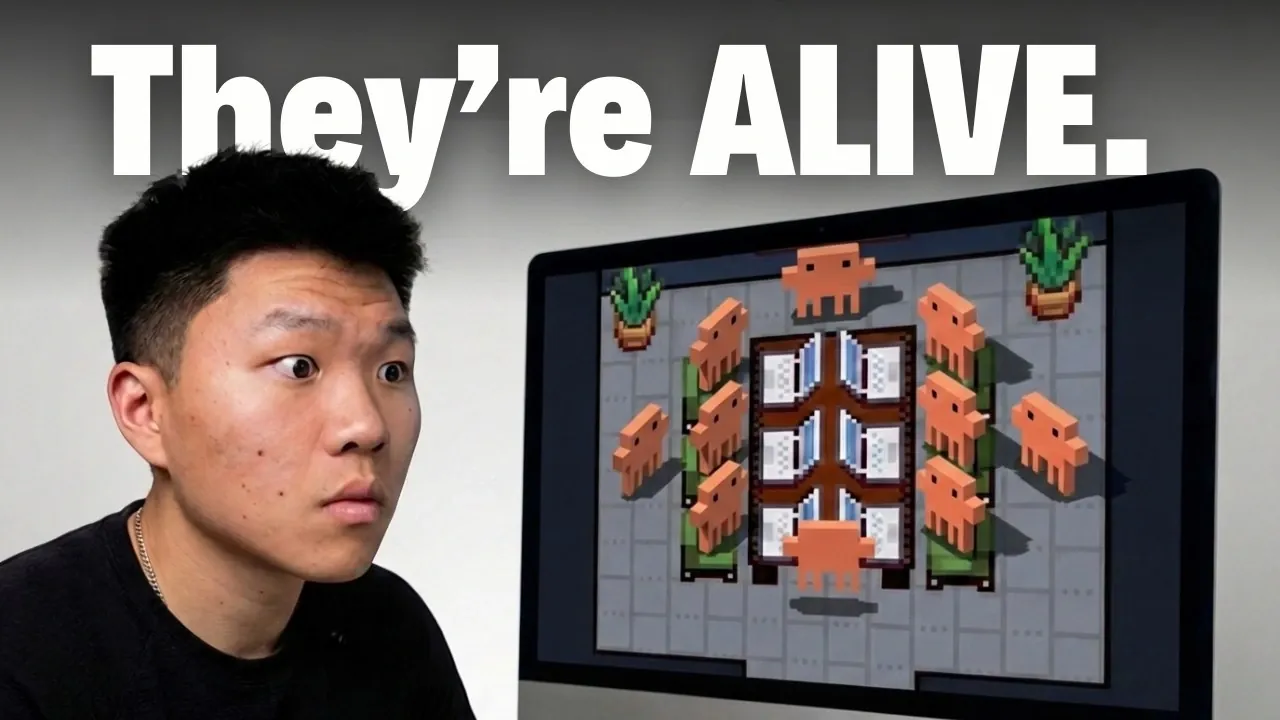
Pixel Agents integrates animated pixel art characters into Visual Studio Code (VS Code) to create a virtual workspace for managing AI-driven workflows. Demonstrated by Nate Herk , this extension allows users to observe AI agents performing tasks like coding or file analysis in real time, represented as animated figures within a customizable desktop environment. By offering a visual representation of agent activity, it provides a structured way to monitor and manage multiple processes simultaneously.
Learn how Pixel Agents supports workflow management through features like real-time task tracking and sub-agent delegation. The overview also covers customization options, including designing your virtual office and selecting pixel art characters. Additionally, it examines compatibility considerations and upcoming updates, such as agent teams and enhanced visualization features.
How Pixel Agents Enhances Workflow Management
TL;DR Key Takeaways :
- Pixel Agents is a Visual Studio Code extension created by Pablo De Lucca that uses animated pixel art characters to represent AI coding agents, making workflows more intuitive and visually engaging.
- It offers real-time activity tracking, sub-agent management and extensive customization options, including personalized virtual office designs and character selection.
- The tool is currently exclusive to Windows and integrates with Cloud Code for seamless task execution, but lacks support for macOS and other platforms.
- Security is a priority, with no data collection and verified safety measures making sure user privacy and trust.
- Future updates will include features like agent teams and enhanced visualization tools, aiming to improve workflow organization and decision-making insights.
Pixel Agents bridges the gap between abstract AI processes and tangible, visual representations. It reimagines how you manage AI agents by offering a dynamic and interactive experience. Here’s how it works:
- Animated pixel art characters: Each AI agent is represented as a unique animated character, visually indicating activities such as coding, searching, or awaiting input.
- Real-time activity tracking: Monitor the actions of each agent at a glance, making sure you stay informed about ongoing tasks.
- Sub-agent management: Visualize and control secondary agents that handle delegated tasks, simplifying the management of complex workflows.
This visual approach makes it easier to oversee multiple agents and parallel processes, reducing the cognitive load often associated with multitasking in AI-driven environments.
Customizing Your Virtual Workspace

Pixel Agents stands out with its extensive customization options, allowing you to create a workspace that reflects your personal preferences and enhances your productivity. Key features include:
- Personalized office design: Choose furniture, decor and layouts to craft a virtual office tailored to your style.
- Character selection: Pick from six distinct pixel art designs to represent your agents, adding a touch of personality to your workflow.
This level of customization not only improves the visual appeal of your workspace but also fosters a more engaging and motivating environment for managing AI agents.
How to Install Pixel Agents

Expand your understanding of AI Agents with additional resources from our extensive library of articles.
- Kimi K2.5 Multi-Agent System : Parallel AI for Faster Tasks
- Cursor AI Browser Experiment Shows Limits of Autonomous Dev Teams
- Beginner’s Guide to Building & Selling AI Agents
- What a ChatGPT Agent? Discover OpenAI’s New All-in-One AI Tool
- Agent Zero : Private Local AI Agent with Docker & Terminal Access
- How to Build a 24/7 AI Agent with No Code Using Make
- Antigravity vs Cursor vs Windsurf : Autonomy, Costs & Limits Compared
- Ion UI Guide: Set up Multiple AI Agents on Mac, Windows, Linux
- AI Trading Simulator with Debating Agents for Easier Stock Research
- Coinbase & Stripe Build AI Agents to Pay and Buy Online
Who Can Benefit from Pixel Agents?
Pixel Agents is particularly beneficial for users managing multiple agents or handling intricate workflows. Its visual and interactive approach simplifies complex tasks and makes AI coding workflows more accessible. Key advantages include:
- Effortless task tracking: Quickly assess progress across various tasks, especially when working with multiple terminals and agents.
- Accessibility for non-technical users: The intuitive design reduces the learning curve, making it easier for users with limited technical expertise to adopt AI-driven workflows.
Whether you’re an experienced developer or new to AI coding, Pixel Agents provides a user-friendly platform for enhancing productivity and workflow transparency.
Technical Features and Compatibility
Pixel Agents is built exclusively for Visual Studio Code and is currently compatible only with Windows operating systems. Its technical capabilities include:
- Cloud Code integration: Execute tasks such as coding, file analysis and task delegation seamlessly within the extension.
- Real-time activity logs: Generate synchronized animations that accurately reflect agent actions, making sure clarity and precision in workflow visualization.
While the tool offers robust functionality, its lack of support for macOS and other platforms limits its accessibility for users outside the Windows ecosystem.
Security and Privacy Measures
Security is a core focus of Pixel Agents, making sure that users can trust the extension with their workflows. Developed by a verified publisher, it adheres to strict privacy standards. Key security features include:
- No data collection: The extension does not collect or transmit user data, safeguarding your privacy.
- Verified safety: Thorough reviews confirm the absence of suspicious activity, making sure data integrity and user trust.
These measures make Pixel Agents a reliable choice for users prioritizing security in their AI-driven coding environments.
Planned Updates and Future Potential
The developers of Pixel Agents are actively working to expand its capabilities, with several exciting updates on the horizon. Upcoming features include:
- Agent teams: Group agents for collaborative tasks, improving workflow organization and efficiency.
- Enhanced visualization tools: Gain deeper insights into agent decision-making and task execution through advanced visual analytics.
These enhancements aim to broaden the tool’s appeal and functionality, catering to a wider range of user needs and use cases.
Limitations and Areas for Improvement
While Pixel Agents offers a unique and engaging experience, it does have some limitations that users should consider:
- Platform exclusivity: The extension is currently unavailable for macOS and other operating systems, restricting its adoption among non-Windows users.
- Limited workflow insights: The tool lacks detailed analytics on workflows and decision-making processes, which may be a drawback for users requiring granular data.
Addressing these limitations in future updates could significantly enhance the tool’s versatility and user experience.
Unlocking New Possibilities with Pixel Agents
Pixel Agents redefines how you interact with AI coding agents by combining functionality with visual appeal. Its ability to transform complex workflows into an accessible and interactive experience makes it a valuable tool for developers and non-technical users alike. While there is room for improvement, particularly in platform compatibility and workflow visualization, its current features provide a strong foundation for enhancing productivity and simplifying multitasking. As new updates are introduced, Pixel Agents has the potential to become an indispensable tool for managing AI-driven coding environments.
Media Credit: Nate Herk | AI Automation
Disclosure: Some of our articles include affiliate links. If you buy something through one of these links, Geeky Gadgets may earn an affiliate commission. Learn about our Disclosure Policy.
