Your iPhone is more than just a device for communication and entertainment. It’s a sophisticated tool packed with features that can enhance productivity, simplify tasks, and add a personal touch to your experience. However, many of these features often go unnoticed or underutilized. Below are 12 lesser-known iPhone features that can help you unlock the full potential of your device. The video below from iReviews gives us more details.
1. Extract Text from Photos and Videos
Your iPhone’s Live Text feature allows you to interact with text directly from photos and paused videos. This functionality is especially useful for tasks like copying text from a document, translating foreign languages, or looking up information. For example, if you take a picture of a restaurant menu, you can tap and hold the text to select it, then choose options like “Copy,” “Look Up,” or “Translate.” This feature saves time and eliminates the need for manual transcription.
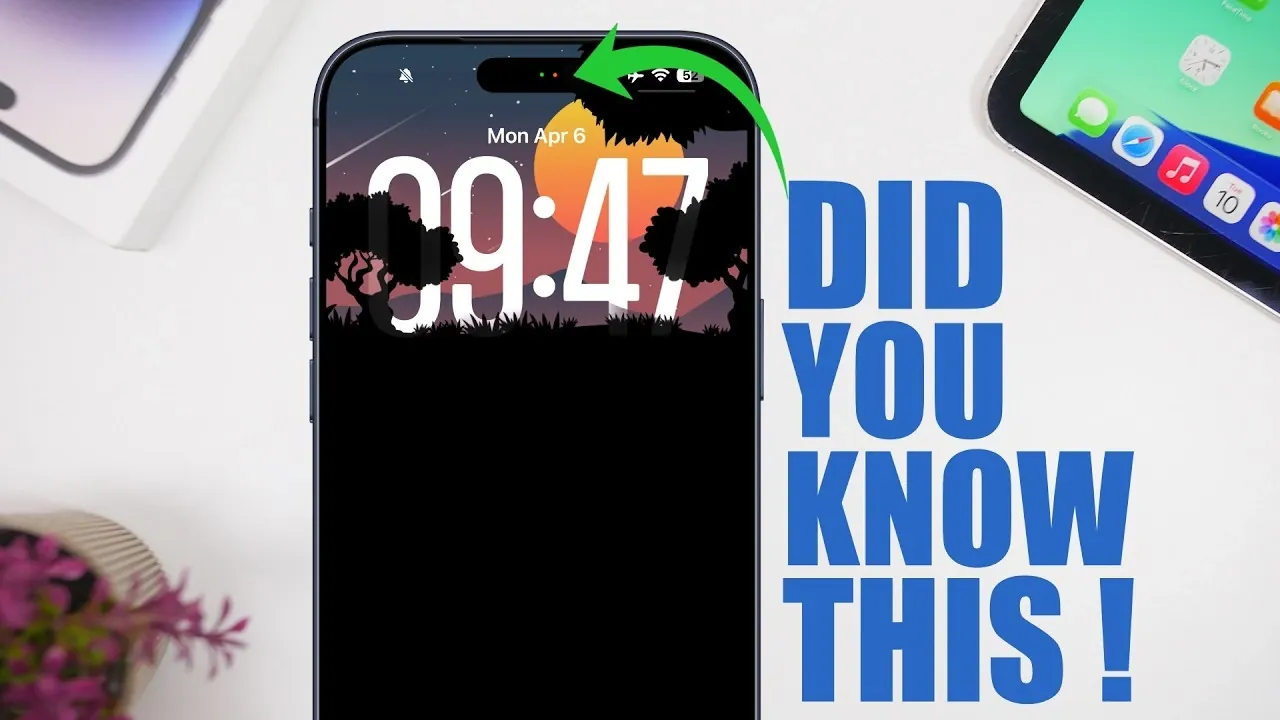
2. Privacy Indicators with Dynamic Island
For users of newer iPhone models equipped with Dynamic Island, the small green and orange dots are more than just visual cues, they’re privacy safeguards. The green dot indicates that your camera is active, while the orange dot signals microphone usage. These indicators provide real-time awareness of when apps are accessing your camera or microphone, helping you maintain control over your privacy.
3. Shake to Undo
Mistakes happen, but correcting them doesn’t have to be complicated. By simply shaking your iPhone, you can undo your last action. Whether you’ve made a typo, accidentally deleted a note, or moved an app icon, this gesture offers a quick and intuitive way to reverse changes. It’s a small but powerful feature that can save you time and frustration.
4. Capture Full-Page Screenshots in Safari
When browsing in Safari, you’re not limited to capturing just the visible portion of a webpage. After taking a screenshot, select the “Full Page” option to save the entire webpage as a PDF. This feature is particularly handy for saving long articles, research materials, or documents for offline access. It eliminates the need for multiple screenshots and keeps your content organized in a single file.
5. Edit Screenshots with Ease
Your iPhone’s built-in screenshot editing tools make it easy to crop, annotate and share images. After taking a screenshot, you can instantly access these tools to make adjustments without needing third-party apps. For example, you can highlight important sections, add text, or draw directly on the image. This streamlined process enhances productivity and ensures your screenshots are ready to share in seconds.
6. Pause and Resume Voice Messages
Recording voice messages in iMessage has become more user-friendly with the ability to pause and resume recordings. This feature is ideal for situations where you need to gather your thoughts or handle interruptions without starting over. By allowing you to create detailed messages at your own pace, it ensures clear and effective communication.
7. Shuffle Wallpapers Automatically
Add a touch of personalization to your iPhone by allowing dynamic wallpapers. From the Photos app, you can select multiple images to create a rotating wallpaper collection. Your iPhone will automatically shuffle through these images, giving your home screen a fresh and dynamic look every time you unlock your device. This feature combines functionality with creativity, making your phone truly your own.
8. Quickly Reset the Calculator
Clearing the Calculator app doesn’t have to be a tedious process. Instead of deleting numbers one by one, simply hold down the delete button to reset all input instantly. This shortcut is especially useful when working on complex calculations, saving you time and effort.
9. Delete Apps Directly from the App Store
Managing your apps has never been easier. In the App Store’s updates section, you can swipe left on any app and tap “Delete” to remove it from your device. This eliminates the need to navigate to your home screen, streamlining the process of decluttering and organizing your apps.
10. Handle Calls Discreetly
If you’re unable to answer a call but don’t want to decline it outright, there’s a subtle solution. By allowing Airplane Mode while the phone is ringing, the call will be marked as “failed” instead of “declined.” This approach avoids sending a notification to the caller, allowing you to manage calls discreetly without causing misunderstandings.
11. Record Videos with Background Audio
You can now record videos without interrupting your music or other background audio. By allowing the “Allow Audio Playback” option in your camera settings, your iPhone lets you capture videos while your music continues to play. This feature is perfect for creating content with a soundtrack or preserving the ambiance of a moment.
12. Use Spotlight Search for Quick Scheduling
Spotlight Search is more than just a tool for finding apps or files, it can also streamline your scheduling. By typing phrases like “Meeting tomorrow at 5:00 pm” directly into Spotlight, you can create calendar events without opening the Calendar app. This integration simplifies the process of managing your schedule and saves valuable time.
Unlock the Full Potential of Your iPhone
Your iPhone is equipped with a wide range of features designed to enhance your daily life. From extracting text from images to discreetly managing calls, these hidden capabilities can make your device more efficient and personalized. By exploring and using these tools, you can streamline tasks, boost productivity and enjoy a more seamless iPhone experience.
Uncover more insights about iPhone in previous articles we have written.
- iPhone 18 Pro Max Leak: Dynamic Island Stays For 2026
- iPhone Fold: 7.8-Inch Screen & Galaxy Z Fold 8 Comparison
- Apple’s iPhone Fold: Everything We Know So Far
- Iphone Fold Leak: 8-inch Display and a $2,500 Price Point
- No iPhone 18 In 2026? Here’s What Apple is Doing Instead
- iPhone 18 Pro Max Design Leaks: Smaller Dynamic Island & More
Source & Image Credit: iReviews
Disclosure: Some of our articles include affiliate links. If you buy something through one of these links, Geeky Gadgets may earn an affiliate commission. Learn about our Disclosure Policy.
