Apple has officially released iOS 26 Beta 6, offering a comprehensive update that focuses on refining the user experience. This latest beta version introduces a combination of visual enhancements, functional upgrades, and bug fixes, all delivered in a 10.56 GB download with build number 23A5318C. As the final public release is anticipated in mid-September, this beta provides an early look at the improvements and features users can expect. The video below from
Brandon Butch gives us more details on the update.
Key Visual Enhancements: Liquid Glass Design
The liquid glass design, a hallmark of iOS 26, receives further refinement in Beta 6, enhancing the visual appeal and usability of the interface. Key updates include:
- A redesigned lock screen clock with improved color dispersion, making it more readable in various lighting conditions.
- Liquid glass effects now applied to settings toggles and the battery widget, creating a cohesive and immersive aesthetic across the system.
These updates aim to unify the design language, making sure a visually consistent experience across all elements of the operating system.
Smoother and Faster Animations
Beta 6 introduces significant improvements to the responsiveness and fluidity of the user interface. Notable enhancements include:
- Faster app launches and closures, providing a more immediate and seamless interaction.
- Subtle bounce effects added to the settings menu and control center, offering tactile feedback that enhances usability.
- Fine-tuned toggle animations in the settings menu, delivering a polished and professional feel.
These changes contribute to a more engaging and intuitive user experience, making everyday interactions with your device smoother and more enjoyable.
Fresh Ringtones for Personalization
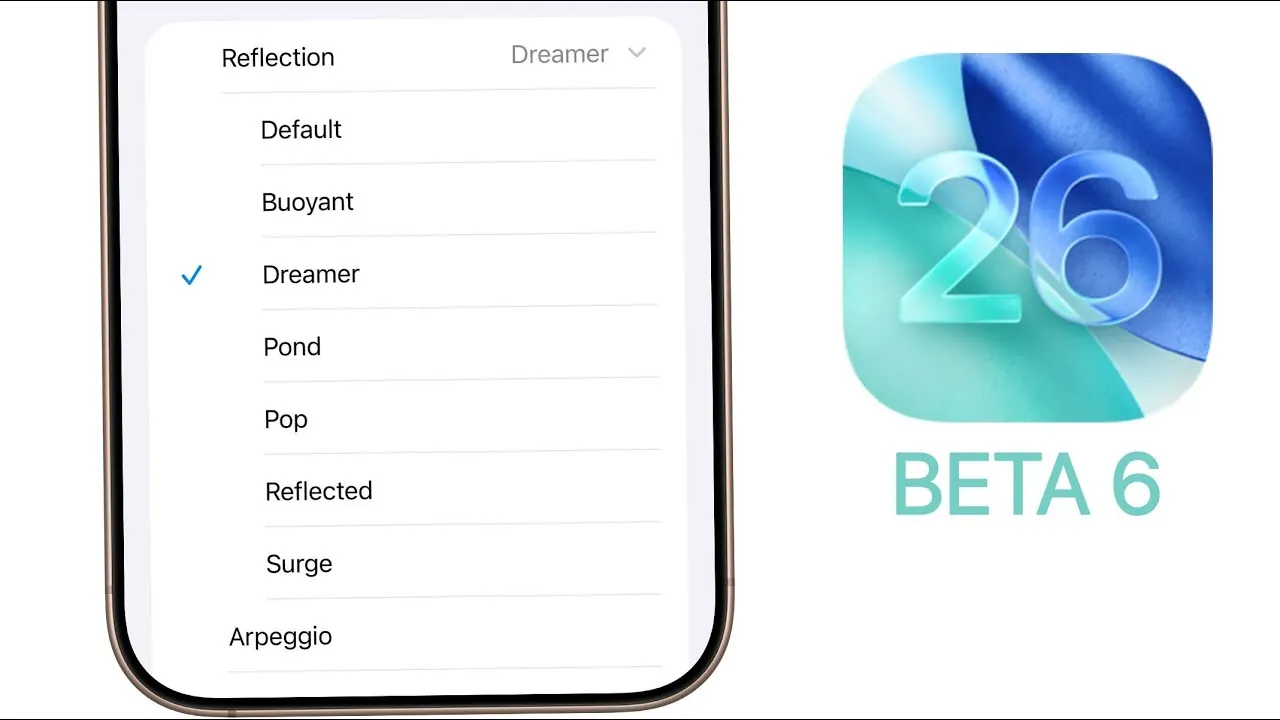
For users seeking greater customization, Beta 6 introduces seven new ringtones. Highlights include:
- Six variations of the popular “Reflection” tone, offering subtle differences to suit individual preferences.
- A completely new ringtone titled “Little Bird”, providing a fresh and unique sound option.
These additions allow users to further personalize their devices, enhancing the auditory experience.
Camera Settings Simplified
Apple has responded to user feedback by simplifying the camera settings in Beta 6. The toggle for reversing scroll direction has been removed, reverting the camera mode switching behavior to its original design. This change ensures a more intuitive and consistent experience, particularly for long-time users familiar with the previous functionality.
Photos App: Improved Navigation
The Photos app has been updated to include a new splash screen that highlights enhanced navigation and customization options. These updates are designed to make it easier for users to explore and organize their photo libraries. With a more intuitive layout, the Photos app now offers a streamlined experience for managing your memories.
Renamed Phone Settings Toggles
Several toggles in the Phone app have been renamed to improve clarity and usability. Changes include:
- “Detect Call Waiting” is now labeled as “Hold Assist Detection”, providing a clearer description of its functionality.
- “Silence Spam Callers” has been simplified to “Spam”, making it more concise and easier to locate.
These adjustments aim to make the settings menu more user-friendly, reducing confusion and improving accessibility.
Bug Fixes and Known Issues
Beta 6 addresses a variety of bugs to enhance system stability and performance. Key fixes include:
- Resolving app crashes that occurred during search operations.
- Improving the “Add to Home Screen” functionality for web apps, making sure a smoother process.
- Fixing an issue with alphanumeric passcode entry, which previously caused errors for some users.
However, a known issue persists in the Messages app, where the translation feature fails unless both participants enable it. Apple is expected to address this in future updates.
Performance and Battery Life
While there are no significant changes to raw performance metrics, the faster animations introduced in Beta 6 create a perception of improved responsiveness. Battery life remains consistent with previous beta versions, with no notable gains or losses reported. This stability ensures that users can test the beta without concerns about diminished performance or excessive battery drain.
Looking Ahead: Weekly Updates
Apple has committed to releasing weekly beta updates leading up to the Release Candidate (RC) in early September. These updates are expected to include additional refinements, bug fixes, and performance optimizations. The final public release of iOS 26 is scheduled for mid-September, promising a polished and feature-rich experience for all users.
Refining the iOS Experience
iOS 26 Beta 6 highlights Apple’s dedication to delivering a seamless and intuitive user experience. With its focus on visual enhancements, functional updates, and bug fixes, this beta sets the stage for a refined final release. As the public launch approaches, users can look forward to a more cohesive, responsive, and personalized interaction with their devices.
Here are more detailed guides and articles that you may find helpful on iOS 26 Beta 6.
- iOS 26 Beta 6 Release Date, Features, and Updates
- iOS 18.1 Beta 6: Apple Intelligence Hidden Gems You Need to See
- iOS 12 Beta 6 vs iOS 11.4.1 Speed Test (Video)
- iOS 18.1 Beta 6: Surprise Features You Won’t Believe
- Another Look at iOS 18 Beta 6
Source & Image Credit: Brandon Butch
Disclosure: Some of our articles include affiliate links. If you buy something through one of these links, Geeky Gadgets may earn an affiliate commission. Learn about our Disclosure Policy.
