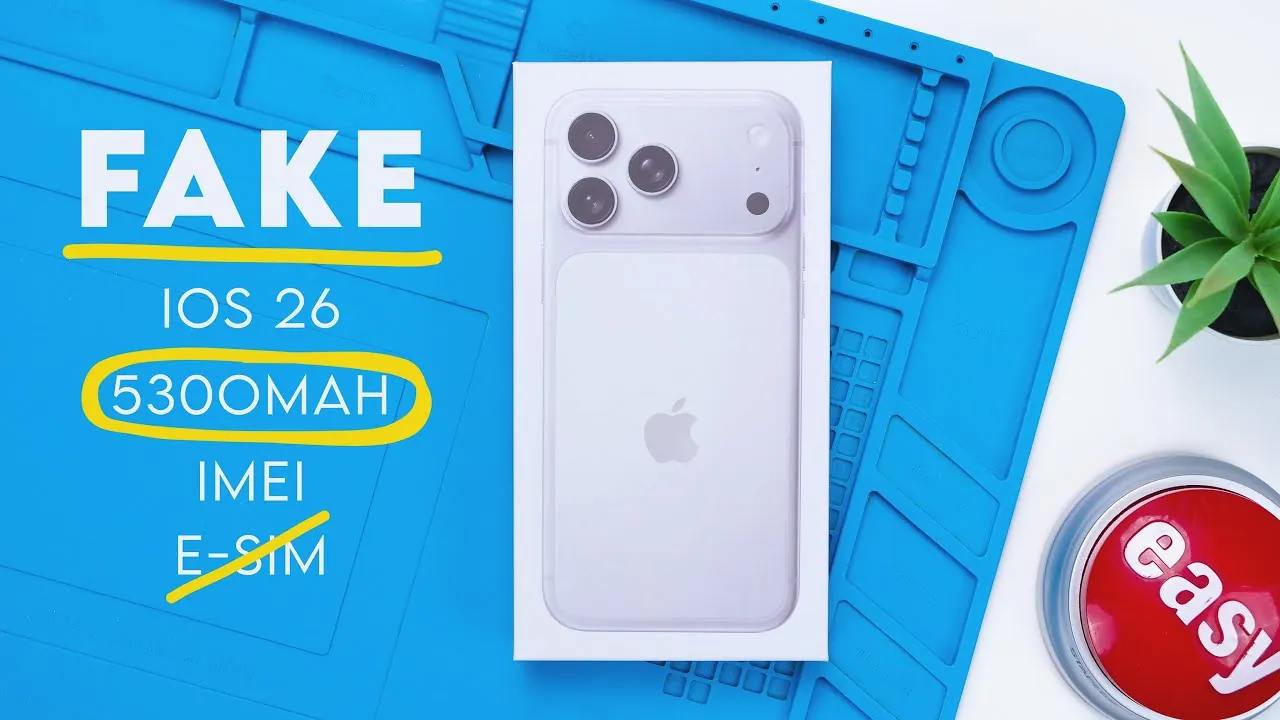
Counterfeit iPhones have become increasingly sophisticated, making it harder to distinguish them from genuine Apple devices. However, by carefully examining key aspects such as packaging, design, internal components, and performance, you can uncover the subtle signs of a fake. The video below from Phone Repair Guru provides practical steps to help you identify counterfeit iPhones and avoid falling victim to scams.
Packaging and Design: First Impressions Matter
The packaging is often the first indicator of a counterfeit iPhone. While counterfeit boxes may appear convincing at first glance, subtle differences can reveal their inauthenticity.
- Color and Finish: Genuine iPhone boxes are pristine white with a smooth, high-quality finish. Counterfeit versions may appear slightly off-white, dull, or have inconsistencies in texture.
- Black Light Details: Authentic Apple packaging includes hidden black light markings that are often missing in counterfeit products. These details can be checked using a UV light.
The phone’s physical design is another critical area to inspect. Counterfeit iPhones often attempt to replicate Apple’s sleek unibody design but fail to match the precision and quality of genuine devices.
- Build Quality: Fake devices may have poorly aligned screws, uneven edges, or scratches on the back panel. The overall finish is often less refined compared to a genuine iPhone.
- Apple Logo: While the logo placement may seem accurate, counterfeit devices often lack the polished craftsmanship of authentic iPhones. The logo may feel slightly raised or misaligned.
Internal Components: What’s Inside Counts
The internal components of a phone can provide significant clues about its authenticity. Genuine iPhones are equipped with advanced features and tightly integrated hardware, which counterfeit models struggle to replicate.
- Battery Capacity: Some fake iPhones advertise larger batteries, such as 5,300 mAh, but these often use low-quality materials that result in poor performance and shorter lifespans.
- Internal Layout: Apple’s internal design is compact and carefully organized. Counterfeit devices may have detachable components, such as cameras or batteries, which are inconsistent with Apple’s design philosophy.
- MagSafe and Wireless Charging: Genuine iPhones support MagSafe technology and wireless charging, features that are typically absent in counterfeit models.
Display and Operating System: Look Beyond the Surface
The display and operating system are two of the most telling indicators of a fake iPhone. Genuine iPhones use high-quality materials and proprietary software that counterfeit devices cannot fully replicate.
- Screen Quality: Authentic iPhones feature high-resolution OLED displays with vibrant colors and minimal bezels. Counterfeit models often use lower-quality LCD screens, which may have a larger chin, less vibrant colors, and reduced clarity.
- Operating System: Counterfeit devices typically run an Android-based OS disguised as iOS. These fake operating systems often exhibit software inconsistencies, such as broken apps, limited functionality, and an unconvincing user interface. For example, a fake iPhone might claim to run “iOS 26” but fail to deliver the seamless experience of genuine iOS software.
Performance and Specifications: The Devil Is in the Details
Counterfeit iPhones often underperform due to outdated hardware and software. These devices may appear functional at first but fail to meet the standards of genuine Apple products.
- Processor and RAM: Many fake devices use older processors, such as the MediaTek 6765, paired with 6 GB of RAM. While these specifications may seem adequate, the devices often struggle with basic tasks and multitasking.
- Spoofed Data: Counterfeit phones may display fake hardware specifications to mislead buyers. For instance, the device might claim to have an A16 Bionic chip but perform like a budget Android phone.
- Outdated Software: These devices often run older versions of Android, such as version 10, which lack modern features, security updates, and compatibility with newer apps.
Camera Quality: A Clear Difference
The camera is another area where counterfeit iPhones fall short. Apple is renowned for its advanced camera technology, which counterfeit devices cannot replicate.
- Image Quality: Photos and videos taken with fake iPhones often have dull colors, poor autofocus, and low resolution. The difference in quality is especially noticeable in low-light conditions.
- Front Camera: The front-facing camera on counterfeit devices typically produces grainy, poorly lit images that lack the sharpness and clarity of genuine iPhones.
Protect Yourself: Tips to Avoid Counterfeit iPhones
Counterfeit iPhones are designed to deceive consumers by mimicking the appearance of genuine devices while falling short in performance, functionality, and reliability. To protect yourself from these scams, consider the following tips:
- Buy from Trusted Sources: Always purchase smartphones from authorized retailers or directly from Apple. Avoid third-party sellers or online marketplaces with questionable reputations.
- Inspect Carefully: Pay close attention to the packaging, design, and performance of any device you’re considering. Look for inconsistencies in build quality, software, and features.
- Be Skeptical of Low Prices: If a deal seems too good to be true, it probably is. Genuine iPhones rarely sell for significantly less than their retail price.
- Verify Serial Numbers: Use Apple’s official website to check the serial number of the device. Counterfeit products often have invalid or duplicated serial numbers.
By staying informed and vigilant, you can avoid counterfeit products and ensure that your investment in a smartphone is both reliable and worthwhile.
Dive deeper into Fake iPhone detection with other articles and guides we have written below.
- How to check if your iPhone has been repaired with fake parts
- Don’t Be FOOLED by This Fake iPhone 16 Pro Max!
- Fake iPhone 12 Pro Max vs real iPhone 12 Pro Max (Video)
- Fake iPhone 15 Pro Max shown off on video
- Fake iPhone XS Max vs real iPhone XS Max (Video)
Source & Image Credit: Phone Repair Guru
Disclosure: Some of our articles include affiliate links. If you buy something through one of these links, Geeky Gadgets may earn an affiliate commission. Learn about our Disclosure Policy.
