If you’ve been waiting for the release of the Eclipse Litetouch Keyboard, you’ll be pleased to know that it has now cleared FCC and it’s nearly available to purchase.
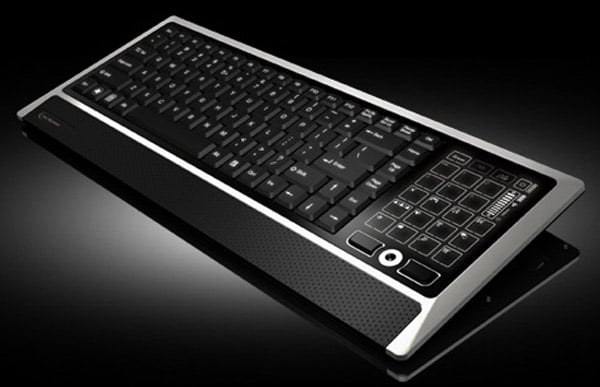
The Eclipse Litetouch is unique in that the number pad on the right side of the keyboard has been replaced with an LCD touchscreen. This innovative feature allows the touchscreen to be programmed with multiple sets of controls to be displayed, making it highly customizable for different tasks and applications. Whether you’re a gamer, a graphic designer, or someone who just loves tech gadgets, this keyboard offers a new level of interaction and functionality.
Customizable Touchscreen
The LCD touchscreen on the Eclipse Litetouch keyboard is not just a gimmick; it provides real utility. Users can program the touchscreen to display different sets of controls depending on their needs. For example, a gamer might set up custom macros for their favorite games, while a graphic designer could have shortcuts for their most-used tools in Photoshop. The touchscreen can also display media controls, shortcuts for frequently used applications, or even a calculator. This level of customization can significantly enhance productivity and streamline workflows.
Check out the video after the jump to see it in action.
Pricing and Compatibility
The Eclipse Litetouch keyboard will be available in both a wired version for $99 and a wireless version for $129. Both versions will be compatible with Windows and Mac OS X systems, making it a versatile choice for a wide range of users. The wireless version offers the added convenience of a clutter-free workspace, which can be particularly beneficial for those who value a minimalist desk setup.
In addition to its innovative touchscreen, the Eclipse Litetouch keyboard features a sleek design with a brushed aluminum finish, giving it a premium look and feel. The keys are backlit, making it easy to use in low-light conditions, and the overall build quality is robust, ensuring that it can withstand the rigors of daily use.
For those who are concerned about the learning curve associated with a new type of keyboard, the Eclipse Litetouch comes with intuitive software that makes it easy to set up and customize the touchscreen. The software is user-friendly and offers a range of options for personalizing the keyboard to suit your specific needs.
Overall, the Eclipse Litetouch keyboard represents a significant advancement in keyboard technology. Its customizable touchscreen offers a level of flexibility and functionality that is unmatched by traditional keyboards. Whether you’re looking to enhance your productivity, streamline your workflow, or simply enjoy the latest in tech innovation, the Eclipse Litetouch keyboard is a compelling choice.
Via Engadget
Disclosure: Some of our articles include affiliate links. If you buy something through one of these links, Geeky Gadgets may earn an affiliate commission. Learn about our Disclosure Policy.
