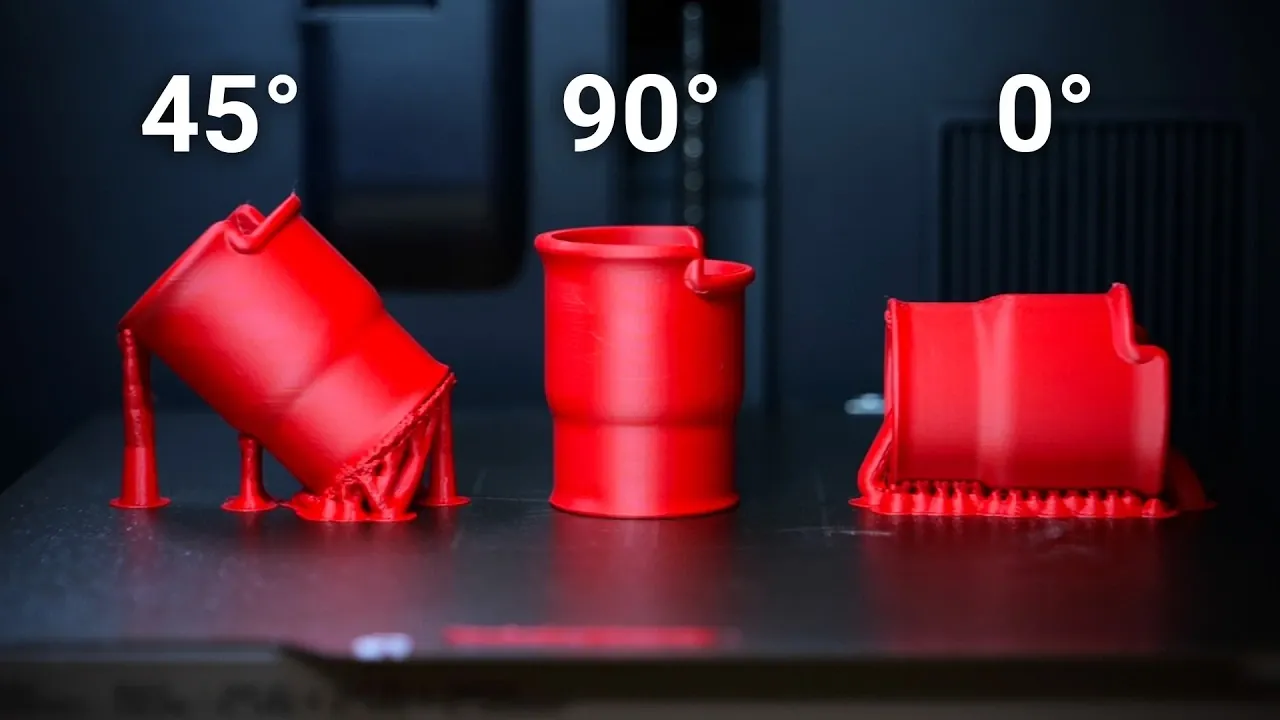
Imagine holding a 3D-printed part in your hands, marveling at its intricate design, only to have it snap under pressure due to weak layer adhesion. This is the frustrating reality of anisotropic strength, a limitation inherent to 3D printing where parts are weaker along their layer lines. But what if there was a way to make these parts stronger, not by changing the material or printer, but by simply adjusting the angle at which they’re printed? Advocates of angled 3D printing claim it can boost tensile strength by as much as 27%, while also improving surface quality. Yet, this approach isn’t without its challenges, raising the question: does angling really deliver stronger, more reliable parts, or is it just another overhyped technique?
In this feature, CNC Kitchen explore the science and strategy behind angled 3D printing, uncovering how print orientation affects mechanical properties, surface finish, and overall functionality. From the mechanics of stress distribution to the trade-offs of increased support structures, we’ll delve into the nuances that make angled printing both promising and complex. Whether you’re a seasoned maker or a curious newcomer, you’ll gain insights into how this technique can transform your 3D printing projects, if applied thoughtfully. By the end, you might just find yourself rethinking the way you approach your next design.
Optimizing 3D Print Orientation
TL;DR Key Takeaways :
- 3D printed parts are anisotropic, meaning their strength varies based on the direction of applied forces, with horizontal prints being up to 50% stronger than vertical ones.
- Angling parts during printing can improve tensile strength by up to 27% and enhance surface quality, particularly for organic shapes or shallow slopes.
- Angled printing introduces challenges such as increased support requirements, potential warping, and additional post-processing needs, which must be carefully managed.
- Strategies like modular design and hybrid orientations can reduce support needs, improve strength, and optimize surface quality for complex or large parts.
- Effective angled printing requires thoughtful planning, including material selection, load distribution analysis, and minimizing post-processing efforts to maximize benefits.
Understanding Anisotropic Strength in 3D Printing
3D-printed parts are inherently anisotropic, meaning their strength varies depending on the direction of applied forces. This characteristic stems from the layer-by-layer deposition process, where parts are weakest along the layer lines due to limited adhesion between layers. For example, a horizontally printed part can be up to 50% stronger than a vertically printed one. Recognizing this limitation is essential when designing parts for applications where strength is critical.
The anisotropic nature of 3D printing highlights the importance of orientation. By strategically angling parts, you can mitigate weaknesses and improve overall performance. This understanding forms the foundation for optimizing print orientation to achieve desired results.
How Print Orientation Affects Strength and Surface Quality
The orientation of a part during printing directly impacts its mechanical properties, surface finish, and the need for support structures. Angling parts, such as printing them at a 45° orientation, can distribute stress more evenly across layers, resulting in improved tensile strength. Research indicates that angled prints can achieve strength gains of up to 27%, although these benefits follow an S-shaped curve, with diminishing returns beyond optimal angles.
In addition to strength, angled printing can enhance surface quality. Parts with organic shapes or shallow slopes benefit the most, as smoother transitions between layers reduce visible layer lines and shrink marks. This makes angled printing particularly advantageous for components where aesthetics are as important as functionality.
However, achieving these benefits requires a deliberate approach. The interaction between the part’s geometry, layer orientation, and support structures must be carefully planned to avoid unintended consequences.
Does Angled 3D Printing Really Make Parts Stronger?

Enhance your knowledge on 3D printing by exploring a selection of articles and guides on the subject.
- X-MAKER JOY Smart 3D Printer for Kids & Beginners | StackSocial
- Toybox 3D Printer Deluxe Bundle with 8 Printer Food Colors
- What is Stack 3D printing and how can you use it?
- BambooFill Wood 3D Printing Filament Demonstrated (video)
- Bambu Lab H2S Review : Affordable Large-Format 3D Printing
- How Volumetric 3D Printing Works & Why It’s So Fast Printing
- Multi-Color 3D Printing : The Future of Design and Manufacturing
- QIDI PLUS4 : High-Performance 3D Printing at a Competitive Price
- Bamboo Lab A1 Mini Review: Affordable 3D Printing for Beginners
- New Rapid Liquid Printing technique set to transform 3D printing
Challenges and Trade-Offs of Angled Printing
While angled printing offers clear advantages, it also introduces several challenges. Printing at an angle often necessitates additional support structures, which can increase material usage, print time, and complexity. Poorly designed supports may lead to warping or even print failures, particularly for larger or intricate parts. Moreover, angling a part can shift failure points to unexpected areas, complicating the design process and requiring additional analysis.
The interaction between supports and the part’s geometry is another critical consideration. Removing supports can leave marks or imperfections on the surface, necessitating post-processing to achieve the desired finish. This additional step can increase production time and costs, offsetting some of the benefits of angled printing.
Despite these challenges, angled printing remains a valuable technique when applied thoughtfully. By understanding the trade-offs and planning accordingly, you can maximize its advantages while minimizing potential drawbacks.
Practical Tips for Optimizing Angled Printing
To fully use the benefits of angled printing, it’s essential to incorporate orientation considerations into the design phase. Here are some practical tips to guide your process:
- Design with orientation in mind: Optimize part geometry to minimize support requirements and enhance strength.
- Use slicer tools effectively: Adjust the model’s geometry and create stable contact points for angled prints.
- Export models in the desired orientation: Ensure consistency across different users and machines by saving the model in its intended print position.
Additionally, consider modular designs to reduce the need for supports. Splitting a part into smaller components that are printed separately and assembled later can improve strength while simplifying the printing process. This approach is particularly useful for large or complex parts where traditional angled printing might be impractical.
Innovative Solutions to Address Angled Printing Challenges
To overcome the challenges associated with angled printing, you can explore innovative techniques that balance strength, surface quality, and support requirements. One effective approach is modular design, where parts are divided into smaller sections that are printed flat and then assembled. This method reduces the need for supports and enhances overall strength, making it ideal for large or intricate parts.
Another strategy involves experimenting with hybrid orientations, where different sections of a part are printed at varying angles. This approach allows you to optimize strength and surface quality while minimizing support requirements. For example, critical load-bearing areas can be printed at angles that maximize tensile strength, while aesthetic sections are oriented to achieve a smoother finish.
By combining these techniques with careful planning and analysis, you can address the limitations of angled printing and unlock its full potential.
Key Considerations for Angled Printing
Angled printing is not a universal solution, and its effectiveness depends on the specific requirements of your project. While it can improve strength and surface quality, it may also introduce new challenges, such as shifting failure points or complicating load distribution. Complex loading scenarios, where forces interact with both infill and perimeters, further highlight the limitations of this technique.
To achieve the best results, it’s crucial to adopt a thoughtful and deliberate approach. Consider the following factors when planning your print orientation:
- Material properties: Different materials respond differently to angled printing, so choose a material that complements your design goals.
- Geometry and load distribution: Analyze how forces will interact with the part’s structure to avoid unexpected failure points.
- Post-processing requirements: Account for the time and effort needed to remove supports and achieve the desired surface finish.
By addressing these considerations, you can make informed decisions that maximize the benefits of angled printing while minimizing its drawbacks.
Unlocking the Potential of Angled Printing
Optimizing print orientation is a critical step in producing stronger, more functional, and visually appealing 3D-printed parts. Angled printing offers significant advantages, including improved tensile strength and enhanced surface quality. However, it also requires careful planning to address challenges such as increased support needs and potential design complexities.
By understanding the trade-offs and using innovative solutions like modular designs and hybrid orientations, you can harness the full potential of angled printing. This approach allows you to create high-quality, durable parts tailored to your specific needs, making sure that your 3D printing projects achieve both functional and aesthetic success.
Media Credit: CNC Kitchen
Disclosure: Some of our articles include affiliate links. If you buy something through one of these links, Geeky Gadgets may earn an affiliate commission. Learn about our Disclosure Policy.
