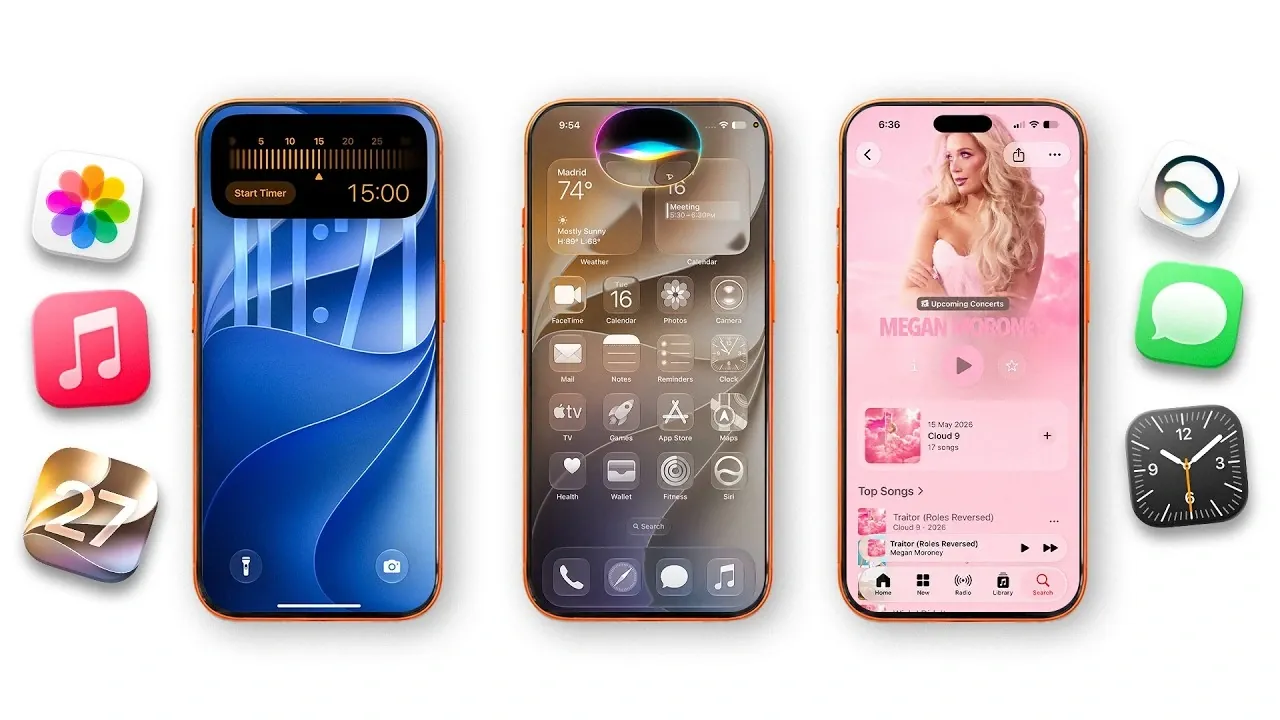
Apple’s iOS 27 brings a robust lineup of updates designed to elevate your iPhone experience. With a strong emphasis on artificial intelligence (AI), enhanced personalization, and optimized performance, this release redefines how you interact with your device. From smarter Siri capabilities to advanced photo editing tools, iOS 27 delivers features that cater to productivity, creativity, and everyday convenience. Here’s an in-depth exploration of the most impactful updates and how they can enhance your daily life. The video below from Nikias Molina gives us a look at the iOS 27 features.

Siri Gets Smarter and More Context-Aware
Siri in iOS 27 has evolved into a more intelligent and intuitive assistant. With its integration into Dynamic Island, Siri now features fluid animations that allow it to blend seamlessly into your device’s interface. This update enables Siri to handle tasks with greater precision and context-awareness, saving you time and effort.
Key improvements include:
- On-Screen Awareness: Siri can now interact directly with the content displayed on your screen, such as editing photos, creating notes, or even providing contextual suggestions.
- Conversational Follow-Ups: You can refine commands or ask related follow-up questions without needing to restart the conversation.
- Dedicated Siri App: A new app centralizes all Siri interactions and preferences, making it easier to manage and customize your assistant.
These enhancements make Siri a more versatile and user-friendly tool, capable of handling complex tasks with ease and efficiency.
AI-Powered Photo and Video Editing
iOS 27 introduces innovative photo and video editing tools powered by AI, offering professional-grade capabilities directly on your iPhone. These tools are designed to make editing more accessible while delivering precise results.
For photo editing, new features include:
- Cleanup: Remove unwanted objects or imperfections from images with a single tap.
- Extend: Expand the edges of your photos seamlessly, perfect for reframing shots.
- Reframe: Adjust the focus and composition of your photos effortlessly.
For video enthusiasts, the update offers:
- Automatic subtitle generation, improving accessibility and creative possibilities.
- Enhanced slideshow customization tools for creating polished presentations.
- Frame extraction allows you to capture high-quality stills from videos.
These features empower users to create and manage stunning visual content with ease, whether for personal or professional use.
Camera Features That Boost Creativity
The camera app in iOS 27 uses AI to enhance both functionality and creativity. Real-time object recognition, powered by Siri, allows you to identify items, access nutritional information, or even translate text instantly. Additionally, the new Image Playground feature provides a space to experiment with AI-generated visuals, create custom emojis, and modify images in innovative ways.
These updates transform your iPhone camera into a versatile tool, offering practical applications alongside creative possibilities.
Enhanced Native Apps
Apple has significantly upgraded several built-in apps in iOS 27, streamlining workflows and improving usability. These updates reflect Apple’s commitment to enhancing everyday tasks and interactions across its ecosystem.
- Photos: Improved organization tools, identity document storage and temporary shared album options for collaborative sharing.
- Calendar: Natural language event creation and Siri-assisted scheduling simplify planning and time management.
- Safari: Tab organization by topic, price drop alerts for online shopping and custom extension creation enhance your browsing experience.
- Reminders: Automatic categorization of grocery lists saves time and effort.
- Apple Music: Redesigned artist pages, landscape mode and improved Automix features elevate your listening experience.
- Fitness: Shareable workout summaries with redesigned visuals promote engagement and motivation.
These updates make Apple’s native apps more intuitive and functional, catering to a wide range of user needs.
Widgets and Home Screen Customization
iOS 27 introduces full-screen widgets for apps like Photos, Music and Home, providing more detailed information at a glance. Lock screen customization has also been expanded, allowing for minimalistic designs and the ability to hide the time display. These features give you greater control over your device’s appearance and functionality, allowing a more personalized user experience.
Performance and Design Upgrades
Performance improvements are a cornerstone of iOS 27. Faster app launches, quicker AirDrop transfers and enhanced Wi-Fi connectivity ensure a smoother and more efficient experience. The redesigned app icons and customizable Liquid Glass UI bring a modern aesthetic to the interface, while compatibility with devices starting from the iPhone 11 ensures broad accessibility.
Streamlined Shortcuts and Automations
Creating shortcuts is now more intuitive in iOS 27, thanks to natural language processing. Simply describe a task in plain language and the system will generate the corresponding shortcut automatically. An expanded gallery of pre-made shortcuts offers a variety of options for automating everyday tasks, helping you save time and effort.
Audio and AirPods Enhancements
Audio customization takes center stage in iOS 27 with the introduction of a built-in equalizer. This feature allows you to create personalized sound profiles tailored to your preferences. Siri integration with AirPods enables hands-free commands, while GymKit support ensures seamless connectivity with compatible gym equipment. These updates enhance both convenience and personalization for audio enthusiasts.
Apple Maps: A More Immersive Experience
Apple Maps now offers an enhanced satellite view with the option to remove labels, providing a more immersive exploration experience. Improved search functionality and personalized recommendations for nearby locations make navigation more intuitive and user-friendly, making sure you can find what you need with ease.
Home and Security Upgrades
HomeKit in iOS 27 supports 4K resolution cameras, delivering sharper and more detailed video feeds. AI-powered summaries for security camera footage help you quickly review important events, while grouped notifications for smart door locks improve organization and ensure you stay informed about your home’s security.
Other Noteworthy Features
iOS 27 includes several additional updates that enhance usability and personalization:
- Redesigned Apple Pay interface for easier card selection and faster payments.
- Temporary shared albums with expiration options for collaborative photo sharing.
- New customizable wallpapers featuring vibrant colors and dynamic themes.
These features further enrich the iOS experience, offering practical benefits alongside aesthetic enhancements.
Source & Image Credit: Nikias Molina
Disclosure: Some of our articles include affiliate links. If you buy something through one of these links, Geeky Gadgets may earn an affiliate commission. Learn about our Disclosure Policy.
