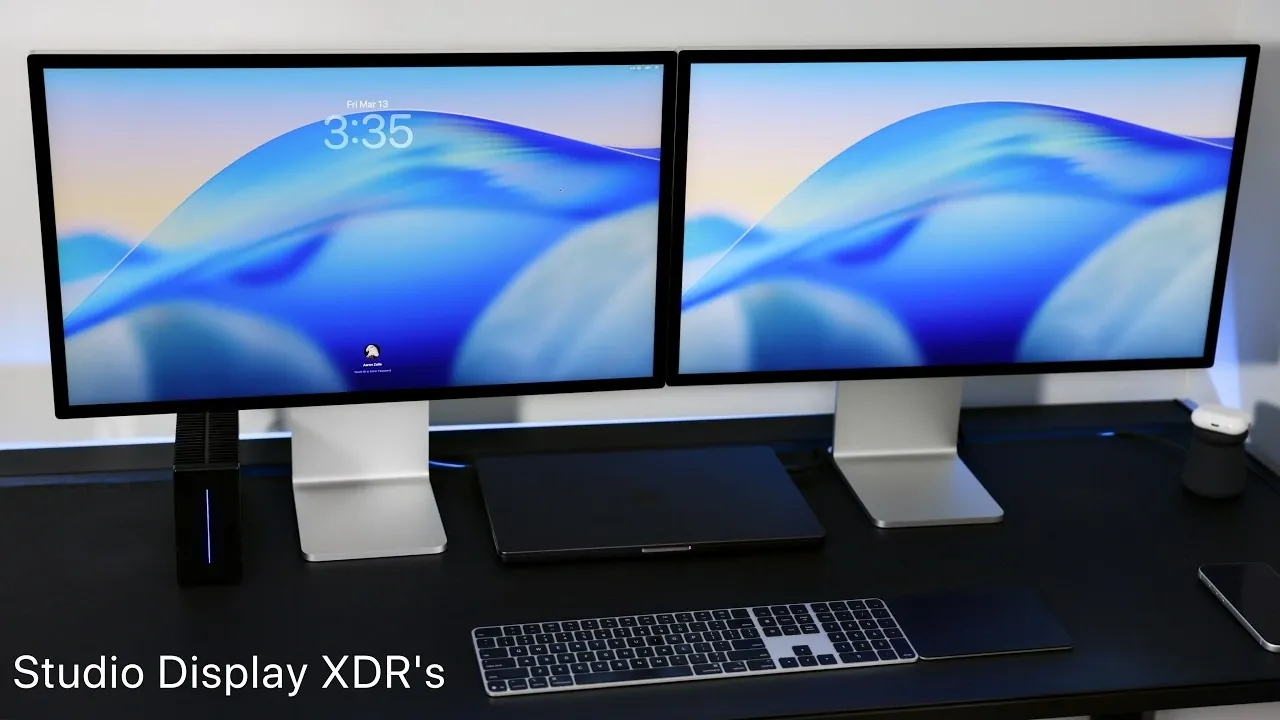
The Studio Display XDR is a professional-grade monitor carefully designed to meet the needs of creative professionals. With its advanced display technology, exceptional brightness, and versatile connectivity, it is tailored to enhance workflows for video editors, color graders, and content creators. The video below from Zollotech provides more insights into its unboxing experience, key features, and performance in a dual-monitor configuration, highlighting why it stands out as a premium choice for professionals.

Unboxing and Design
The unboxing experience of the Studio Display XDR immediately reflects its premium quality. Inside the box, you’ll find a braided power cable and a Thunderbolt cable, both designed for durability and a clean, organized setup. The monitor itself features a height- and tilt-adjustable stand, providing ergonomic flexibility that ensures comfort during extended work sessions. Its minimalist design is complemented by efficient venting for cooling and rubber feet for added stability.
For those working in bright or reflective environments, the nano-texture glass variant, priced at $3,599 compared to the standard model’s $3,299, offers reduced glare without compromising image clarity. This attention to detail in both design and functionality underscores the Studio Display XDR’s professional focus, making it a standout choice for demanding users.
Display Technology and Features
The Studio Display XDR incorporates innovative Mini-LED backlighting technology, featuring 2,304 local dimming zones that deliver exceptional brightness and contrast. Its display specifications are tailored to meet the needs of professionals who demand precision:
- Peak HDR brightness of 2,000 nits and SDR brightness of 1,000 nits, surpassing the Pro Display XDR’s 1,600 nits HDR and 500 nits SDR.
- A 120 Hz refresh rate for smooth and fluid visuals, though full functionality requires an M3 Pro or newer hardware.
- P3 wide color gamut for accurate color reproduction, supported by specialized presets, including modes for medical imaging and video editing.
The optional nano-texture coating further enhances visibility by minimizing glare, making it particularly suitable for environments with challenging lighting conditions. These features collectively position the Studio Display XDR as a top-tier monitor for professionals who prioritize precision, color accuracy and performance.
Connectivity and Versatility
The Studio Display XDR is equipped with a range of modern connectivity options, making sure compatibility with complex workflows and multi-device setups. Key connectivity features include:
- Two Thunderbolt 5 ports (upstream and downstream) for high-speed data transfer and daisy-chaining multiple displays.
- Two USB-C ports (10 Gbps) for connecting peripherals such as external drives, cameras, or other accessories.
Thunderbolt 5 compatibility ensures future-proofing, allowing users to connect high-performance accessories like external SSD arrays or additional monitors. This versatility makes the Studio Display XDR an excellent choice for professionals managing demanding, multi-device workflows.
Internal Hardware and Audio
The Studio Display XDR is powered by the A19 Pro chipset, which includes 128 GB of onboard storage. While the specific purpose of this storage remains unclear, it highlights the monitor’s advanced internal architecture, which could support future software updates or additional functionality.
The audio system features a six-speaker array with force-canceling woofers, delivering sound quality comparable to the MacBook Pro. While it is not intended to replace dedicated studio monitors, the audio system provides clear and balanced sound for casual listening, video playback, or remote meetings. This integration of high-quality audio further enhances the monitor’s all-in-one appeal.
Webcam and Microphone
The Studio Display XDR includes a 12 MP webcam designed to elevate video conferencing and content creation. Its features include:
- Center Stage, which uses AI to keep you in frame even as you move.
- Portrait mode and edge lighting for professional-looking visuals during video calls.
Additionally, the built-in voice isolation microphone ensures crystal-clear audio, making it ideal for remote meetings, podcasts, or voiceovers. Together, these features provide a polished and professional communication experience, further enhancing the monitor’s versatility.
Performance in a Dual-Monitor Setup
The Studio Display XDR excels in a dual-monitor configuration, offering significant productivity benefits for professionals. Its 120 Hz refresh rate ensures smooth multitasking, while the high brightness and color accuracy make it ideal for tasks such as video editing, color grading and graphic design.
To fully use its capabilities, your system must support Thunderbolt 5. Additionally, some users may need to make hardware adjustments, such as upgrading to an M3 Pro or newer processor, to unlock the monitor’s full potential. When paired with compatible hardware, the Studio Display XDR delivers a seamless and high-performance dual-monitor experience.
Comparison with Pro Display XDR
The Studio Display XDR introduces several improvements over its predecessor, the Pro Display XDR, making it a compelling choice for professionals seeking the latest advancements in display technology. Key improvements include:
- A higher refresh rate of 120 Hz, delivering smoother visuals for both creative and general workflows.
- Enhanced brightness and superior local dimming, resulting in better contrast and more vibrant images.
While the Pro Display XDR features a distinctive rear design that some users may prefer, the Studio Display XDR focuses on performance and functionality, offering a more advanced feature set that caters to modern professional needs.
Final Thoughts
The Studio Display XDR represents a significant step forward in professional-grade monitors, offering unmatched brightness, color accuracy and connectivity options. Its ability to seamlessly integrate into dual-monitor setups and support demanding workflows makes it an invaluable tool for video editors, color graders and other creative professionals. While it requires newer hardware to unlock its full potential, the Studio Display XDR is a worthy investment for those seeking a high-performance monitor tailored to professional needs.
Learn more about Studio Display XDR with other articles and guides we have written below.
- Apple Studio Display XDR vs Studio Display: Full Details
- Apple Studio Display XDR Review: 27-inch 5K mini-LED at $3,299
- Apple Studio Display vs Pro Display XDR (Video)
- Apple Studio Display 2: Everything You Need to Know
- Is the Kuycon G32P a Good Apple Pro Display XDR Alternative Under $2,000?
Source & Image Credit: zollotech
Disclosure: Some of our articles include affiliate links. If you buy something through one of these links, Geeky Gadgets may earn an affiliate commission. Learn about our Disclosure Policy.
