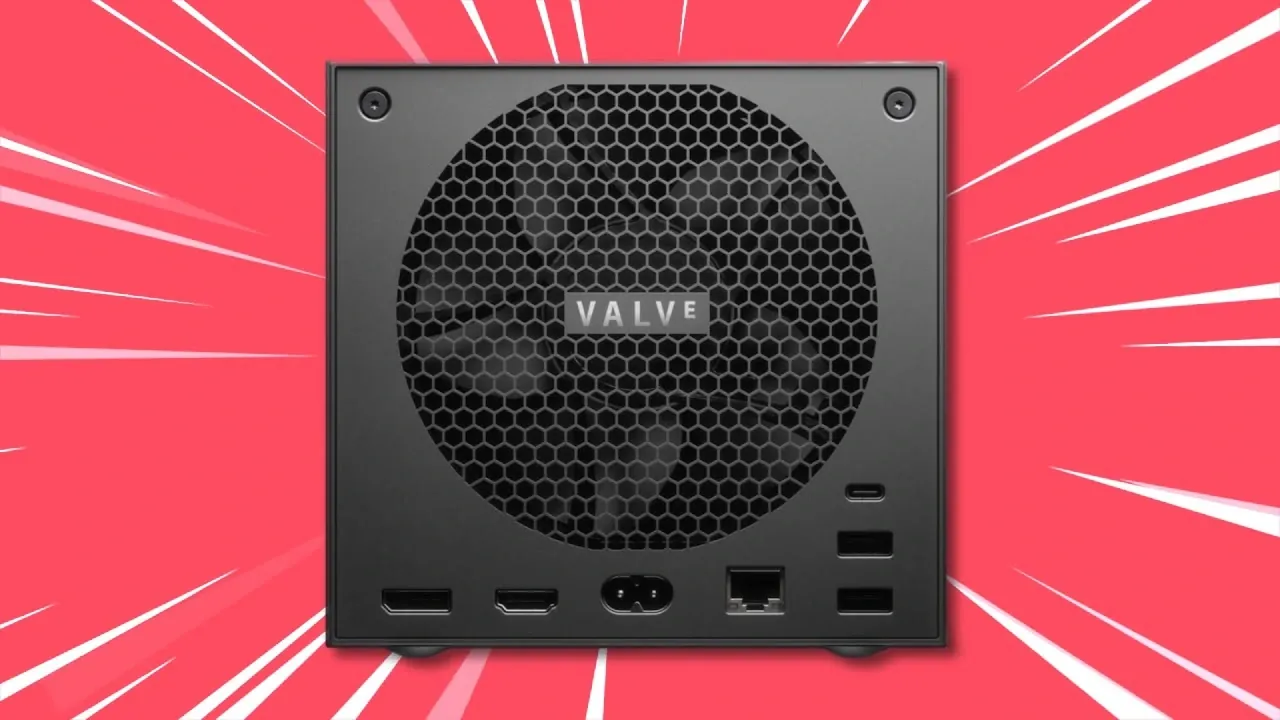
What if the device that promised to bring PC gaming to your living room faced a seemingly insurmountable technical roadblock? That’s exactly the challenge Valve encountered with the Steam Machine and its reliance on HDMI 2.0, a limitation that capped its ability to deliver the innovative visuals and performance modern gamers crave. NerdNest takes a closer look at how Valve tackled this problem head-on, navigating the restrictive licensing policies of HDMI 2.1 and the inherent challenges of open source platforms like Linux. The result? A series of clever workarounds that might not be perfect but show Valve’s determination to keep the Steam Machine relevant in a world of high refresh rates, HDR, and 4K gaming.
In this explainer, we’ll unpack the technical hurdles Valve faced, from bandwidth constraints to hardware compatibility, and explore the innovative solutions they’ve implemented, like chroma subsampling and FreeSync support—to enhance the Steam Machine’s performance. But these fixes come with trade-offs, and not all users will experience the same benefits. Whether you’re a casual gamer looking for a seamless living room setup or a tech enthusiast eager to push the limits of your high-end display, this breakdown will help you understand what’s possible, what’s not, and whether Valve’s efforts are enough to keep the Steam Machine in the game. Sometimes, innovation means finding a way forward when the rules seem stacked against you.
Steam Machine HDMI Challenges
TL;DR Key Takeaways :
- Valve has addressed HDMI 2.1 limitations on Linux systems, particularly for the Steam Machine, by collaborating with AMD and implementing innovative solutions to enhance gaming performance despite licensing and hardware constraints.
- HDMI 2.0 bandwidth limitations (18 Gbps vs. HDMI 2.1’s 48 Gbps) restrict features like 4K resolution at 120 FPS with HDR and 10-bit color, impacting the Steam Machine’s ability to fully use modern display technologies.
- Valve’s workarounds include chroma subsampling (with potential blurring in text-heavy scenarios), AMD FreeSync support (dependent on TV compatibility), and DisplayPort 1.4 (limited by lack of TV support), offering partial solutions to HDMI 2.0 constraints.
- Proprietary restrictions, such as the HDMI Forum’s licensing policies, highlight broader challenges for open source platforms like Linux, limiting innovation and user choice in gaming and display technologies.
- The Steam Machine is best suited for casual gamers with standard setups, while hardcore gamers or users with high-end displays may face trade-offs due to HDMI 2.0 limitations, emphasizing the importance of understanding individual hardware needs.
Understanding HDMI 2.1 Limitations on Linux
The HDMI Forum’s licensing policies create significant barriers for open source platforms like Linux. These restrictions prevent the full implementation of HDMI 2.1 features, leaving Linux systems, including the Steam Machine, limited to HDMI 2.0. This limitation reduces the available bandwidth from 48 Gbps (HDMI 2.1) to 18 Gbps (HDMI 2.0), which directly impacts the system’s ability to support advanced gaming features such as high resolutions, fast frame rates, and HDR.
For users, this means that the Steam Machine cannot fully use modern display technologies. Features like 4K resolution at 120 FPS with HDR and 10-bit color depth are unattainable due to the bandwidth constraints of HDMI 2.0. This limitation is particularly noticeable when playing graphically demanding games or using high-end displays, where the hardware’s full potential remains untapped.
How HDMI 2.0 Bandwidth Impacts Gaming
The reduced bandwidth of HDMI 2.0 forces users to make compromises when gaming or streaming content. You may need to prioritize certain features over others, such as choosing between high resolution, frame rate, HDR, or 10-bit color depth. For instance, achieving 4K resolution at 120 FPS while allowing HDR and 10-bit color is impossible under HDMI 2.0’s bandwidth limitations.
This trade-off is especially evident in visually intensive games or when using advanced displays. High refresh rates and HDR are critical for immersive gaming experiences, but the constraints of HDMI 2.0 mean you may have to settle for lower settings, which can diminish the overall quality of gameplay.
Valve Solved it! Steam Machine Update!

Uncover more insights about Valve’s Steam Machine in previous articles we have written.
- Worlds Smallest DIY Steam Machine : Ryzen 7840U for Steady
- Steam Machine Pricing Outlook, Early 2026 Release Window
- Steam Machine : Early 2026 Release Date, Prices, Specs & OS
- Valve Steam Machine Returns in 2026, Specs, Price Outlook
- Steam Machine 4K at 60fps, Steam OS Features and Performance
- Steam Machine Price : Why Valve Set the Tag at $1,000 in 2026
- Steam Machine Verified Pushes Devs to Optimize for Steam OS
Valve’s Innovative Workarounds
To address these challenges, Valve has implemented several solutions to optimize the Steam Machine’s performance. These workarounds aim to mitigate the limitations of HDMI 2.0 while enhancing the gaming experience:
- Chroma Subsampling: This technique compresses color data (chroma) while prioritizing brightness data (luma), allowing for higher resolutions and frame rates. Although effective, chroma subsampling can result in slight blurring, particularly in text-heavy games or applications.
- FreeSync Support: By using AMD’s FreeSync technology, Valve ensures smoother gameplay by synchronizing the frame rate with the display’s refresh rate. However, the effectiveness of this feature depends on whether your TV supports FreeSync, which may limit its utility in certain setups.
- DisplayPort 1.4: DisplayPort 1.4 offers significantly higher bandwidth than HDMI 2.0, supporting features like 4K at 120 FPS with HDR and 10-bit color. While this is a viable option for users connecting to computer monitors, most living room TVs lack DisplayPort inputs, making it less practical for home theater setups.
These solutions demonstrate Valve’s commitment to overcoming technical limitations, but they also come with trade-offs. For example, chroma subsampling may reduce visual clarity in specific scenarios, and FreeSync’s effectiveness is contingent on hardware compatibility.
Historical Context: Proprietary Restrictions
The challenges Valve faces with HDMI 2.1 are not unique and reflect a broader trend of proprietary restrictions in the tech industry. A historical example is Nintendo’s 10NES chip in the 1980s, which restricted unauthorized third-party game development to maintain control over its ecosystem. Similarly, the HDMI Forum’s licensing policies limit open source platforms like Linux from fully using HDMI 2.1, restricting innovation and user choice.
These parallels underscore the ongoing tension between proprietary standards and open source development. While proprietary restrictions often aim to protect intellectual property and ensure quality control, they can also stifle creativity and limit the potential of open source platforms to deliver innovative solutions.
Challenges You Might Face
Despite Valve’s efforts, some challenges remain for Steam Machine users. If you rely on chroma subsampling, you may notice slight blurring in text-heavy games or applications. TVs without FreeSync support will not benefit from variable refresh rates (VRR), potentially leading to screen tearing during fast-paced gameplay. Additionally, if you use DisplayPort-to-HDMI adapters, you might encounter audio compatibility issues, adding another layer of complexity to your setup.
These challenges highlight the importance of understanding your specific gaming and display needs. While Valve’s solutions address many limitations, they may not fully resolve all issues, particularly for users with specific hardware configurations or advanced gaming requirements.
Who Benefits Most?
The Steam Machine is designed primarily for living room gaming, but its technical limitations may affect different users in varying ways. Casual gamers who prioritize convenience and accessibility are likely to benefit the most, as the Steam Machine offers a solid gaming experience for standard setups. However, hardcore gamers or those with high-end displays may find the HDMI 2.0 restrictions more limiting.
If you’re connecting the Steam Machine to a computer monitor, you can bypass HDMI restrictions by using DisplayPort, unlocking higher resolutions and frame rates. For living room setups, however, the reliance on HDMI 2.0 may limit your ability to fully enjoy the highest-quality visuals and performance. Understanding these trade-offs is essential when deciding whether the Steam Machine aligns with your gaming preferences and hardware.
Valve’s Commitment to Overcoming Limitations
Valve’s efforts to address HDMI 2.1 challenges on Linux-based systems reflect its dedication to delivering a competitive gaming experience. By implementing workarounds like chroma subsampling, FreeSync, and DisplayPort support, Valve ensures that the Steam Machine remains a viable option for a wide range of gamers. While these solutions do not completely eliminate the restrictions imposed by HDMI 2.0, they demonstrate Valve’s commitment to innovation and user satisfaction.
As a user, it is important to weigh the trade-offs and compatibility challenges when considering the Steam Machine. Whether you’re a casual gamer seeking a convenient living room setup or a hardcore enthusiast with advanced display requirements, understanding the technical limitations and available solutions will help you make an informed decision. Valve’s approach strikes a balance between overcoming constraints and delivering a competitive, enjoyable gaming experience.
Media Credit: NerdNest
Disclosure: Some of our articles include affiliate links. If you buy something through one of these links, Geeky Gadgets may earn an affiliate commission. Learn about our Disclosure Policy.
