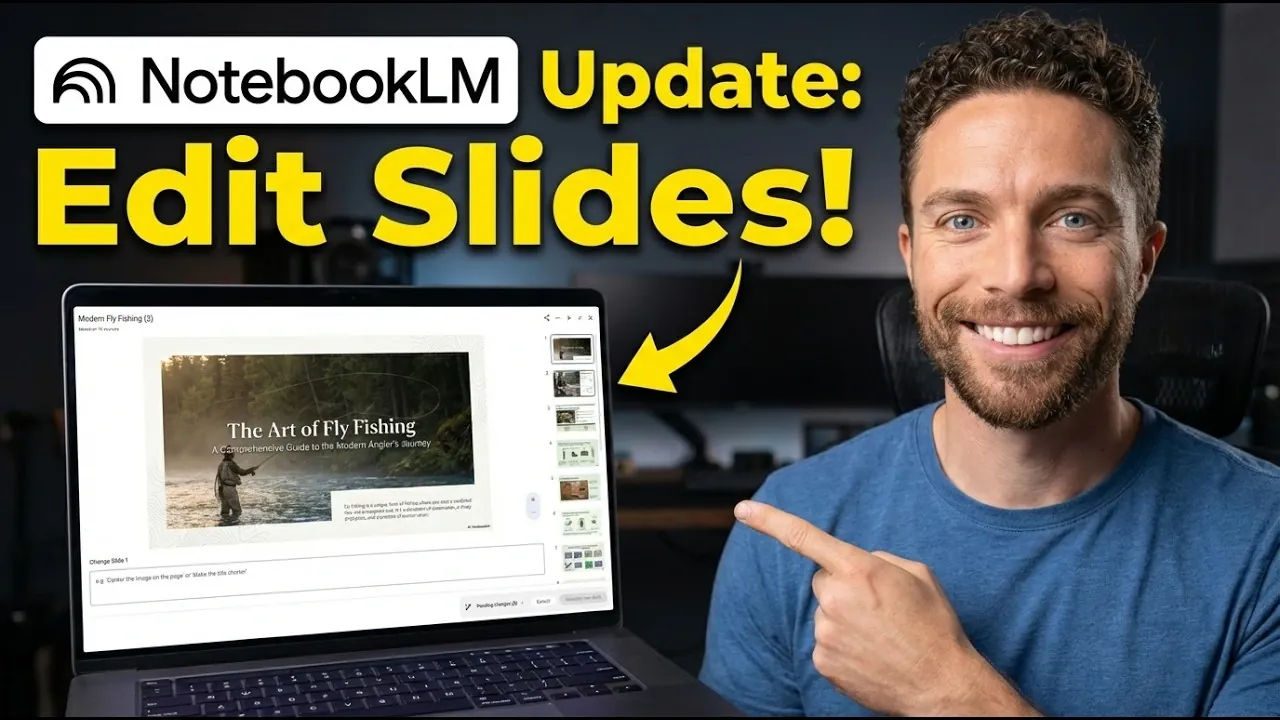
NotebookLM’s latest update introduces the “Revise” feature, allowing users to make precise edits to individual slides in their presentations. As explained by Paul Lipsky, this functionality enables you to request specific changes, such as modifying text, replacing images, or adjusting layouts, and receive an updated version of your slide deck with clearly marked revisions. While this update also includes faster processing speeds and expanded export options, it does have some limitations, such as the inability to perform batch edits or export fully editable files in PowerPoint format.
In this explainer, you’ll learn how to use the “Revise” feature to streamline your slide customization process, along with tips for managing the constraints of one-slide-at-a-time editing. You’ll also discover how the improved processing speeds can help you meet tight deadlines and explore the expanded export options for sharing your work. By understanding these updates and their practical applications, you can make the most of NotebookLM’s enhanced capabilities while navigating its current limitations.
NotebookLM Update
TL;DR Key Takeaways :
- The new “Revise” feature allows users to customize individual slides by providing specific instructions, automating the editing process for greater efficiency and accuracy.
- Key limitations include the inability to perform batch edits and restrictions on editable exports, as PowerPoint files are rendered as non-editable images.
- Processing speeds have been significantly improved, allowing faster revisions, particularly beneficial for time-sensitive projects.
- Expanded export options now include PowerPoint and PDF formats, with plans to add Google Slides export functionality in the future.
- The update is currently available to Pro and Ultra subscribers, with a phased rollout planned for other user tiers to ensure a refined experience for all users.
Revise Feature: Simplifying Slide Customization
The “Revise” feature is the centerpiece of this update, designed to streamline the process of editing slide content. Instead of manually adjusting slides, you can provide clear instructions for changes, such as modifying text, replacing images, or altering layouts. The tool then generates a revised version of your slide deck, with updated slides clearly marked for easy identification and review. This ensures that your edits are accurate while maintaining a transparent record of revisions.
By automating the editing process, the “Revise” feature not only saves time but also ensures that you retain full control over the final presentation. Whether you are preparing a business pitch or an academic lecture, this tool enhances efficiency without compromising on quality.
Key Limitations: Challenges in Flexibility
While the update introduces valuable enhancements, it also comes with certain constraints that may affect usability in specific scenarios.
- Edits must be applied one slide at a time, as batch editing across multiple slides is not supported. This can be time-consuming for users working on large presentations.
- When exporting presentations as PowerPoint files, the slides are rendered as non-editable images. This restricts your ability to make further adjustments outside the NotebookLM platform.
These limitations may pose challenges for users who require greater flexibility, particularly in collaborative environments or when handling extensive slide decks. Addressing these issues in future updates could significantly enhance the platform’s appeal.
How to Edit Slide Decks in NotebookLM
Explore further guides and articles from our vast library that you may find relevant to your interests in NotebookLM.
- NotebookLM Update Expands Prompt Limit to 10,000 Characters
- Google NotebookLM Guide: Sources, Citations & Output Tools
- Google NotebookLM Deep Research, AI Research Assistant Update
- How NotebookLM Uses Gemini 3 to Build Decks, Visuals & Data
- NotebookLM Tips Pros Use for Better Decks and Infographics Today
- Using Google NotebookLM with Gemini 3.0 for Smarter Research
- NotebookLM + Gemini 3 Stack for Dev, Students, Founders & Analysts
- 12 Genius Ways to Use NotebookLM That Will Change Your Workflow
- Plan, Learn & Present Faster with NotebookLM and Gemini 3 Together
- Create Professional Presentations in Minutes with NotebookLM AI
Performance Boost: Faster Processing for Tight Deadlines
A notable improvement in this update is the optimization of processing speeds. Generating revised slide decks is now significantly faster than creating a deck from scratch. If your requested changes are minimal, the processing time is further reduced, allowing you to complete tasks more efficiently.
This enhancement is particularly beneficial for time-sensitive projects, where meeting tight deadlines is critical. Whether you are finalizing a presentation for a last-minute meeting or refining a project submission, the faster revisions ensure that you can deliver high-quality results without unnecessary delays.
Expanded Export Options: Greater Sharing Flexibility
NotebookLM now supports exporting presentations in both PowerPoint and PDF formats, providing more options for sharing and presenting your work. This expanded functionality caters to diverse user needs, whether you are presenting in a corporate setting or sharing materials with a wider audience.
However, the absence of integration with Google Slides remains a notable gap. The platform has announced plans to introduce Google Slides export functionality in the future, which could further enhance its utility for users who rely on that ecosystem. Until then, the current export options offer a solid foundation for most use cases.
Access and Availability: Gradual Rollout for All Users
The new features are currently available to Pro and Ultra subscribers, with a phased rollout planned for other user tiers. If you are a Pro or Ultra user, you can start using the “Revise” feature and other updates immediately. For users on other plans, the gradual rollout indicates that these capabilities will eventually become accessible to a broader audience.
This approach ensures that the platform can address any potential issues or feedback from early adopters before making the features widely available. As a result, all users can look forward to a more refined and reliable experience over time.
Media Credit: Paul J Lipsky
Disclosure: Some of our articles include affiliate links. If you buy something through one of these links, Geeky Gadgets may earn an affiliate commission. Learn about our Disclosure Policy.
